In this article
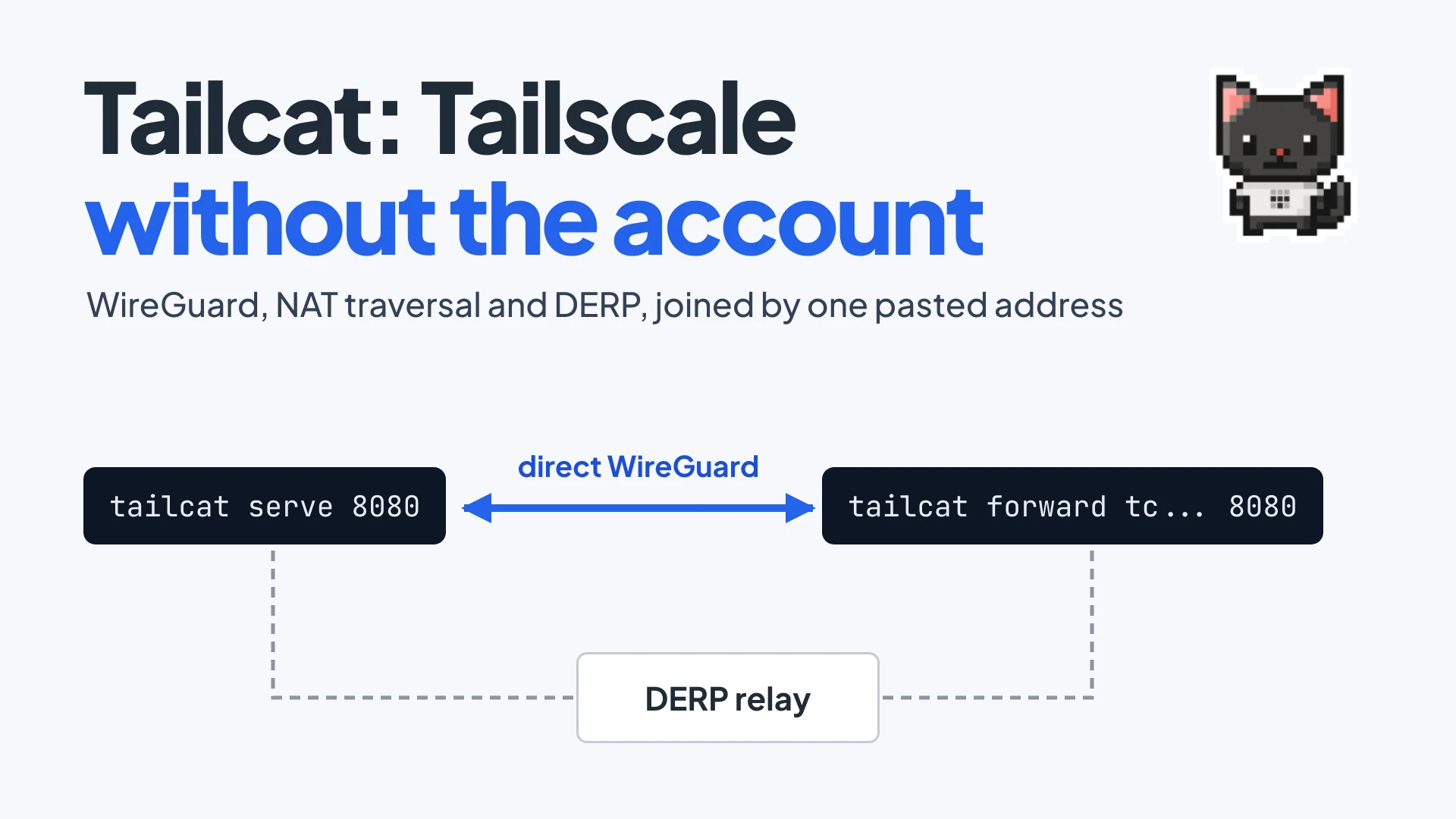
tailcat serve 8080 on one machine prints a string of about 140 characters that starts with tc. Paste that string into tailcat forward on any other machine and port 8080 shows up there on 127.0.0.1, over a WireGuard tunnel that punches through both NATs when it can and falls back to a relay when it can’t. There’s no account, no login, no daemon, and no sudo. That is tailcat, which Tailscale open sourced in August 2026 and describes as “Tailscale without Tailscale, by Tailscale”.
The interesting part is what got removed. Tailscale’s product is two things glued together: a data plane that moves encrypted packets between machines, and a control plane that decides who is allowed to talk to whom. Tailcat ships only the first half and replaces the second with a string you copy and paste.
Summary
- Tailcat is netcat over Tailscale’s data plane. It reuses the same WireGuard, magicsock NAT traversal and DERP relay code as the Tailscale client, under a BSD-3-Clause license, with no control plane and no account.
- The address is the whole setup. A
tc...address is base64-encoded CBOR holding the server’s WireGuard public key, a path-discovery key, a pre-shared key and a DERP region. Whoever holds it can connect, so treat it like a password. - It runs entirely in userspace. A gVisor TCP/IP stack inside the process terminates connections, so there is no TUN device, no routing change and no root.
- Direct when possible, relayed when not. Connections bootstrap through a DERP relay, then upgrade to peer-to-peer UDP. Tailscale’s free relays are rate limited, keep metadata logs and come with no uptime promise.
- Both ends must run tailcat. It connects two machines you control. It does not give you a public URL, so a browser, a phone or a webhook provider still needs a tunnel that does.
A note on method: the commands and output in this post come from the tailcat README, changelog and source at v0.7.0 (September 19, 2026) and the main branch as of November 14, 2026. We read the code rather than benchmarking it, so the throughput figure further down is the project’s own example, not our measurement.
What tailcat keeps from Tailscale and what it drops
A normal Tailscale node logs in, registers its public key with the coordination server, and receives a “network map”: the list of peers, their keys, their IPs and the ACLs that apply. That coordination server is the control plane. Everything after that (encrypting packets, finding a path between two NATed machines, relaying when no path exists) is the data plane, and it lives in a Go package called magicsock. (The split is a general networking idea; our control plane vs data plane post covers it.)
Tailcat is a thin wrapper around that package. According to the README, it reuses four pieces of the Tailscale client:
- WireGuard, the userspace implementation, for encrypting tunnel traffic.
- magicsock, which multiplexes traffic over direct UDP and DERP and does the STUN endpoint discovery and UDP hole punching.
- Netstack, gVisor’s userspace TCP/IP stack, which terminates TCP connections inside the tailcat process.
- DERP, Tailscale’s encrypted relay protocol, used both as the meeting point and as the fallback data path.
What’s gone is the login flow, the tailnet, MagicDNS, ACLs, the admin console, and the stable 100.x address per device. The product page lists the missing parts without embarassment: “No accounts, login flow, tailnets, or IP addresses”, and also no users, admins or governance.
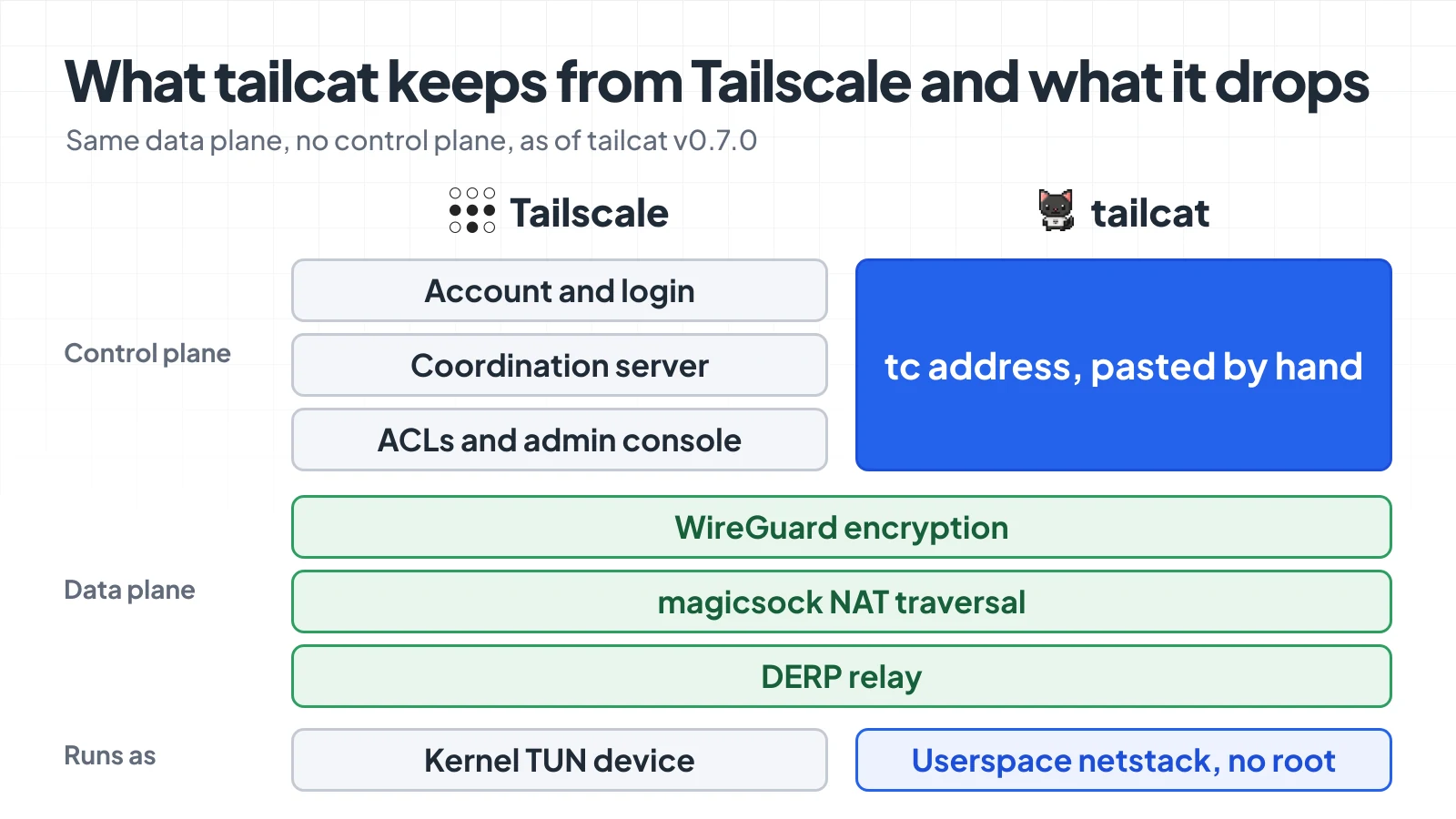
Tailcat is the bottom half of Tailscale with the top half replaced by a string. Based on the tailcat README.
The origin story explains the shape. Brad Fitzpatrick wrote the first version in September 2023 on a ten-hour flight, under the name “derpcat”, as a fork of the Tailscale repo. It bitrotted several times, got revived as an ordinary Go module that imports tailscale.com, and was released at the TailscaleUp conference in August 2026. As of November 14, 2026 the repo shows 9.7k stars and 446 forks, and the latest tagged release is v0.7.0.
What a tc address contains
With no coordination server, the client has to learn three things some other way: which key to encrypt to, where to meet the server, and proof that it’s allowed in. All three are packed into the address.
A tailcat address is the literal prefix tc followed by base64-encoded CBOR. The README lists the fields:
- The server’s WireGuard public key (Curve25519, 32 bytes).
- A separate path-discovery public key (Curve25519, 32 bytes). This one appears in cleartext on direct-path probe packets, so keeping it separate avoids leaking the WireGuard key there.
- A WireGuard pre-shared key, 256 random bits, on by default.
- DERP info: either a small integer naming one of Tailscale’s tailcat relay regions, or the full hostname and IPs of a relay.
With just a region ID the address is around 140 bytes. You can take one apart without connecting to anything:
$ tailcat parse tcomFwWCCcjS5nKNqAod034nWoJZW0LZqDhhC8U_dKdnDRYQ8uNGFpGQEu
{
    "ServerPublic": "nodekey:9c8d2e6728da80a1dd37e275a82595b42d9a838610bc53f74a7670d1610f2e34",
    "RegionID": 302
}
Region 302 is San Francisco. The default relay list at https://tailcat.dev/derpmap.json had four regions when I fetched it on November 14, 2026: New York (301), San Francisco (302), Frankfurt (303) and Tokyo (304). That is far fewer than the DERP fleet a regular tailnet gets.
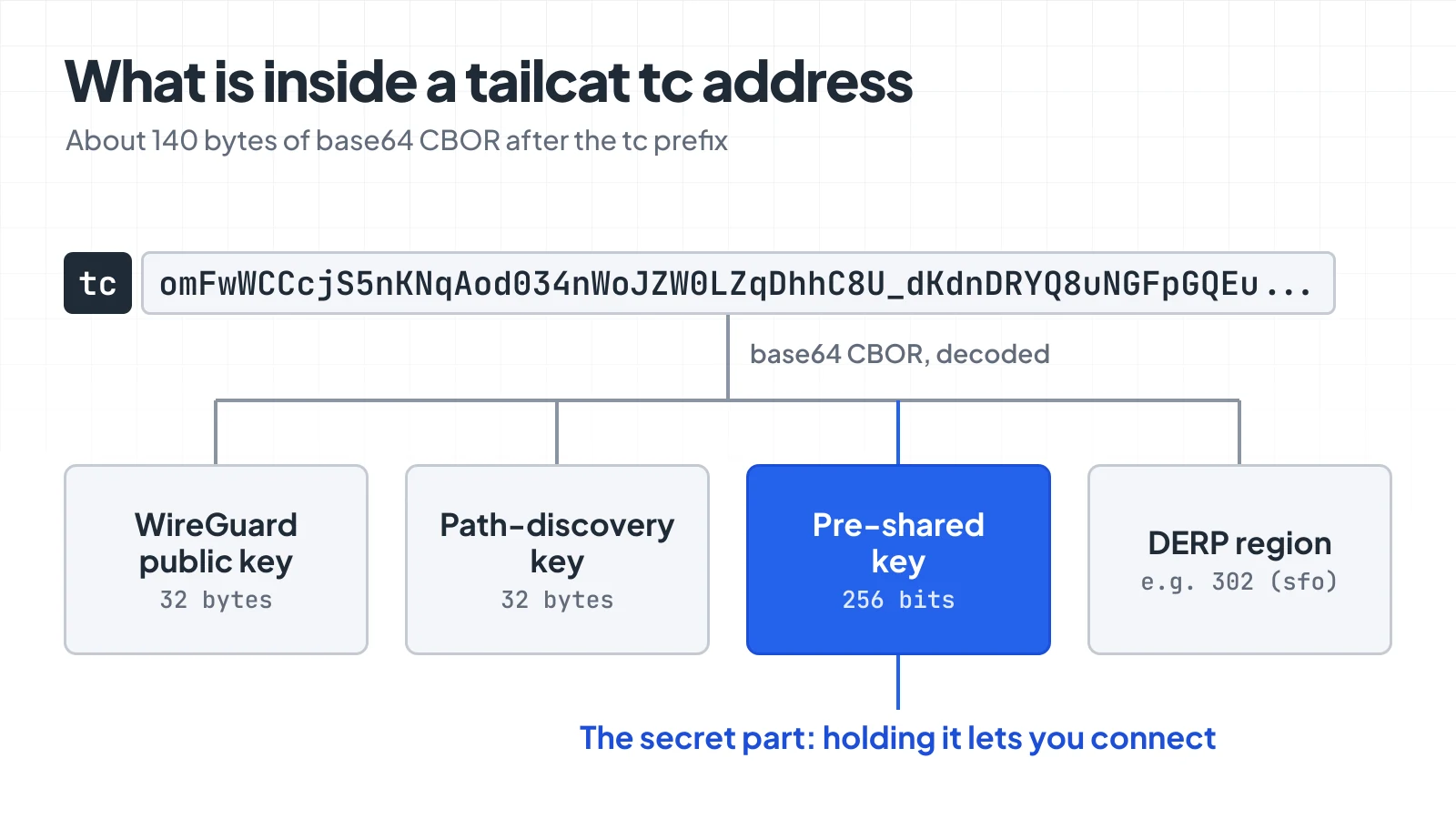
Four fields replace everything a coordination server would normally hand out.
The pre-shared key does two jobs. It gives the tunnel post-quantum protection against someone recording traffic today and breaking Curve25519 later. And it stops the relay operator, who can see both peers’ public keys, from joining the tunnel themselves. It’s also what makes the address a bearer credential. The docs are blunt: the default address “is a secret bearer capability”, so don’t log it, commit it or paste it into a public channel.
How two machines find each other without a coordinator
Take one concrete case and keep it for the rest of the post: a dev server on port 8080 on a laptop behind home Wi-Fi, and a cloud VM that needs to reach it. Neither side has an open inbound port.
On the laptop:
$ tailcat serve 8080
# 🐈 Server listening with new address: tcXXXXXXXXX
On the VM:
$ tailcat forward tcXXXXXXXXX 18080:8080
$ curl http://127.0.0.1:18080/
Here is what happens between those two commands, per the connection flow in the README and disco.go in the source:
- The laptop generates a WireGuard keypair and a pre-shared key in memory, opens an outbound connection to the nearest DERP relay, and prints its address.
- The VM parses the address, generates its own throwaway keypair, and connects to the same relay.
- The VM sends a “Meow” packet through the relay, addressed to the laptop’s public key. It’s a raw DERP packet with the four-byte magic
meow, a type byte, and the VM’s node key and discovery key. - The laptop adds the VM as a WireGuard peer, rebuilds its own tiny network map, and answers with “Meowed”.
- The WireGuard handshake runs, through the relay at first. The tunnel is up at this point and data can flow.
- In parallel, both sides learn their public IP and port over STUN, trade those endpoints through the relay, and try UDP hole punching. If a direct path works, traffic moves off the relay.
That Meow exchange is the entire control plane. In real Tailscale, step 3 and 4 are a login and a network map push from the coordination server; here the server builds a one-peer map on the spot from a packet the client sent it.
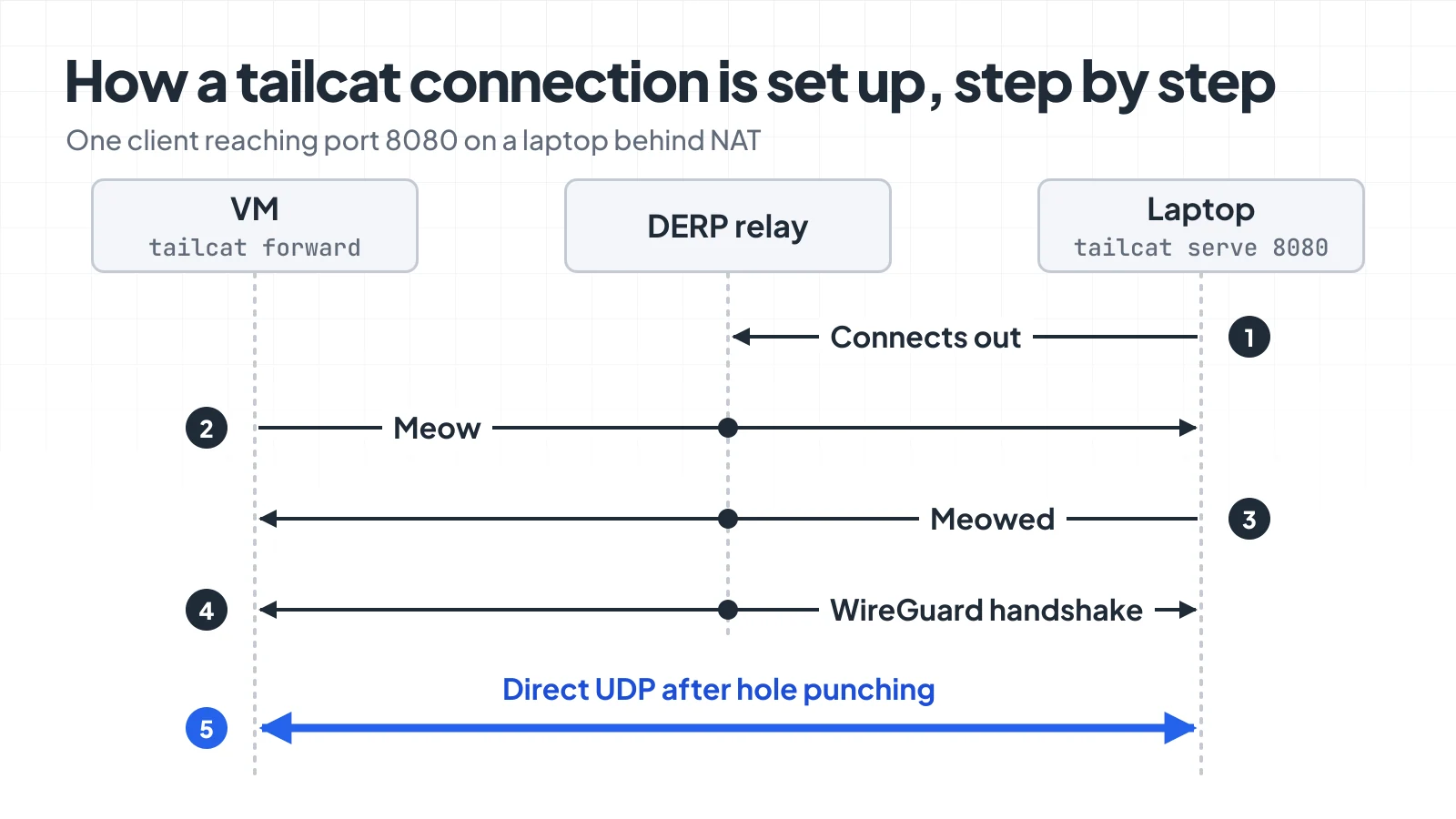
The relay introduces the two sides, then usually gets out of the way.
You can watch the upgrade happen. tailcat ping --until-direct reports the path for each pong:
$ tailcat ping --until-direct <tc-addr>
pong in 42.1ms via DERP(sfo)
pong in 1.2ms via 203.0.113.7:41641
If both machines sit behind hard NATs with no port mapping available (some carrier-grade NAT setups, strict corporate firewalls), hole punching fails and traffic stays on DERP. It still works. It’s just slow on the shared relays, which leads to the tradeoffs below. For background on why two NATed machines can’t simply dial each other, see our post on reaching a home server behind CGNAT.
Why it needs no root and no TUN device
A regular VPN client creates a virtual network interface, assigns it an IP and edits the routing table, which is why installing one asks for admin rights. Tailcat does none of that. The WireGuard packets it decrypts are fed into gVisor’s netstack, a TCP/IP stack that runs as a library inside the process. From the kernel’s point of view, tailcat is an ordinary program holding an HTTPS connection to a relay and a UDP socket.
Each peer does get an IPv6 address inside the tunnel, derived from its public key, but the OS never sees it and the README calls it an implementation detail that may go away.
The catch is that ordinary programs can’t just connect to the other side, since there’s no interface to route through. Tailcat bridges that gap in three ways:
tailcat forward tcXXXXXXXXX 18080:8080opens a normal listening port on127.0.0.1and carries each connection through the tunnel.tailcat socks <tc-addr> curl http://server.tailcat:8080/starts a SOCKS5 proxy on an ephemeral port and runs the child command with its proxy environment pointed at it.- Plain
tailcat <tc-addr> 8080connects stdin and stdout to the port, which is the netcat behaviour the name promises.
This is also why it suits sandboxes and CI runners. A container with no NET_ADMIN capability and no /dev/net/tun can still run it. Fitzpatrick’s launch post says most of his recent use has been wiring sandboxed AI agents to machines they need to reach, without joining them to a tailnet.
What else the CLI serves
Port forwarding is the base case. The same server process can expose a few built-in services instead of a local port:
tailcat serve 5555:10.2.200.213:5555        # proxy one host on the server's LAN
tailcat serve --ssh-authorized-keys=alice@github ssh   # built-in SSH server, keys from github.com/alice.keys
tailcat serve files                         # current directory over SFTP, read-only
tailcat recv ~/inbox                        # write-only drop box
tailcat serve exit-node                     # let the client reach the server's whole network
On the client side there’s tailcat ssh, tailcat cp (which wraps the system scp), tailcat ls and tailcat browse, an alias for forward --open-browser on port 80. There is also no-auth-ssh, which hands a shell to anyone holding the address. The README puts a warning box around that one, and it deserves it.
The main branch adds an iperf-style tailcat perf that hasn’t shipped in a tagged release yet. Its README example shows 943 Mbit/s over a direct path with a 1.2ms round trip, which is plausible for two machines on a fast LAN or the same datacentre and tells you little about a home uplink. It refuses to run through Tailscale’s shared relays at all, because that would mostly measure the rate limit.
A browser demo at https://tailscale.github.io/tailcat/ compiles the same Go library to WebAssembly and can swap files with the CLI. Browsers can’t open raw UDP sockets, so it stays on DERP until WebRTC support lands.
Who can connect: ephemeral keys, saved keys and –allow
By default every run generates a fresh key, prints an address nobody has seen before, and throws the key away on exit. A leaked address from yesterday’s session points at nothing.
Stable addresses are opt-in. tailcat genkey --key=default saves a key to ~/.config/tailcat/keys/default.private.json, and from then on plain tailcat serve reuses it. The flip side is in the docs in so many words: anyone you have ever shared that address with can connect to every future server using that key. default is also a magic name, so once that file exists you get the stable address without asking for it. The startup line tells you which mode you’re in (“new address” or “saved key”), and --key=new forces a one-off.
To use a stable address safely, pin the clients. The client generates an identity with tailcat genkey --client --key=client-default and gives the server its public node key; the server runs with --allow=nodekey:.... Handshakes from any other key are silently dropped, so an outsider can’t tell that anything is listening. With that in place you can even publish the address in a DNS TXT record ("tailcat=tc...") and run tailcat ssh my-server.example.com. Without --allow, a TXT record gives the capability to everyone who can run dig.
What you give up without the control plane
Most of the rough edges are the control plane’s old jobs, now yours.
- No revocation. You can’t remove one person from a shared address. With an ephemeral key you restart the server; with a saved key you rotate it, or you should have used
--allowfrom teh start. - No directory. There are no device names and no stable IPs. Every connection begins with getting a 140-character secret from one machine to another over some channel you trust.
- Throttled, logged relays. The hosted DERP relays are rate limited (Tailscale doesn’t publish the figure), exist in four regions, and per the product page keep metadata logs and aren’t “intended for privacy or high-throughput use cases”. The README adds that access can be revoked at any time. You can run your own derper and bake its hostname into the address with
genkey --region=derp.example.com, at which point nothing touches Tailscale’s servers. - A young threat model.
SECURITY.mdsays tailcat “was originally designed for use with oneself: the same person running both ends”, and that malicious peers weren’t historically in scope. Two rounds of bugs in the write-only drop box have already been reported and fixed. Be careful about accepting addresses from, or serving shells to, people you don’t trust. - No stability promise. The CLI flags, the Go API and the wire format may all change. There were seven releases between August 29 and September 19, 2026.
- Not anonymous. Peers see each other’s IPs on a direct path, and the relay sees both.
None of that is hidden; the project says most of it in its own README. Tailscale’s framing is “use tailcat when you need a quick connection” and Tailscale proper when you need a network you can govern. If what you want is the governed network without Tailscale the company, the options in our open source Tailscale alternatives roundup are a closer fit than tailcat.
When the other end can’t run tailcat
Tailcat’s model has one hard requirement: both sides run tailcat. That covers laptop to VM, CI runner to staging box, agent sandbox to a Raspberry Pi. It doesn’t cover the cases where the other end is somebody else’s software: a client opening your demo in a browser, your phone, or Stripe posting a webhook to the dev server on port 8080. Those need a public URL, and tailcat deliberately doesn’t make one.
That’s the job of a reverse tunnel with a public endpoint. With Pinggy, the same laptop runs:
ssh -p 443 -R0:localhost:8080 free.pinggy.ioIt prints an address like https://xxxx.run.pinggy-free.link, and anything that speaks HTTPS can reach port 8080 through it. The laptop still only makes an outbound connection, same as with tailcat, and there’s still nothing to install since ssh is already there. The trade is the opposite one: traffic always passes through Pinggy’s servers instead of going peer to peer, the URL is reachable by anyone who has it, and on the free tier the tunnel lasts 60 minutes and gets a new random URL on reconnect. The mechanics are in our SSH reverse tunnelling explainer.
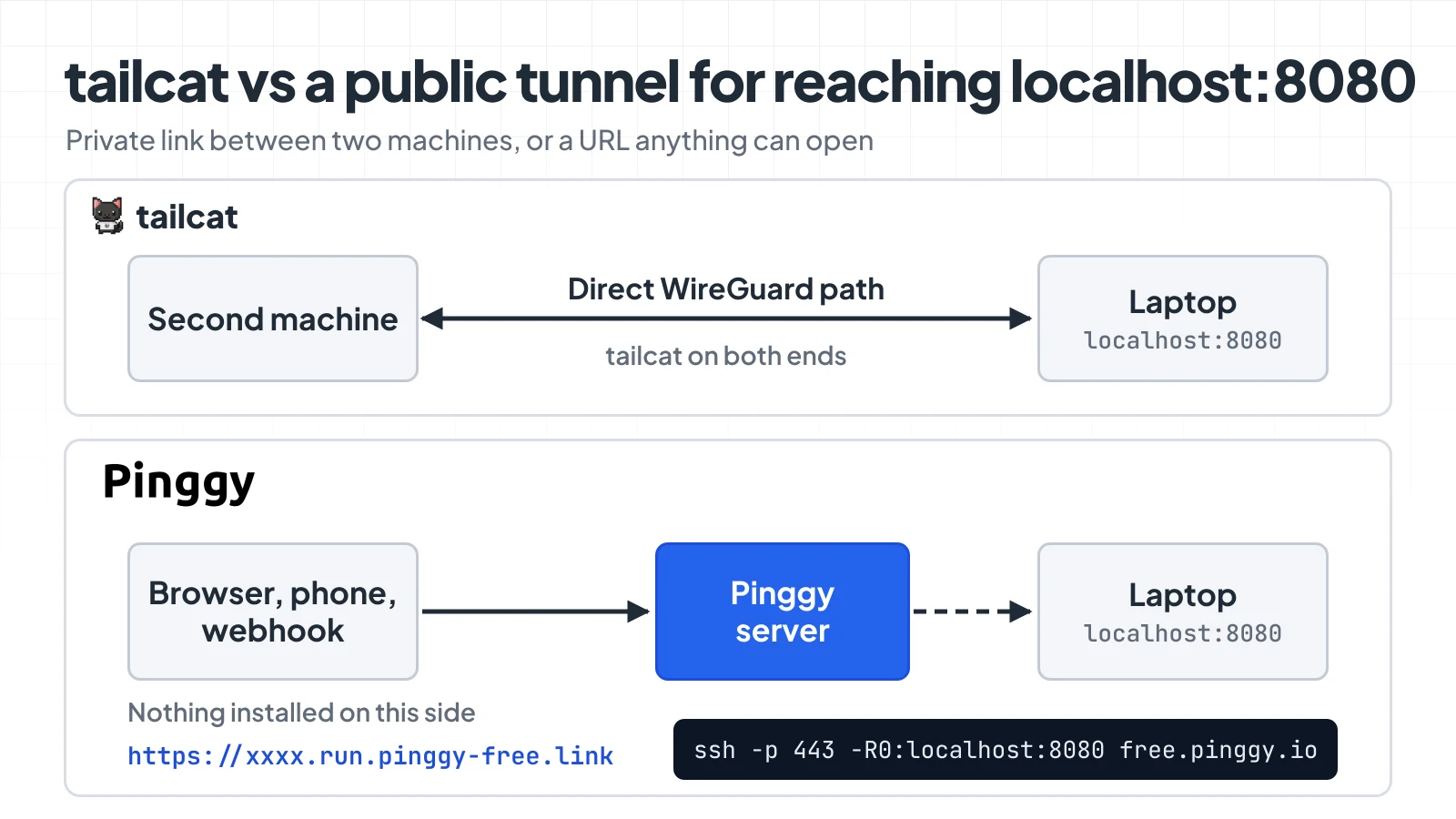
Same laptop, same port. Which one fits depends on who is on the other end.
The two don’t compete so much as cover different halves of “reach my localhost”. I’d pick tailcat when I own both machines and want the traffic end to end between them, and a public tunnel when the thing connecting is a browser or a third-party service.
Try it and watch the path change
The quickest way to see the mechanism for yourself takes two terminals on two different networks, say a laptop and any VM.
Install it from the install page: brew install tailcat on macOS, scoop install tailcat on Windows, a static binary or .deb/.rpm on Linux, or go install github.com/tailscale/tailcat/cmd/tailcat@latest. Then:
- Run
tailcat serve 8080on the laptop, with anything listening on 8080 (python3 -m http.server 8080will do). - Run
tailcat parse <tc-addr>on the address it prints and find the region ID. - On the VM, run
tailcat ping --until-direct <tc-addr>and watch the first pongs arrive “via DERP” before one arrives from a plain IP and port. If it never goes direct, you’ve found a hard NAT. - Run
tailcat forward <tc-addr> 18080:8080andcurl http://127.0.0.1:18080/. - Stop the server, start it again, and note that the old address is dead.
Step 3 is the one worth doing even if you never use tailcat again. It’s Tailscale’s NAT traversal with the product peeled off, and seeing a connection hop from a relay in San Francisco to a direct 1ms path explains more about how mesh VPNs work than most diagrams do. If you want the same thing inside your own Go program, the CLI is a wrapper over the github.com/tailscale/tailcat package, and a working server is about twenty lines.