In this article

In January 2026, Logitech let a developer certificate expire. That one lapsed cert broke G HUB and Options+ for a chunk of its macOS users all at once: scroll direction flipped, button remaps stopped firing, custom gestures died, DPI settings reset, and for some people the app just refused to launch. Reinstalling didn’t help, because the installer depended on the same expired signing chain. Logitech’s own statement afterward was blunt: “We dropped the ball here. This is an inexcusable mistake.”
That’s the backdrop for why a lot of people were primed to cheer when OpenLogi showed up: a native, local-first alternative to Options+, written in Rust, that remaps buttons, drives DPI, and controls SmartShift over the same HID++ protocol Logitech’s own software uses, without an account, without a cloud service, and without a background daemon phoning home.
Summary
- What it is - a Rust rewrite of Logitech’s mouse/keyboard configuration software: remap buttons, set DPI presets, toggle SmartShift, invert scroll, set per-app profiles, all over HID++.
- Why people want it - Options+ ships a 200MB+ streaming installer, a root-level auto-update daemon, Sentry crash telemetry, a bundled AI Prompt Builder, and a Zoom integration, for what should be a device driver.
- No account, no cloud - config lives in a plain TOML file on disk; the only automatic network call is fetching device product images.
- Cross-platform, unevenly - macOS 13+ (Apple Silicon only) and Linux are solid with proper distro packages; Windows 11 support is the newest and roughest port.
- The catch - the project grew fast enough, with polished-enough marketing copy, that its own Hacker News thread spent as much time debating whether it was AI-written as it did praising the feature set.
- Repo - github.com/AprilNEA/OpenLogi, dual-licensed Apache-2.0 / MIT.
What Options+ actually installs on your machine
It’s worth being specific about what people are reacting to, because “bloated driver software” undersells it. For a utility whose entire job is “let me remap a button,” Options+ and G HUB install a background daemon that runs as root to handle auto-updates, wire up Sentry crash reporting with its own local databases, bundle an AI Prompt Builder nobody asked a mouse driver for, and add a Zoom integration bridge that activates even if you’ve never touched a Logitech webcam. On macOS, installing it drops a notification that several new background processes were added to your Login Items. None of that is a rumor; it’s what’s sitting in the installed file tree once you look.
Then there’s the January outage. An expired signing certificate isn’t a design flaw in the traditional sense, but it’s exactly the kind of failure a sprawling background-daemon architecture is more exposed to: more moving parts that all need to keep working for the driver to keep working. A tool that only needs to talk to a mouse over HID++ for a few seconds whenever you change a setting doesn’t have that failure surface.
What OpenLogi actually is
OpenLogi splits into three pieces: an agent that owns the input hooks and all device I/O as a background service, a GUI built on GPUI (a Rust UI toolkit) that’s a pure IPC client to the agent, and a CLI for headless device inventory and diagnostics. Configuration is a plain TOML file you can read and edit by hand, and by the project’s own description, the only automatic network call the software makes is fetching device product images; update checks only run if you ask for them.
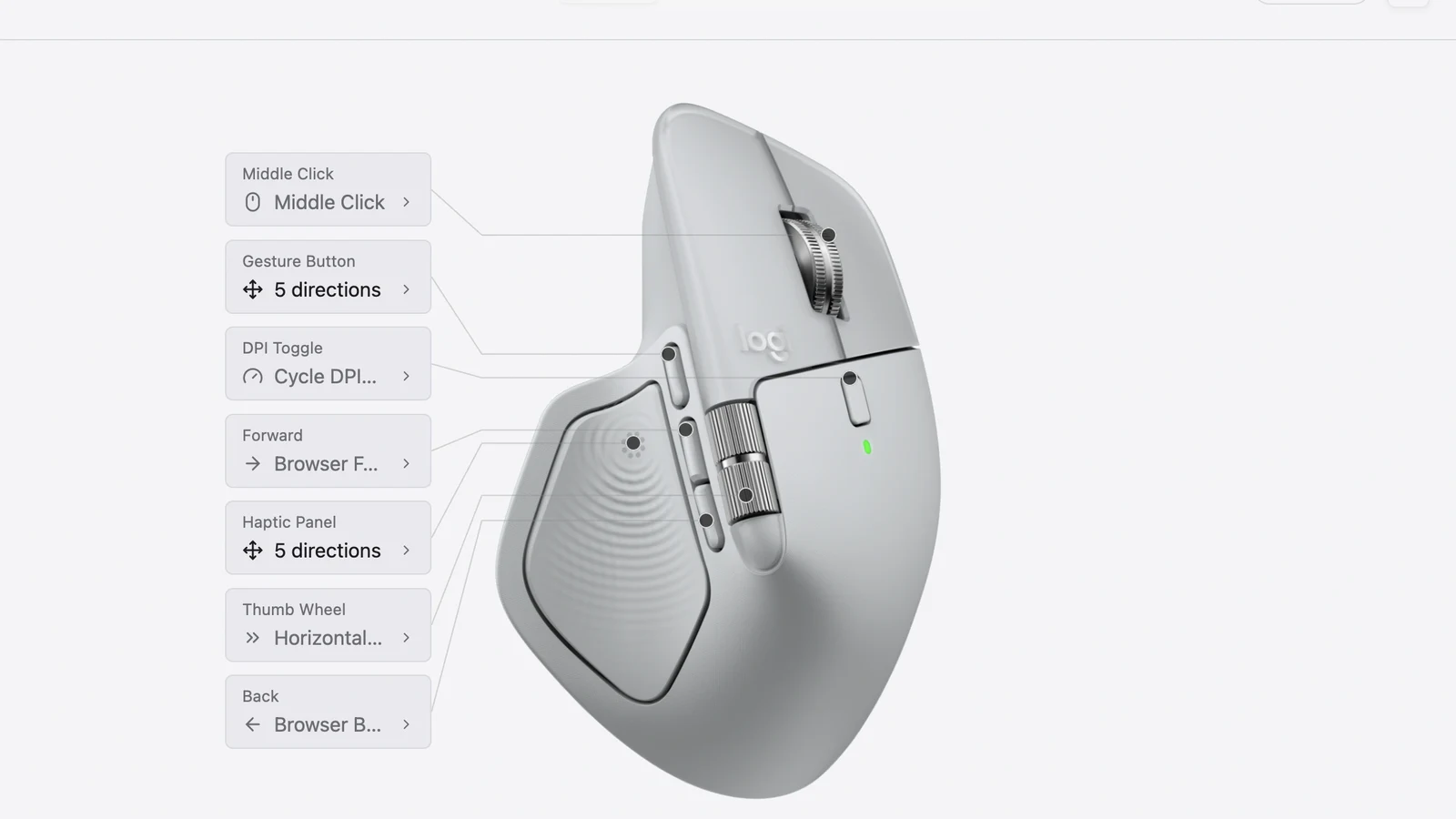
On the protocol side, it talks HID++, the same feature-register-based wire protocol Logitech’s own drivers use, over Bolt receivers, legacy Unifying receivers, Bluetooth, and USB. Concretely, it reads and writes registers for DPI control, SmartShift wheel sensitivity (the setting that switches Logitech’s scroll wheel between free-spin and ratcheted modes), native scroll-direction inversion, and RGB keyboard lighting. The README credits protocol reference work to Solaar, the long-running Linux tool that’s been reverse-engineering and documenting HID++ for Logitech’s Unifying receiver line for years. That’s a meaningful acknowledgment: Solaar sits at 9.2k GitHub stars after roughly a decade of steady development, and OpenLogi’s own star count passed it within about a month of picking up any real attention.
Install paths are what you’d expect from a project that packages properly for each OS:
# macOS
brew install --cask openlogi

# Debian/Ubuntu
sudo dpkg -i openlogi_*.deb

# Fedora/RHEL
sudo rpm -i openlogi-*.rpm

# Arch
sudo pacman -U openlogi-*.pkg.tar.zst
Windows gets a signed .msi or a portable .zip. Linux packaging includes systemd units, udev rules for unprivileged device access, and a NixOS module, which is the kind of detail that signals actual distro-maintainer involvement rather than a single tarball thrown over the wall. The UI is localized into 20 languages, which is unusually thorough for a project this young.
How fast this actually happened
The release history is public, and it tells a fairly normal open-source story right up until it doesn’t. Point releases go back to at least mid-July 2026 (v0.6.20), landing new device support and bug fixes roughly every few days: G915 and G502 X receiver support, Lightspeed nano receiver handling, per-device capture sessions, hotplug-driven inventory, SmartShift write fixes. By mid-August the project had reached v0.7.1 after a fairly substantial internal refactor in v0.7.0 that reorganized how the agent talks to hardware over HID++.
Then it hit a front page. As of this week the repository sits at roughly 9.7k stars, around 260 forks, over 800 commits, and north of 100 open issues, and the discussion thread crossed 1,000 upvotes and 300 comments. That’s a lot of eyeballs landing on a project in a matter of days, which is exactly the kind of jump that surfaces both real bugs and, in this case, a fight about how the thing got written.
The part of the story that isn’t about mice
Once the thread got big, a chunk of the conversation stopped being about button remapping. Commenters pointed out that the landing page copy, especially the FAQ, reads like typical LLM output: comprehensive, evenly-hedged, a little repetitive in the way models tend to restate a question before answering it. That observation turned into a broader question: if the marketing copy was AI-written, how much of the code was too, and does that matter for a project that runs a privileged background daemon with input-hook access and writes firmware-level settings to your hardware?
There’s no way to settle that from the outside, and it’s worth being precise about what is and isn’t verifiable. What is verifiable: the repository ships a CLAUDE.md and an AGENTS.md at the top level, which are instruction files for AI coding agents, now a common sight in actively AI-assisted codebases. That’s a fact about the repo, not proof of how any specific line got written; plenty of projects keep those files around as documentation for contributors who use agentic tools without the agent having authored the bulk of the logic. What’s speculation: a few commenters floated that specific chunks resembled code from LinearMouse, an existing macOS-only open-source Logitech alternative, though nothing in the public discussion substantiated that beyond a resemblance claim.
The more useful takeaway isn’t “AI wrote it, be scared” or “who cares, it’s open source.” It’s that a privileged daemon with device I/O and OS-level input hooks deserves the same scrutiny regardless of who or what wrote it: read the parts that touch permissions and network calls, check the issue tracker for how maintainers respond to reported bugs, and don’t assume a clean download page means a clean codebase. That standard predates AI-assisted coding; it’s just gotten more relevant.
The rough edges people are actually hitting
Under the hype, the issue tracker reads like what you’d expect from a project that just 10x’d its user base in a week. Reported problems include scroll-direction inconsistencies on some devices, button mappings that don’t stick across reconnects, and SmartShift toggling not registering on certain firmware revisions. Platform support is uneven by design right now: macOS is Apple Silicon only, with no Intel Mac build; per-application profile switching on Linux only works under X11 and XWayland, not native Wayland sessions; and Windows is explicitly flagged by the maintainers as the newest, least-battle-tested port, validated end to end but with “more rough edges” than the other two platforms.
None of that is disqualifying for a project a few weeks past its first real spike in usage. It’s just the normal cost of moving fast, and it’s worth knowing before you uninstall Options+ on a machine you can’t afford to have a non-functional mouse on for an afternoon.
Should you actually switch?
If you’re on Linux and have been living with Solaar’s function-but-not-flashy interface, OpenLogi is worth trying specifically for the polish: a real GUI with a clickable device diagram instead of a settings list, plus proper distro packages. If you’re on a Mac and your main complaint about Options+ is the background daemon sprawl and the January outage still stings, this is a genuine, no-account replacement, as long as you’re on Apple Silicon. If you’re on Windows, it works, but you’re testing the newest part of the project, so keep Options+ around until you’ve confirmed your specific device and mappings behave.
If none of that describes you, and Options+ is merely annoying rather than actively breaking things for you, there’s no urgency. The project isn’t going anywhere; the release cadence over the past month suggests active maintenance, and a few more months of bug reports settling down will make the Windows and edge-case-device story a lot more predictable. Either way, “no account and no telemetry to remap a scroll wheel” is a bar Logitech’s own software should have cleared a long time ago, and it’s a genuinely good sign that it took an independent, permissively-licensed project to get there instead of a fork of the vendor’s own tooling.
For more on the broader shift toward local-first, no-cloud infrastructure that this fits into, see our rundown of open-source Tailscale alternatives and self-hosted VPNs, both driven by the same instinct: keep the thing that controls your hardware or your network on hardware you actually control.