In this article
Self-hosting a large language model is rarely a compute problem first. It is a capacity problem: the weights either fit in fast memory or they do not, and almost everything about the experience - which models you can even load, how long a prompt you can hold, how many tokens per second you see - follows from that single fact.
Apple moved that ceiling on August 25, 2026. The new Mac Studio with M5 Ultra scales to 512GB of unified memory at 1.2TB/s, a 50% bandwidth jump over the M3 Ultra’s 819GB/s, in a box that draws a couple of hundred watts from a wall socket. That is enough to hold mlx-community/GLM-5.2-4bit - a 743B-parameter mixture-of-experts model, 418GB on disk - entirely in memory, with room left for a working context. It is also not enough to hold Kimi K3, whose official MXFP4 checkpoint is 1.56TB.
This post is the concrete version of that tradeoff, and it concentrates on the models where the answer is actually in doubt: the arithmetic that decides what fits, real measured repository sizes for the large open-weight models, the tokens-per-second you should expect, the three ways to run something bigger than 4-bit allows on one machine (lower-bit GGUF quants, streaming weights off SSD, or a second Mac), and how to serve the result to anywhere in the world from behind your own NAT.
Summary
The machine: M5 Ultra Mac Studio, announced August 25, 2026. Up to 80-core GPU and 512GB of unified memory at 1.2TB/s. Starts at $5,499; the 512GB build is still unpriced and ships late October 2026. Apple Newsroom
What fits at MLX 4-bit. Anything under ~200GB is a non-question, so the interesting ones are:
- MiniMax M3 (427B) - ~240GB
- DeepSeek 671B - ~404GB
- GLM-5.2 (743B) - 418GB, the edge of the box
Too big for 4-bit? Three options:
- Drop to a lower-bit GGUF. Kimi K2.7-Code needs two Macs at 4-bit (641GB) but fits one at Unsloth’s 2-bit, 339GB.
- Stream from SSD.
llama.cppmmaps GGUF files, so a model bigger than your memory still runs. Measured speed: 1 to 2 tok/s. Fine for a batch job, useless for chat. - Add Macs. Thunderbolt 5 RDMA turns four into a 2TB pool. Kimi K3 needs this: even Unsloth’s 1-bit quant wants 610GB, so no single Mac runs it.
Speed: GLM-5.2 runs at 17.7 tok/s and DeepSeek V3 at just over 20, both measured on the older M3 Ultra. A dense Llama 405B manages 2.9. Total parameters decide what fits; active parameters decide how fast. Buy this for sparse MoEs, not dense models.
Serving it: mlx_lm.server binds to 127.0.0.1:8080. One Pinggy command gives it a public HTTPS URL behind auth that OpenAI clients already speak: ssh -p 443 -R0:localhost:8080 -t free.pinggy.io k:your-secret-key
What is actually in the box
The M5 Ultra is not a new die. It is a quad-die part: two dual-die M5 Max chips bonded with next-generation UltraFusion, which Apple rates at over 4.4TB/s of inter-die bandwidth. That matters for inference, because the fabric between halves has to be fast enough that the GPU can treat all 512GB as one flat pool rather than two NUMA domains you have to think about.
Here is how the two chips in the new Mac Studio compare, taken from Apple’s tech specs page:
| Spec | M5 Max | M5 Ultra |
|---|---|---|
| CPU | 18-core (6 super + 12 performance) | 30-core base, up to 36-core (12 super + 24 performance) |
| GPU | 32-core or 40-core | 64-core or 80-core |
| Neural Engine | 16-core | 32-core |
| Unified memory | 36GB base, up to 128GB | 96GB base, 256GB or 512GB |
| Memory bandwidth | 460GB/s (32-core GPU) or 614GB/s (40-core GPU) | 1.2TB/s on both configurations |
| Starting price | $2,499 | $5,499 |
Two details are easy to skim past and both matter more than the core counts. First, the M5 Ultra runs at 1.2TB/s regardless of which GPU you pick, so the cheaper 64-core config gives up compute but not decode bandwidth. Second, every GPU core now carries a Neural Accelerator, a dedicated matrix-multiply unit. That is a prefill feature, and we will come back to why.
For contrast, the M5 Max caps at 128GB. If your goal is running models above roughly the 70B dense / 120B MoE class, the Ultra is the only option in this lineup, and the memory upgrade is where the money goes: 96GB to 256GB alone adds $4,000.
The two numbers that decide everything
Local inference has exactly two hardware constraints, and they map cleanly onto two specs.
Capacity decides what loads. At 4-bit quantization a model needs roughly 0.5 to 0.6 GB of memory per billion total parameters, plus the KV cache and framework overhead. The word total is doing the work there. A mixture-of-experts model activates only a fraction of its parameters per token, but the router can pick any expert at any step, so all of them have to be resident. DeepSeek-V4-Flash activates 13B parameters per token and still needs 151GB of memory, because its total is 284B. If you want the longer version of why MoE models behave this way, we covered it in What is Mixture of Experts in LLM Models.
Bandwidth decides how fast. During decode, generating each token requires reading the active weights out of memory once. So the theoretical ceiling is:
tokens/sec = (memory bandwidth * efficiency) / bytes read per tokenEfficiency in practice lands somewhere around 0.6 to 0.8 of peak. Run the numbers for a 4-bit 70B dense model on the M5 Ultra: about 40GB of weights read per token, 1.2TB/s of bandwidth, so a ceiling near 30 tok/s and a realistic 20 to 25. Now run them for a 4-bit MoE with 20B active parameters: only ~11GB read per token, and you are suddenly in the 70 to 100 tok/s range from a model that occupies 200GB.
This is the single most important thing to understand about a 512GB Mac. Capacity and speed are decided by different numbers, and sparse models exploit the gap. A 743B MoE with 40B active is faster to generate from than a 405B dense model, despite being nearly twice the size. The systematic MLX benchmarks on an M3 Ultra 512GB show this starkly: Mixtral 8x7B (12.9B active of 47B total) hits 68.4 tok/s at 4-bit and 1K context, while a dense Qwen 32B manages 31.2 and a dense Llama 405B collapses to 2.9 tok/s. Dense models above ~120B are technically loadable on this machine and practically unusable.
Prefill is a different bottleneck
Decode is bandwidth-bound. Prefill - processing the prompt you just sent - is compute-bound, because it multiplies a whole block of tokens against the weights at once. Apple is explicit about the split: “Generating the first token is compute-bound, and takes full advantage of the Neural Accelerators,” while “generating subsequent tokens is bounded by memory bandwidth, rather than by compute ability.”
That is why the Neural Accelerators in every M5 GPU core matter. In Apple’s own MLX measurements, M5 delivered 3.3x to 4.06x faster time-to-first-token than M4 across six models, but only 1.19x to 1.27x faster subsequent tokens - because decode was still gated by a 28% bandwidth increase. Apple’s Mac Studio claim of “up to 9.8x faster LLM prompt processing in LM Studio” versus M1 Ultra is a prefill number, not a generation number.
If you are running a coding agent, prefill is the number you feel. Agents routinely resend tens of thousands of tokens of context per turn, and a run that generates 200 tokens after reading 60,000 spends most of its wall-clock time in prefill. The same MLX benchmark run shows prefill throughput itself degrading with sequence length - roughly 345 tok/s at 1K context down to 154 tok/s at 128K, a 55% drop.
How much of the 512GB you actually get
macOS does not hand the GPU all of unified memory. There is a wired-memory ceiling controlled by a sysctl, and on a machine this large the default leaves a lot of capacity on the table. Check it:
sysctl iogpu.wired_limit_mbA return value of 0 means the system default is in force, which is typically around 75% of installed RAM. On a 512GB machine that is roughly 384GB - enough for GLM-5.3-Flash, not enough for GLM-5.2 at 418GB. Raise it, in megabytes:
# Give the GPU ~472GB of a 512GB machine, leaving ~40GB for macOS
sudo sysctl iogpu.wired_limit_mb=483328

# Revert to the system default at any time
sudo sysctl iogpu.wired_limit_mb=0
Two caveats worth taking seriously. The setting does not survive a reboot, so script it at login if you depend on it. And do not set it to the full installed amount - macOS still needs memory for the kernel, the window server, and whatever else you have open, and starving it produces beachballs or a hard reset rather than a graceful failure. For reference, the reviewer who first ran DeepSeek R1 671B on an M3 Ultra 512GB allocated 448GB for a 404GB model and left 64GB to the OS. Somewhere between 32GB and 64GB of headroom is the sane range on a 512GB box.
Budget the rest like this: model weights + KV cache + a few GB of framework overhead. The KV cache is the part people forget, and it scales linearly with context length. On long-context runs you can quantize it, which mlx-lm supports directly:
mlx_lm.generate \
  --model mlx-community/DeepSeek-V4-Flash-4bit \
  --prompt "Summarise this repository's architecture." \
  --max-tokens 1024 \
  --kv-bits 8 \
  --quantized-kv-start 4096
That keeps the cache in full precision for the first 4,096 tokens and switches to 8-bit after, which is where the memory actually starts to bite. There is also --max-kv-size for a rotating cache if you would rather cap it hard than pay for it.
The models that just fit, briefly
Anything under about 200GB at 4-bit is a non-question on this machine and not worth dwelling on: Qwen3.8-27B at 16.1GB, gpt-oss-120b at ~65GB in native MXFP4, Qwen3.8-Flash-Next (a 125B MoE with only 6B active) at roughly 100GB, DeepSeek-V4-Flash (284B/13B active) at 151GB, and GLM-5.3-Flash (320B/18B active) at 177.6GB. All of them load with hundreds of gigabytes left for context, and all of them run on a 256GB machine costing $4,000 less.
Two practical notes before moving on to the models that actually justify 512GB. GLM-5.3-Flash is a good illustration that quantization is not an optimization but the whole reason these models run at all: its original BF16 checkpoint is 643GB and does not fit this machine in any configuration. And its MLX conversion ships with its own loader rather than running under stock mlx_lm, because the hybrid Kimi-Delta-linear plus DeepSeek-sparse attention stack is too new. mlx-community/DeepSeek-V4-Flash-4bit is the one in this group that works with plain mlx_lm.chat and mlx_lm.server today, which is why it is used in the commands throughout this post.
The models that actually fill 512GB
This is the tier the configuration exists for, and where you start trading weights against context.
MiniMax M3 is a ~427B MoE (128 experts, top-4 routing, plus one shared expert, first three layers dense) with a 1M-token context window and native text, image and video input. The 4-bit MLX conversion is ~240GB. That leaves plenty of room, but the 1M context is theoretical rather than practical - filling it would cost far more KV cache than you have left.
DeepSeek-V3.1-class 671B models at 4-bit land around 380GB. This is the configuration that made the M3 Ultra 512GB famous, and the numbers held up: DeepSeek R1 671B needed 404GB of weights and ran at 17 to 18 tok/s, while DeepSeek V3-0324 cleared 20 tok/s with mlx-lm. On M5 Ultra’s 1.2TB/s, scaling by bandwidth alone points to the high 20s.
GLM-5.2 (743B total / 40B active) is the ceiling. mlx-community/GLM-5.2-4bit is 418GB, and combined with a raised wired limit and a modest context it fits on one machine. Independent measurement from the oMLX benchmark database on an M3 Ultra 512GB puts it at 213.6 tok/s prefill and 17.7 tok/s generation. A separate published run of GLM-5 at 4-bit reports a resident footprint of 391.8 to 415.4GB with 10.7 to 16.7 tok/s generation and 77.7 to 187 tok/s prefill depending on context length. Those two datasets agree closely enough to trust.
GLM-5.3, whose weights Z.AI published on August 29, 2026, shares GLM-5.2’s near-identical ~743B footprint - 78 transformer layers, 256 routed experts with 8 active per token, 1M context. Its native FP8 checkpoint is 756GB and its BF16 release is 1.5TB, so neither fits, and no MLX conversion has landed yet. But Unsloth’s GGUF conversion is real and measured today: their UD-Q4_K_XL build is 467GB, which clears the raised wired limit with almost nothing left over, and UD-Q3_K_XL at 343GB is the safer choice if you want actual headroom for context. That is a different toolchain (llama.cpp, not mlx_lm) and a real quality tradeoff at the lower end, which the next section covers in detail.
The models that overflow one machine at 4-bit
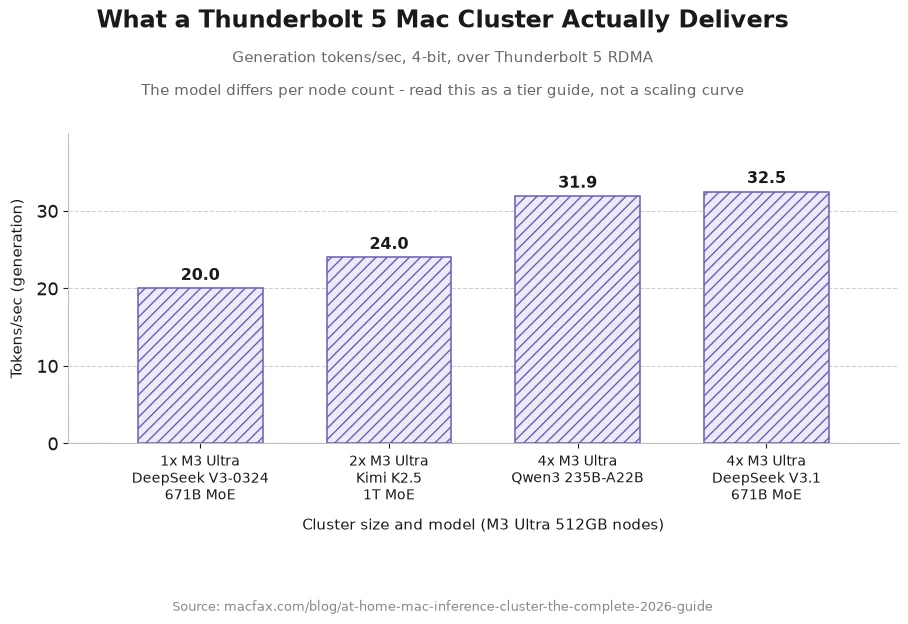
Kimi K2.7-Code is a 1T-parameter MoE with 32B active, and mlx-community/Kimi-K2.7-Code-4bit is 641GB. It misses a single 512GB machine by about 130GB at MLX 4-bit. Two real options: add a second Mac Studio, which is what people did on the previous generation running Kimi K2.5 across two M3 Ultra 512GB machines for a 1TB pool, or switch toolchains entirely - the next section covers a verified GGUF quant that fits this exact model on one Mac.
DeepSeek-V4-Pro (1.6T total / 49B active, MIT) needs roughly 862GB in its native format, which mixes FP4 expert weights with FP8 attention. Two machines minimum.
Qwen3.8-Max (2.4T total / 95B active, August 3, 2026) and Kimi K3 (2.8T total / 104B active, July 27, 2026) are cluster models on any hardware. Kimi K3’s public repository is 1.56TB across 96 safetensor shards in MXFP4 with MXFP8 activations, and Moonshot recommends 64 or more accelerators for production serving. Four 512GB Mac Studios give you a 2TB pool, which is the first configuration where K3 becomes a home-lab proposition rather than a data-center one.
Squeezing bigger models in with GGUF and disk offload
A second Mac is not the only way past the 472GB ceiling. Everything above assumes mlx_lm and Apple’s own 4-bit conversions, but llama.cpp and the GGUF format are a separate toolchain with their own quantizations, and Unsloth publishes “Dynamic” GGUF quants that push well past 4-bit without the naive quality loss that used to come with it. Their method upcasts the layers that are sensitive to precision (attention, the router, certain normalization layers) and pushes everything else down to 1- or 2-bit, rather than quantizing every layer uniformly. That is why a 1-bit Unsloth quant behaves nothing like a naive 1-bit quant.
Usefully, Unsloth publishes a memory-requirement table for each model rather than just file sizes, and those two numbers are not the same thing. Here is what their own docs say each model needs in combined RAM plus VRAM, which on a Mac is just unified memory, against the 472GB you get after raising the wired limit. Figures are from Unsloth’s per-model pages for DeepSeek-V4, MiniMax M3, GLM-5.3, Kimi K2.7-Code and Kimi K3:
| Model | 2-bit | 3-bit | 4-bit | Best tier that fits 472GB |
|---|---|---|---|---|
| DeepSeek-V4-Flash (284B) | 102GB | 110-135GB | 162GB | Lossless Q8 (169GB) with room to spare |
| MiniMax M3 (427B) | 148GB | 164-200GB | 213-270GB | 8-bit (460-470GB), or 4-bit with a huge context |
| GLM-5.3 (754B) | 245GB | 290-360GB | 372-475GB | 4-bit at the low end of that range, 3-bit if you want context headroom |
| Kimi K2.7-Code (1T) | 325-350GB | 385-470GB | ~584GB | 3-bit, right at the ceiling; 2-bit for comfort |
| Kimi K3 (2.8T) | 726-880GB | - | 1.5TB+ | None. Even 1-bit needs 610GB - this model wants two Macs minimum |
That table reframes the whole question. Two of these models are not remotely hard: DeepSeek-V4-Flash fits at Unsloth’s lossless Q8 in 169GB, and MiniMax M3 fits at 8-bit. Neither needs a 512GB machine at all. GLM-5.3 and Kimi K2.7-Code are the two that genuinely use the memory, and both land in the 3-to-4-bit band where a 512GB Mac is exactly the right size.
And Kimi K3 is off the table entirely, which corrects the tempting reading of its file listing. The HF repo lists a 466GB 1-bit file that looks like it would squeeze in, but Unsloth’s own hardware table says the smallest 1-bit tier wants 610GB of RAM plus VRAM, and their recommended quant is the 594GB UD-IQ1_S. A 2.8T model does not fit one Mac at any bit depth worth using.
What the lower bit depths actually cost you
The other thing Unsloth publishes, and the reason you should not just grab the smallest file that fits, is per-quant accuracy. Their GLM-5.3 numbers are the clearest illustration:
| GLM-5.3 quant | Size | Top-1 accuracy | Perplexity |
|---|---|---|---|
| UD-IQ1_S (1-bit) | 216.7GB | 72.56% | 4.6130 |
| UD-IQ2_M (2-bit) | 238.6GB | 78.53% | 3.7433 |
| UD-Q4_K_XL (4-bit) | 467.3GB | 94.29% | 2.7006 |
| UD-Q5_K_XL (5-bit) | 562.5GB | 95.82% | 2.6842 |
“Just use a smaller quant” is not a smooth dial. Going from 4-bit to 5-bit buys 1.5 points of accuracy for 95GB, which is a bad trade on a machine this size. Going the other way is much worse: 4-bit to 2-bit saves 229GB and costs 16 points of top-1 accuracy, and 1-bit gives up 22 points. The same pattern shows up in Kimi K2.7-Code’s numbers, where 4-bit measures ~1.8420 perplexity against the lossless Q8’s ~1.8419 - a difference of one ten-thousandth - and 2-bit jumps to ~2.4131.
The practical rule that falls out: 4-bit is close to free, and everything below it is expensive. Pick the largest model whose 4-bit tier fits your memory, rather than the largest model you can cram in at 2-bit. On 512GB that means GLM-5.3 at 4-bit, not Kimi K3 at 1-bit.
Actually running one
Unsloth documents per-model inference settings, and they are worth copying rather than guessing. For Kimi K2.7-Code: temperature 1.0, top-p 0.95, suggested context 98,304 tokens (the model goes to 262,144, but context is paid for out of the same memory budget as the weights). GLM-5.3 and Kimi K3 both want temperature 1.0 with top-p 0.95, moving to top-p 1.0 for long agentic runs, and both expose a reasoning-effort setting with max as the default.
git clone https://github.com/ggml-org/llama.cpp
# Unsloth's Mac guidance: Metal is on by default, so just turn CUDA off
cmake llama.cpp -B llama.cpp/build -DGGML_CUDA=OFF
cmake --build llama.cpp/build --config Release -j --clean-first \
  --target llama-cli llama-server

./llama.cpp/build/bin/llama-server \
  --model unsloth/Kimi-K2.7-Code-GGUF/UD-Q2_K_XL/Kimi-K2.7-Code-UD-Q2_K_XL-00001-of-00008.gguf \
  --port 8080 \
  --ctx-size 98304 \
  --temp 1.0 \
  --top-p 0.95
This path is genuinely slower per token than MLX at the same bit depth, since MLX is built for Apple Silicon specifically and llama.cpp’s Metal backend is not. What you get in exchange is the bit depths MLX has no conversions for, and the mmap behaviour in the next section.
Running a model bigger than your memory: RAM plus SSD
If you want UD-Q4_K_XL (584GB) or UD-Q8_K_XL (595GB, Unsloth’s stated lossless tier) for Kimi K2.7-Code, no amount of wired-limit tuning gets you there on 512GB. This is where the third escape route comes in, and it is the least understood of the three.
llama.cpp memory-maps GGUF files by default, which means it never required the whole model to be resident in the first place. The weights live in a file; the OS pages them in on demand and evicts idle pages without writing anything back, because the file on disk already is the authoritative copy. Turn mmap off and a model larger than RAM is an out-of-memory crash. Leave it on, which is the default, and the same model runs by streaming the parts it needs from SSD. Unsloth’s own guidance for Kimi K2.7-Code puts the rule plainly: “RAM+VRAM ≈ the quant size” is the fast path, but with less than that, “it’ll still work, just slower due to offloading.”
“Slower” is doing a lot of work in that sentence, and this is the number people skip. Apply the same bandwidth arithmetic the rest of this post uses. Unified memory on the M5 Ultra moves 1.2TB/s. Apple says the new Mac Studio’s storage is up to twice as fast as the previous generation on a PCIe Gen 6 architecture, and specifically cites “loading huge LLMs” as the use case, but even the fastest SSDs on the market top out around 28GB/s. So the moment a meaningful fraction of your weights has to come off disk each token, your effective read bandwidth drops by roughly two orders of magnitude, and decode speed follows it down.
The published measurements bear that out. On a 96GB RAM plus 24GB VRAM machine running DeepSeek-R1’s 212GB UD-Q2_K_XL from a Gen 5 NVMe - so a little over half the model resident - the reported throughput was ~1.3 tok/s at 8K context and ~1.0 tok/s at 16K, with the SSD reading at 2 to 5GB/s throughout and storage bandwidth, not compute, as the binding constraint. Enabling GPU offload barely moved it. A separate llama.cpp discussion reports a 93GB model on 42GB of combined memory at 1.18 tok/s generation.
So the honest framing is this: disk offload converts “will not run” into “runs at one to two tokens per second.” That is genuinely useful for a batch job you can leave overnight, for evaluating whether a model is worth buying more hardware for, or for a single hard question where you care about the answer and not the latency. It is not usable for interactive chat, and it is nowhere near usable for a coding agent that resends 60,000 tokens of context per turn.
One Apple-Silicon-specific correction, because guides written for PC hardware will send you the wrong way. On a discrete-GPU machine the standard move for a big MoE is --n-cpu-moe N or --override-tensor "\.ffn_.*_exps\.weight=CPU", which pushes the rarely-touched expert weights out of scarce VRAM into plentiful system RAM while attention stays on the GPU. On a Mac there is no such split to exploit: CPU and GPU address the same unified memory, so moving a tensor from “VRAM” to “system RAM” moves it nowhere. The only levers that matter here are how much of the model fits under the wired limit, and mmap streaming the remainder from SSD.
The full fit table
| Model | Total / active params | 4-bit size | One 512GB Mac? |
|---|---|---|---|
| Everything under ~200GB (Qwen3.8-27B, gpt-oss-120b, Qwen3.8-Flash-Next, DeepSeek-V4-Flash, GLM-5.3-Flash) | 27B dense up to 320B MoE | 16.1GB to 177.6GB | Yes, and a 256GB machine does it too |
| MiniMax M3 | ~427B / ~23B | ~240GB | Yes, with context limits |
| DeepSeek 671B class (V3.1, R1) | 671B / 37B | ~380-404GB | Yes, raise the wired limit |
| GLM-5.2 | 743B / 40B | 418GB | Yes, at the edge |
| GLM-5.3 | ~743B / ~40B | Not converted (see GGUF above) | Yes via Unsloth GGUF, not yet via MLX |
| Kimi K2.7-Code | 1T / 32B | 641GB | No at MLX 4-bit; yes via Unsloth GGUF (see above) |
| DeepSeek-V4-Pro | 1.6T / 49B | ~862GB (native FP8) | No - two machines, or SSD-streamed at ~1-2 tok/s |
| Qwen3.8-Max | 2.4T / 95B | ~1.3TB | No - three or four machines; no Unsloth GGUF yet |
| Kimi K3 | 2.8T / 104B | 1.56TB (MXFP4) | No - two Macs minimum, four to run it well; even 1-bit needs 610GB |
Sizes in bold are measured repository sizes from published MLX conversions. The rest are calculated from parameter counts at roughly 0.5 to 0.6 GB per billion and should be treated as within ±10%. Every “no” in the last column has three possible answers, in descending order of how much you will enjoy them: a lower-bit Unsloth GGUF that fits in memory, a second Mac over Thunderbolt 5, or mmap streaming the overflow from SSD at roughly one to two tokens per second.
What speed actually looks like
The M5 Ultra 512GB configuration does not ship until late October 2026, so there are no published measurements on it yet. What there is, in quantity, is data from the M3 Ultra 512GB at 819GB/s. Since decode is bandwidth-bound, scaling those numbers by 1.46x gives a defensible estimate, with the caveat that prefill will improve much more than that thanks to the Neural Accelerators.
| Model / quant | Measured on M3 Ultra 512GB | M5 Ultra estimate (decode) |
|---|---|---|
| GLM-5.2, 4-bit | 213.6 prefill / 17.7 generation | ~26 tok/s |
| DeepSeek V3-0324, 4-bit | just over 20 generation | ~29 tok/s |
| DeepSeek R1 671B, 4-bit | 17-18 generation | ~25 tok/s |
| Llama 3.3 70B, 4-bit | 103-150 prefill / 6.5-15.5 generation | ~10-23 tok/s |
| Mixtral 8x7B, 4-bit, 1K ctx | 68.4 generation | ~100 tok/s |
| Llama 405B dense, 4-bit, 1K ctx | 2.9 generation | ~4 tok/s |
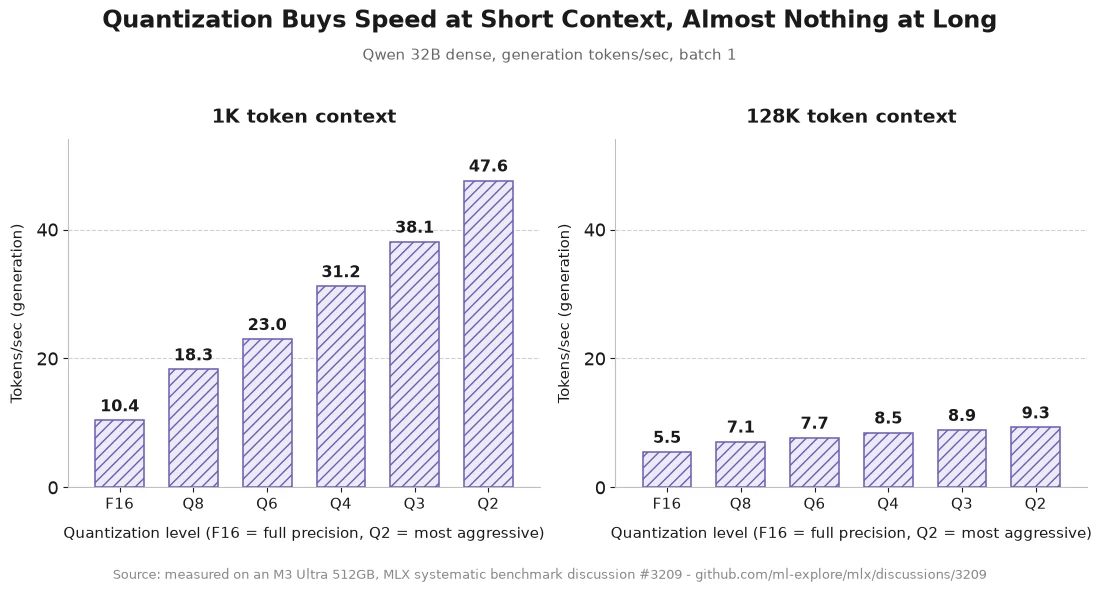
The uncomfortable finding buried in that benchmark set is that context length hurts more than quantization helps. On a dense Qwen 32B, going from 1K to 128K context drops generation from 31.2 to 8.5 tok/s at 4-bit. At 1K context, dropping from F16 to 2-bit buys a 4.5x speedup; at 128K it buys 1.7x. If your workload is long-context - and any agent workload is - the honest expectation is that you will spend most of your time somewhere in the lower half of these tables.
Self-hosting the model behind a Pinggy tunnel
A 512GB inference box is most useful when it is not tied to the desk it sits on, but a local model server binds to loopback and the Mac is almost certainly behind NAT with no port you can forward. Pinggy closes that gap with one SSH command, no daemon and no router configuration.
Serve the model first. mlx-lm ships an OpenAI-compatible server:
pip install mlx-lm

mlx_lm.server \
  --model mlx-community/DeepSeek-V4-Flash-4bit \
  --port 8080 \
  --decode-concurrency 4 \
  --prompt-cache-size 8
That listens on 127.0.0.1:8080 with /v1/models and /v1/chat/completions. The two extra flags matter on a large-memory machine: let several requests decode at once, and keep recent prompt prefixes cached so an agent resending its context does not pay full prefill every turn.
Then expose it, with auth on from the first command. Bearer-key auth is the one that fits an LLM API, because OpenAI-compatible clients already send Authorization: Bearer <key>:
Pinggy prints a public HTTPS URL such as https://abc123.a.free.pinggy.link, certificate included. Point Continue.dev, Aider, OpenCode, the OpenAI SDK or a phone at that URL plus /v1, with your-secret-key as the API key, and everything else is rejected at the edge. Use b:username:password instead if you want a browser password prompt, or w:203.0.113.0/24 to whitelist a known network rather than issue credentials at all. Do not skip this step: an open inference endpoint will find users you did not invite, and they will spend your GPU time.
For an always-on setup, the Pinggy CLI binary is the better tool than a raw SSH command: it auto-reconnects on failure by default, and a Pro token gets you a persistent subdomain so agents and teammates can hold one base URL instead of a fresh random hostname on every reconnect.
./pinggy --token <TOKEN> -l http://localhost:8080Save it as a named config to start it detached and let the daemon keep it alive in the background:
pinggy config save mac-studio -l 8080 <TOKEN>@pro.pinggy.io
pinggy start mac-studio --b
Pinggy also has a web debugger that logs every request crossing the tunnel, which is the first place to look when an agent is failing and you cannot tell whether the client, the tunnel or the server is at fault. It is opt-in, so ask for it with -d:
./pinggy --token <TOKEN> -l http://localhost:8080 -d 4300Then open http://localhost:4300. One gotcha worth knowing: the debugger binds to the IPv6 loopback, so localhost:4300 works but 127.0.0.1:4300 will refuse the connection.
We have walked the same pattern through the Ollama API port, Ollama with Open WebUI, and an oMLX server, the last of which suits a machine this size since its tiered RAM/SSD KV cache is built for long agent sessions.
Where the Mac Studio is the wrong answer
Concurrency. MLX does not match vLLM’s batching efficiency. For one user or a handful of agents a Mac Studio is excellent; for thirty people on one endpoint, a GPU server serving the same model delivers several times the aggregate throughput.
Prefill. The Neural Accelerators are a real 3 to 4x gain, but an 8-GPU H200 node still processes prompts faster. If your workload is “read 100K tokens, write 500,” you will notice.
No CUDA. MLX, llama.cpp’s Metal backend and Core AI cover inference and LoRA fine-tuning. They do not cover the long tail of research code and custom kernels that assume an NVIDIA device.
Dense models above ~120B are a trap. You can load a 4-bit Llama 405B. At 2.9 tok/s you will not want to.
Price and timing. $5,499 with 96GB, $9,499 at 256GB, and the 512GB build is unpriced and not shipping until late October 2026.
What it wins on is capacity, coherence, silence and power draw. An M3 Ultra ran DeepSeek R1 671B under 200W and sits at 160 to 270W under load; an 8x H100 node draws roughly 7kW before cooling and costs $200,000 to $400,000. Against API spend, a $6,800 machine pays back in about 34 months at $200/month, roughly 14 at $500, and under 7 at $1,000.
Which configuration to buy
Flash tier (DeepSeek-V4-Flash 151GB, GLM-5.3-Flash 177.6GB, anything under ~200GB): the 256GB M5 Ultra at $9,499, and save several thousand dollars.
743B tier (GLM-5.2 at 418GB, GLM-5.3 at roughly the same, DeepSeek 671B at ~400GB): 512GB, with the wired limit raised and one eye on your context budget.
Kimi K3 or DeepSeek-V4-Pro: no single machine works. Two 512GB Macs give you 1TB; four give you 2TB and cover every open-weight model published so far.
Not sure yet: a 40-core-GPU M5 Max with 128GB handles everything through the ~100GB class at 614GB/s from a $2,499 base, and will tell you whether local inference fits your workflow before you spend $10,000 finding out.
For the wider hardware picture including NVIDIA options, see Picking the Right Hardware to Run LLMs Locally, and Best Open Source Self-Hosted LLMs for Coding for capability per parameter. How to Self-Host Any LLM is the step-by-step setup guide.
Conclusion
512GB at 1.2TB/s is the first desktop where GLM-5.2 fits at 418GB and generates at a usable rate. Total parameters still decide what loads and active parameters decide how fast, so buy this machine for large sparse MoEs, not big dense ones. And the frontier already outruns one box - Kimi K3 needs 1.56TB - which makes RDMA over Thunderbolt 5, not the 512GB, the real news.