Small LLMs That Fit in 8GB: The Best Models to Self-Host in 2026
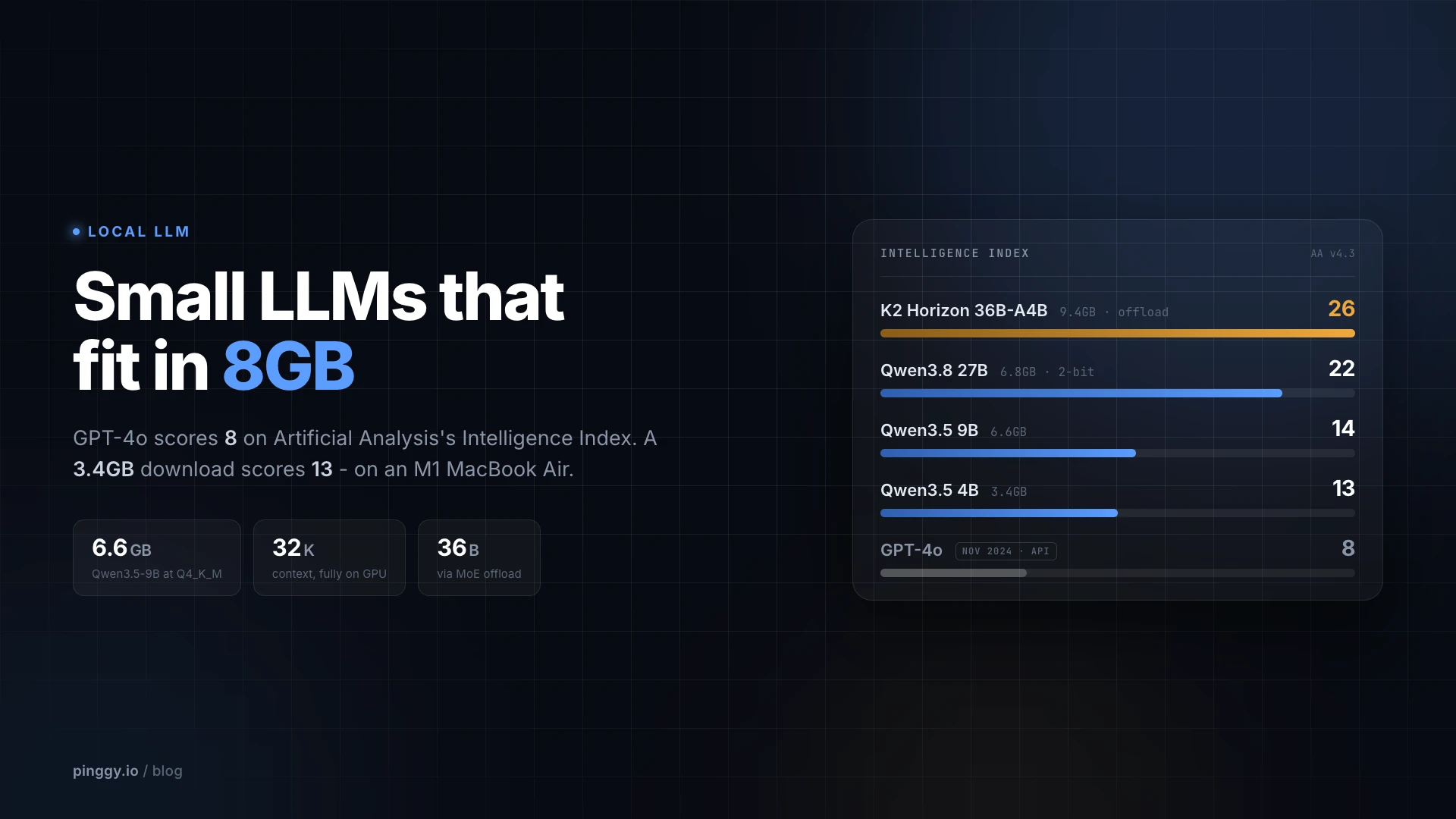
Most people who want to run an LLM on their own hardware are not shopping for a GPU, they are working with whatever is already on the desk. That usually means an 8GB graphics card or a laptop with 8GB of soldered RAM, and for a long time that budget bought you a 7B model that was pleasant to demo and frustrating to use. That changed in 2026, and the clearest way to see how much is to line a local model up against the one that defined the frontier when it shipped.
GPT-4o scores 8 on Artificial Analysis’s current Intelligence Index. Qwen3.5-4B scores 13 - a 3.4GB download that runs on an M1 MacBook Air with 8GB of unified memory and leaves room for your browser. Qwen3.5-9B scores 14 at 6.6GB. The model that needed an OpenAI data centre and charged by the token is now beaten by a file small enough for a USB stick, on a laptop Apple stopped selling years ago.
Two caveats before that claim runs away with itself. GPT-4o was OpenAI’s flagship chat model through most of 2025, but it was not the frontier at the end of 2025 - GPT-5 shipped that August and scores 23 on the same index, which nothing in this guide reaches. And Artificial Analysis scores full-precision models served over an API, so a heavily quantized local build will not deliver its listed score.
This guide covers what actually fits in 8GB, how to budget that 8GB correctly (weights are only part of the bill), and which model to pick depending on whether your 8GB is dedicated VRAM or shared system RAM.
Summary
The highest-scoring thing an 8GB machine can run is K2 Horizon MoVA 36B-A4B (36B total, 4B active, Apache 2.0), which scores 26 - but only via MoE offload, at IQ2_XXS (9.37GB) plus 32GB of system RAM. Qwen3.8-27B scores 22 and squeezes into 8GB at Unsloth’s UD-IQ2_XXS (6.77GB), but it is dense, so offload does not help it and 2-bit costs real quality. Qwen3.5-35B-A3B (15, 9.93GB) is the gentler offload option.
If your 8GB is dedicated GPU VRAM:
- Qwen3.5-9B at Q4_K_M (
ollama pull qwen3.5:9b, 6.6GB) - the default pick. Apache 2.0, 262K context, native vision, and a hybrid attention design that keeps the KV cache small. - Gemma 4 12B QAT (
gemma4:12b-it-qat, 7.2GB) - the largest dense model that fits, but it leaves almost no room for long context. - Ministral 3 8B (
ministral-3:8b, 6.0GB) - Apache 2.0, multimodal, 256K context.
If your 8GB is total system RAM (no discrete GPU):
qwen3.5:4b(3.4GB),gemma4:e2b-it-qat(4.3GB),nemotron-3-nano:4b(2.8GB), orphi4-mini:3.8b(2.5GB).
The rule everyone gets wrong: weights are not the whole budget. A conventional 8B model burns ~144KB of KV cache per token, which is 4.5GiB at 32K context. Qwen3.5-9B spends 32KB per token (1GiB at 32K) because only 8 of its 32 layers use full attention.
What does not fit: gpt-oss:20b (14GB), Gemma 4 26B/31B (16-20GB), Nemotron 3 Nano 30B (24GB). No amount of quantization gets these under 8GB at usable quality.
The 8GB Budget Is Not Just Weights
The most common mistake is treating an 8GB limit as “find a model file under 8GB.” Three things compete for that space: the quantized weights, the KV cache that grows with your conversation, and 0.5-1GB of runtime and framebuffer overhead. Fill it with weights alone and the first long prompt pushes layers onto the CPU, where throughput drops by an order of magnitude.
The KV cache is the part worth doing arithmetic on, because it varies enormously between models that look identical on a spec sheet. The formula is straightforward:
bytes per token = layers x 2 x kv_heads x head_dim x bytes_per_element
Running that against the published config.json for each model makes the differences obvious. Here is the fp16 KV cache cost at 32K context for models in this class:
| Model | Attention layout | KV per token | KV at 32K |
|---|---|---|---|
| Gemma 4 E4B | 35 sliding (512) + 7 full | 15.1 KiB | 0.47 GiB |
| Qwen3.5-9B / 4B | 24 linear + 8 full | 32.0 KiB | 1.00 GiB |
| Gemma 4 12B | 40 sliding (1024) + 8 full | 74.0 KiB | 2.31 GiB |
| Qwen3-8B (previous gen) | 36 full | 144.0 KiB | 4.50 GiB |
| Granite 4.1 8B | 40 full | 160.0 KiB | 5.00 GiB |
That spread is the single most important thing to understand about small models in 2026. Granite 4.1 8B has smaller weights than Qwen3.5-9B (5.3GB vs 6.6GB), but at 32K context its cache alone needs 5GiB, so the pair blows past 8GB while Qwen3.5-9B is still comfortably inside it. The architectural reason is that Qwen3.5 inherits the Qwen3-Next hybrid attention layout: its config.json sets full_attention_interval: 4, so 24 of its 32 layers are linear-attention blocks with a fixed-size recurrent state and only 8 keep a cache that grows with sequence length. Those 8 layers carry 4 KV heads at 256 dimensions each, which is where the 32KB-per-token figure comes from, and it is a 4x saving over the same model with full attention throughout. Gemma 4 takes a different route to the same place, alternating sliding-window attention (512 or 1024 tokens) with a handful of global layers.
This shows up in measured runs. A published llama.cpp benchmark on an RTX 3070 (8GB) reports Qwen3.5-9B holding a steady 55-58 tok/s from 4K all the way to 32K context at about 7GB peak VRAM, while a conventional 12B model in the same test dropped to 4.3 tok/s and spilled to 10GB.
How They Actually Rank
Artificial Analysis runs the most useful independent scoreboard for this, because it scores every model on the same ten evaluations rather than trusting vendor-reported numbers. Here is where the 8GB-class models sit on its Intelligence Index, alongside what each one costs you on disk. The amber bars are the MoE-offload route, which runs on an 8GB card without fitting inside it, and the dashed line is GPT-4o at 8.
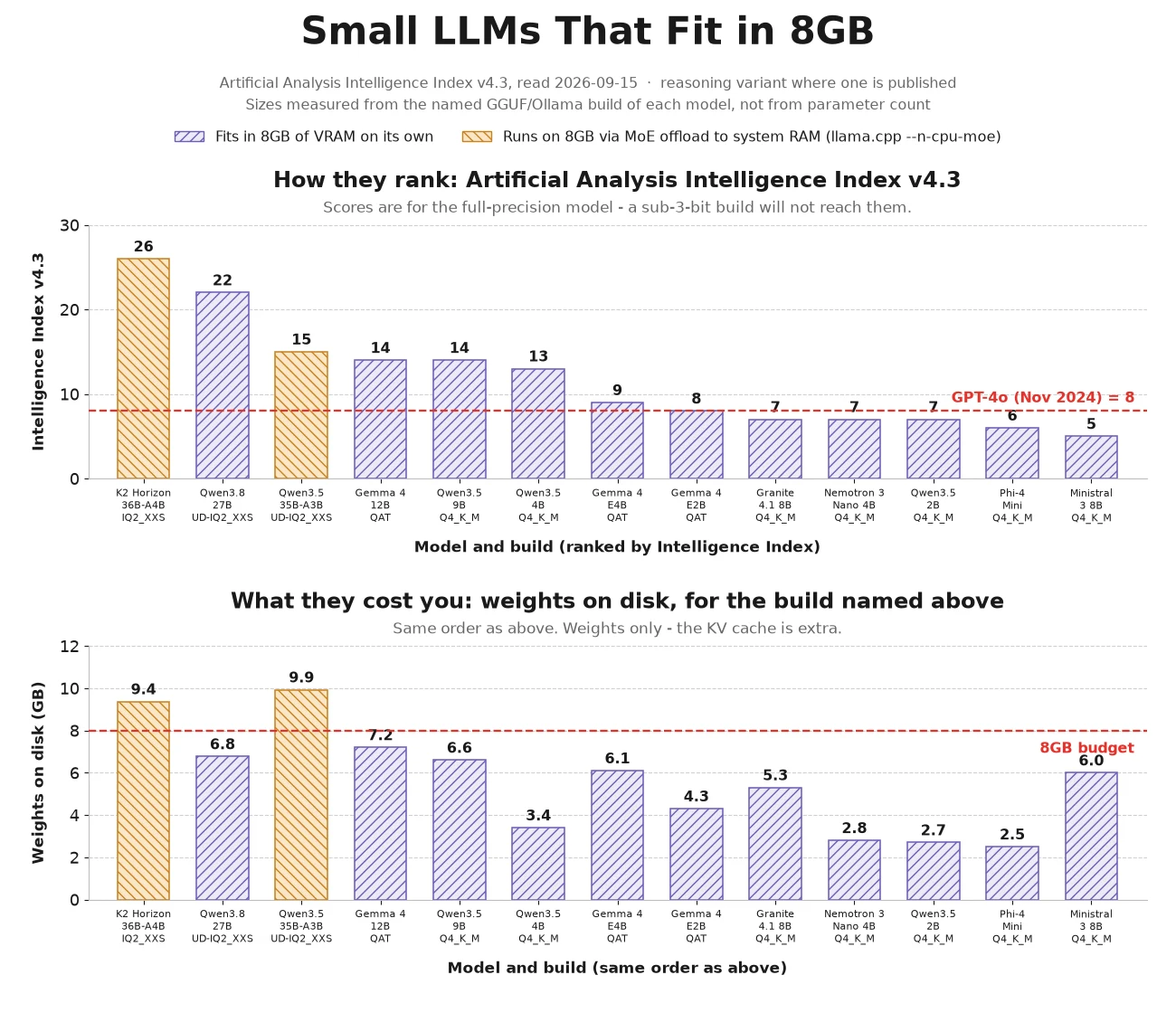
One caveat that trips people up: Artificial Analysis rescales this index, and the versions are not comparable. The current v4.3 folds in ten much harder evaluations, including Humanity’s Last Exam and Terminal-Bench v4.0, so scores compress downward across the board. AA’s own March 2026 write-up of the Qwen3.5 small models put the 9B at 32; the same model reads 14 on today’s leaderboard. Neither number is wrong, they are just different rulers, and secondary sites quote them interchangeably. Check the version string before comparing any two scores.
| Model | AA Index v4.3 | Smallest good build | Fits 8GB? |
|---|---|---|---|
| K2 Horizon MoVA 36B-A4B IQ2_XXS, MoE 36B/4B active | 26 | 9.37GB | Yes, with MoE offload |
| Qwen3.8 27B Unsloth UD-IQ2_XXS, dense | 22 | 6.77GB | Yes, but only at 2-bit |
| Qwen3.5 35B-A3B Unsloth UD-IQ2_XXS | 15 | 9.93GB | Yes, with MoE offload |
| Gemma 4 26B A4B | 17 | 16GB (QAT) | No |
| Gemma 4 12B | 14 | 7.2GB (QAT) | Yes, barely |
| Qwen3.5 9B | 14 | 6.6GB | Yes |
| Qwen3.5 4B | 13 | 3.4GB | Yes |
| gpt-oss-20b | 9 | 14GB (MXFP4) | No |
| Gemma 4 E4B | 9 | 6.1GB (QAT) | Yes |
| Granite 4.1 8B | 7 | 5.3GB | Weights yes, context no |
| Nemotron 3 Nano 4B | 7 | 2.8GB | Yes |
| Phi-4 Mini | 6 | 2.5GB | Yes |
| Ministral 3 8B | 5 | 6.0GB | Yes |
Ranking and memory bill are only loosely related: Qwen3.5 4B sits one point off the top of the bracket at half the weights of the models above it.
The Models That Fit in 8GB of VRAM
K2 Horizon MoVA 36B-A4B is the highest-scoring model an 8GB machine can run, at 26. Released September 3, 2026 by MBZUAI’s Institute of Foundation Models under Apache 2.0, it is a mixture of experts with 100 experts and 8 active per token (37.4B parameters total, ~4B active) plus a Mixture-of-Values attention variant, and a 524K context. Because it is a genuine MoE, llama.cpp can keep attention and the KV cache on the card and push the expert tensors into system RAM. The catch is that it has no hybrid-attention trick: all 48 layers run full attention with 8 KV heads, which works out to 6 GiB of KV cache at 32K context on top of the weights. Budget 32GB of system RAM and treat long context as expensive.
Qwen3.8-27B is the highest-scoring model that fits in 8GB without any offloading at all - but read the asterisk. It scores 22 (34 at xhigh reasoning effort), and Unsloth’s UD-IQ2_XXS build is 6.77GB, comfortably inside 8GB. It is also a dense 27B, so --n-cpu-moe does nothing for it: there are no expert tensors to move. 6.77GB is a 2-bit quantization of a 27B model, and that score was measured on the full-precision weights. A sane 4-bit build (UD-Q4_K_XL) is 16.35GB. Treat the 2-bit build as an experiment worth running rather than a 22-scoring model you now own. It does inherit Qwen3.5’s hybrid attention (48 linear layers, 16 full), so its KV cache is a reasonable 2 GiB at 32K.
Qwen3.5-35B-A3B via Unsloth is the gentler offload option: 36B total, roughly 3B active, UD-IQ2_XXS at 9.93GB, scoring 15. The offloading section below has the command and the caveats.
Qwen3.5-9B is the one to try first if you want everything on the GPU. Released March 2, 2026 under Apache 2.0, it is a 10B-parameter multimodal model (there is a 27-layer vision tower in the config alongside the text stack) with a 262,144-token position limit. It ties Gemma 4 12B at the top of the 8GB bracket on the current Intelligence Index, and it gets there at 6.6GB rather than 7.2GB. The catch, and it is a real one: Artificial Analysis notes the Qwen3.5 small models burn 230-390M output tokens to complete the index, far more than frontier models. Thinking mode is where the quality comes from, and it costs you wall-clock time on slow hardware.
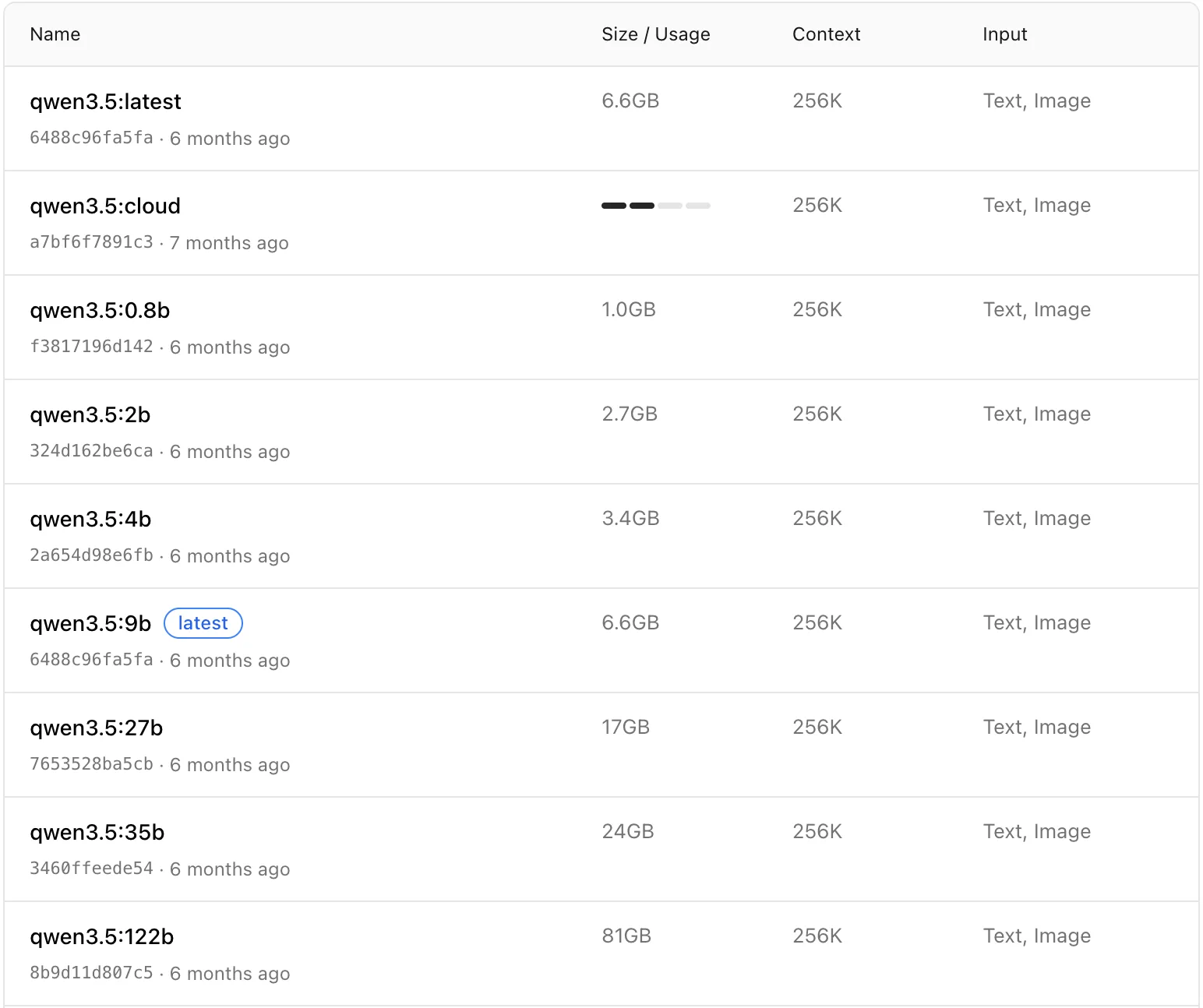
Ollama’s tag list makes the 8GB cutoff easy to see: 9b at 6.6GB is the last rung that fits, and the jump to 27b at 17GB skips straight past every consumer 8GB card.
Gemma 4 12B is the interesting outlier. The BF16 checkpoint is 24GB, the naive Q4_K_M is 7.6GB, and Google’s quantization-aware training build (gemma4:12b-it-qat) lands at 7.2GB, because QAT models are fine-tuned with quantization noise simulated during training and recover most of what naive 4-bit rounding throws away; our post on TurboQuant and Gemma 4 has the math. The tradeoff at 7.2GB is obvious: roughly 800MB left, about 11K tokens of context. A short-conversation option, not a long-document one.
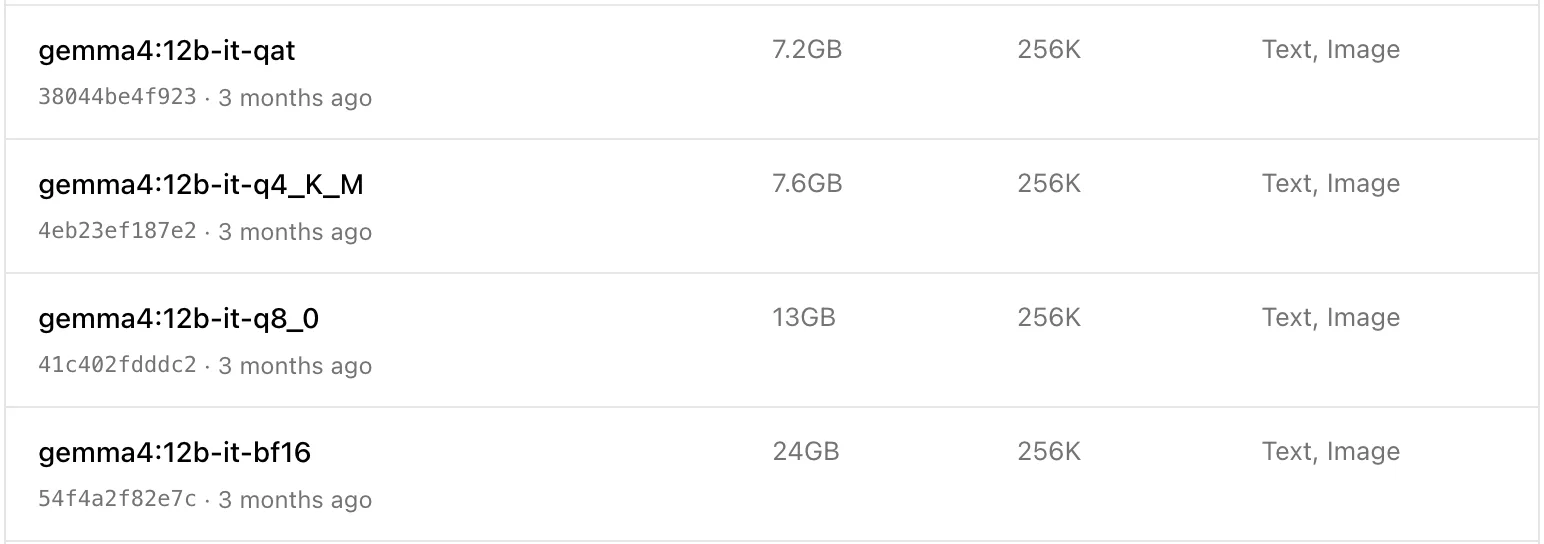
The four 12B builds side by side show the whole compression ladder: 24GB at bf16, 13GB at q8_0, 7.6GB at plain q4_K_M, and 7.2GB for the QAT build that was trained to survive the drop.
Ministral 3 8B (ministral-3:8b, 6.0GB) and Granite 4.1 8B (granite4.1:8b, 5.3GB) are both Apache 2.0 plain dense transformers, which is a feature if you hit tooling bugs with hybrid-attention architectures - llama.cpp and vLLM support for conventional models is simply more battle-tested. Being conventional is also why Granite’s KV cache is the heaviest here: IBM dropped Granite 4.0’s hybrid Mamba design for a dense decoder-only stack, so it suits short-context RAG rather than a 32K chat window.
The Models That Fit in 8GB of System RAM
If your 8GB is shared with the operating system, the browser, and your editor, you have roughly 4-5GB to play with. CPU inference is also bandwidth-bound in a way GPU inference is not, so smaller is genuinely faster here, not just smaller.
Qwen3.5-4B (3.4GB) is the sweet spot. It uses the same 24-linear/8-full attention layout as the 9B, so it carries the same 32KB-per-token cache cost, and it gives up only one point of Intelligence Index against the 9B (13 vs 14) for less than half the weights. Below that the drop is steeper: qwen3.5:2b (2.7GB) falls to 7 and qwen3.5:0.8b (1.0GB) to 6, so do not go below 4B unless the memory genuinely forces it.
Gemma 4 E2B and E4B are built for exactly this scenario. The E-series uses Per-Layer Embeddings so that E4B’s 8.0B total parameters behave like 4.5B at inference time. The QAT builds are gemma4:e2b-it-qat (4.3GB) and gemma4:e4b-it-qat (6.1GB), both accept audio as well as text and images, and E4B’s KV cache is the lightest here at 15.1 KiB per token - 32K context costs under half a gigabyte.
Nemotron 3 Nano 4B (nemotron-3-nano:4b, 2.8GB) is NVIDIA’s agentic pick: a hybrid Mamba-Transformer pruned and distilled from Nemotron Nano 9B v2, with configurable reasoning traces and a 256K context. It ships under the NVIDIA Open Model License rather than Apache 2.0, so check the terms before commercial use.
Phi-4-mini (phi4-mini:3.8b, 2.5GB) remains the best math-and-reasoning model at its size, MIT licensed, with function calling and a 128K context. Microsoft’s synthetic-data training recipe still punches above its parameter count on structured reasoning, though it is text-only.
Granite 4.1 3B (2.1GB) and Ministral 3 3B (3.0GB) round out the tier if you want a plain dense transformer with no reasoning-mode surprises.
What Does Not Fit, No Matter What You Read
A few models get recommended for 8GB setups and should not be. OpenAI’s gpt-oss:20b is 14GB in Ollama’s MXFP4 build - the repeated “runs in 16GB” figure is accurate, and 16 is not 8. Gemma 4 26B A4B is 16GB at QAT, and activating only 4B parameters per token does not help, because every expert still has to be resident; Nemotron 3 Nano 30B is 24GB for the same reason. Our explainer on mixture-of-experts models covers why active parameters and memory footprint are separate numbers.
The exception worth knowing about is aggressive sub-4-bit compression. Bonsai 27B fits a 27B model into 3.9GB with native 1-bit weights, at a real cost in quality. That is a different tradeoff, not a free lunch.
Stretching Past 8GB: Unsloth Dynamic Quants and MoE Offloading
Everything above assumes the whole model lives in your 8GB. There is a second route worth knowing before you settle: run a much larger mixture-of-experts model and keep only part of it on the GPU.
Unsloth publishes Dynamic GGUF quants (the UD- builds) that quantize layer by layer instead of uniformly, pushing expert layers to a lower bit width while leaving attention at 4 or 6 bits. That does not squeeze a 35B model into 8GB on its own, but it moves the floor: Unsloth’s Qwen3.5-35B-A3B-GGUF bottoms out at 9.93GB for UD-IQ2_XXS and 11.32GB for UD-Q2_K_XL, against the 20.71GB UD-Q4_K_XL that Unsloth recommends.
The part that actually matters for an 8GB card is that Qwen3.5-35B-A3B is a mixture of experts: 36B parameters total, roughly 3B active per token. Only a small slice of those weights is touched on any given forward pass, so llama.cpp can keep attention, the router and the KV cache on the GPU and park the bulky expert tensors in system RAM:
llama-server -hf unsloth/Qwen3.5-35B-A3B-GGUF:UD-Q2_K_XL \
  -ngl 999 --n-cpu-moe 30
--n-cpu-moe N moves the routed expert weights of N layers to the CPU; -ot "exps=CPU" is the older, more explicit form of the same idea. Tune N down until the model stops fitting, because the performance curve is a V: catastrophic while you are overcommitted on VRAM, best at the smallest value that genuinely fits, then slowly declining as you push more work onto the CPU.
Be clear-eyed about the trade. This is not a free upgrade from a 9B to a 36B: you need the system RAM (16GB is tight, 32GB comfortable), generation speed becomes bound by DDR bandwidth rather than your GPU’s, and long-prompt processing gets noticeably slower. If your 8GB machine also has 8GB of RAM, skip it. On a desktop with 32GB and an 8GB card it is a real option that the “which model fits in 8GB” framing misses. Our guide to self-hosting and fine-tuning with Unsloth covers the rest of the toolchain.
Running It
Install Ollama and pull a model:
curl -fsSL https://ollama.com/install.sh | sh
ollama pull qwen3.5:9b
ollama run qwen3.5:9b
The one setting worth changing is the context window. Ollama will happily accept a num_ctx that does not fit and silently offload layers to CPU, which looks like a mysterious 10x slowdown rather than an error. Set it explicitly to something your remaining VRAM can hold:
# server-wide default
OLLAMA_CONTEXT_LENGTH=16384 ollama serve

# or per-session, inside the interactive prompt
ollama run qwen3.5:9b
>>> /set parameter num_ctx 16384
Ollama’s default is 4096 tokens, so you are usually raising this rather than lowering it - just raise it deliberately rather than jumping straight to the model’s 262K ceiling.
If you are short on headroom, quantizing the KV cache halves its cost. Set OLLAMA_FLASH_ATTENTION=1 and OLLAMA_KV_CACHE_TYPE=q8_0 before starting the server - flash attention has to be on for the cache type to take effect, and on architectures that do not support it Ollama silently falls back to fp16 rather than warning you. For a fuller walkthrough of the install-to-first-token path, see our step-by-step self-hosting guide, and whichllm if you would rather have a tool detect your hardware and rank models for you.
Reaching Your 8GB Model From Anywhere
Ollama exposes an OpenAI-compatible API on localhost:11434, which is useless from your phone or a teammate’s laptop until you put a public address in front of it. Pinggy does that with one SSH command, no account, no client install, and no firewall change:
ssh -p 443 -R0:localhost:11434 free.pinggy.io
Pinggy prints a public HTTPS URL like https://xxxxx.run.pinggy-free.link that forwards straight to the local Ollama process. Point any OpenAI-compatible client at it and your 8GB machine is now an API endpoint. The same command with port 3000 exposes an Open WebUI frontend instead; our Ollama port-forwarding post covers the details, including keeping the tunnel alive.
Conclusion
If you have 8GB of dedicated VRAM, pull qwen3.5:9b and stop shopping - it is the only model in this class that stays entirely on the GPU at 32K context, and it does so because of how it is built, not because of aggressive quantization. If you have 8GB of system RAM, qwen3.5:4b or gemma4:e2b-it-qat will feel far better than trying to force a 9B onto the CPU. And whatever you pick, do the KV cache arithmetic before you assume a model fits: the difference between 15 KiB and 160 KiB per token decides whether your 8GB holds a 32K conversation or a 4K one.
If this exercise convinces you that 8GB is the real constraint rather than the model, our guide to hardware for self-hosting local LLMs covers what the next tier up actually buys you.