Best Hardware to Self-Host LLMs for Coding and Agentic Work in 2026
If you want to run a coding agent on hardware you own instead of paying for an API, you have to pick a machine. Almost every guide ranks machines by tokens per second of generation. That turns out to be roughly the right number, but for a reason the guides rarely give, and it comes with one exception that will cost you real time.
I started this guide expecting the opposite. An agent sends an enormous prompt on every turn: the system prompt, your file tree, the files it just read, and the whole conversation so far, often 40,000 tokens or more. Against that, a 300-token reply looks like a rounding error. So reading the prompt should dominate, and you should buy for prompt-processing speed.
Two things make that wrong. Prompt caching means an agent does not re-read those 40,000 tokens on a normal turn, only the couple of thousand that changed. And reasoning models spend most of a turn writing thinking tokens, which is generation, not reading.
What follows is the buying guide that falls out of that, with prices checked in September 2026.
Summary
Buy in this order: enough memory to hold the model, then generation speed, then prompt-processing speed. Prompt caching keeps prefill off the critical path on every turn except the cold ones.
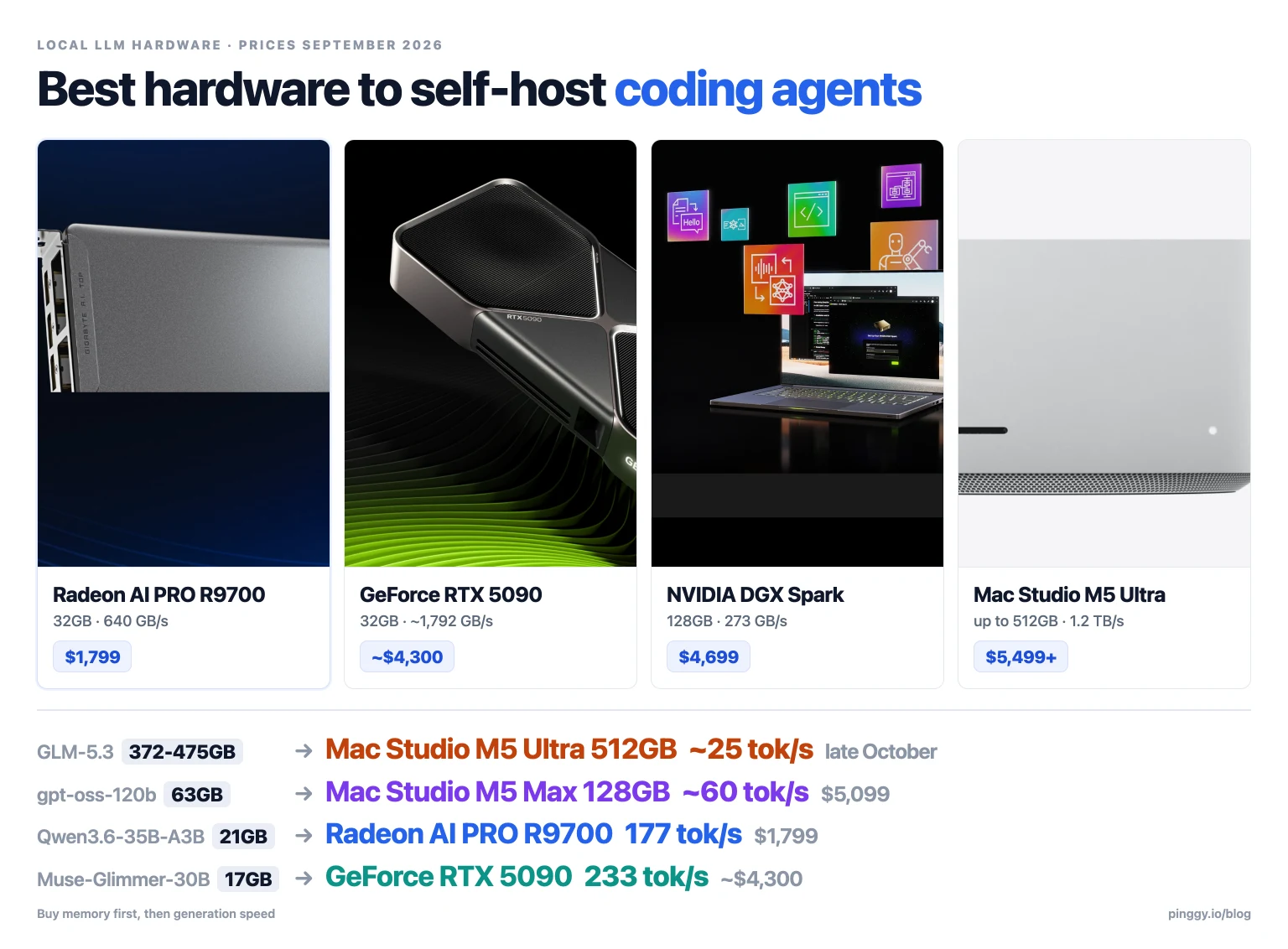
- Best pick for one developer, $1,799: Radeon AI PRO R9700 (32GB, 640 GB/s). At 32k of context it generates 177 tok/s on a 35B MoE with speculative decoding on, against 79 on a Strix Halo box and 46 on a DGX Spark that costs 2.6x more. The catch: you have to test ROCm against Vulkan yourself to find which is faster for your model.
- Best no-fuss pick, ~$4,300: RTX 5090 (32GB). Fastest single card, CUDA, nothing to configure.
- Best big-model machine: Mac Studio M5 Ultra, $5,499 at 96GB and $9,499 at 256GB. Its 1.2 TB/s is what makes a large mixture-of-experts model usable. The 512GB build is the only consumer machine that fits GLM-5.3, and it does not ship until late October 2026.
- Best balance of memory and speed: Mac Studio M5 Max 128GB at $5,099 (614 GB/s).
- Skip: dual-EPYC CPU builds, Intel Arc, and any dense model above 30B on unified memory.
What you actually run: Muse-Glimmer-30B at 16.8GB scores 76.0 on SWE-bench Verified and is explicitly built for agents on consumer hardware. Qwen3.8-27B at 16.5GB is the most-downloaded open model by a factor of three. Both fit on a 32GB card.
Do not go below 4-bit. Q4 costs about 2 points on real coding evals. Below 2-bit, tool calling stops working, which for an agent means it does not work at all.
Context for every price here: DDR5 is up 473% year on year and memory is now roughly 80% of the bill of materials on a high-VRAM GPU. Every price in this guide is higher than it was a year ago.
Where an agent turn actually spends its time
Running a model locally has two stages, and they are limited by different parts of the machine.
Prefill is the model reading your prompt. It processes the whole prompt in one batch of matrix multiplications, so it is limited by raw compute.
Decode is the model writing its reply, one token at a time. Each token requires reading the model’s active weights out of memory once, so it is limited by memory bandwidth. This is the tokens-per-second figure everyone quotes.
Prompt caching removes most of the prefill
Every serving stack worth using keeps the KV cache from the previous turn and processes only the part of the prompt that changed. vLLM’s documentation is explicit that prefix caching lets “the new query skip the computation of the shared part”, and that it “only reduces the time of processing the queries (the prefilling phase) and does not reduce the time of generating new tokens (the decoding phase)”. llama.cpp does the same with cache_prompt, on by default: “the common prefix does not have to be re-processed, only the suffix that differs between the requests.” SGLang’s RadixAttention is on by default too.
An agent appends to its transcript rather than rewriting it, so a normal turn prefills a few thousand new tokens instead of forty thousand.
The effect is not marginal. Anthropic’s sample session reads 1.2k input, 5.3k output, 940.0k cache read, 50.0k cache write. Of roughly 991,000 tokens on the input side, 94.8% came from cache and were never processed again. The same docs show a session cache line reporting “91% of input tokens from cache” across 14 requests.
llama.cpp’s own documented response shows the shape in miniature: 236 prompt tokens reused from cache, one token actually processed in 31 ms, then 35 tokens generated in 661 ms. Decode took 21 times as long as prefill.
One caveat on those percentages: they come from a hosted API. The mechanism is the same strict prefix match locally, but nobody has published measured hit rates for local agent loops, so treat the transfer as reasonable inference rather than measurement.
Reasoning models make it lopsided
A reasoning model emits thousands of thinking tokens before the first word of its answer, and every one of them is decode. Artificial Analysis measures the gap directly. Qwen3 235B starts responding 2.77 seconds after the request, but the first token of the actual answer arrives at 38.25 seconds. gpt-oss-120b goes from 0.75 seconds to 9.98. That entire gap is generation.
The hardware differences do not line up the way you would expect, either. Measure the same machines both ways on LLaMA-7B at Q4_0, using the community-submitted llama-bench runs in llama.cpp’s own CUDA and Apple Silicon benchmark threads, and the fastest machine reads prompts 18x faster than the slowest but writes tokens only 3.6x faster. The wide spread sits on the number you pay only when the cache is cold. The narrow one is what you pay on every token the model writes. (Build versions differ between rows, and the NVIDIA numbers were run with flash attention enabled.)
The split, in seconds
Putting those pieces together gives the wall-clock breakdown of one turn. The rates below are measured on a Radeon AI PRO R9700 running Qwen3.6-35B-A3B at Q4 under llama.cpp, at 32k of context depth, which is where an agent actually works: 2,113 tok/s of prefill and 111 tok/s of decode. The turn shapes are mine.
| One turn | Reading | Writing | Which dominates |
|---|---|---|---|
| First turn of a session: 40k prompt, 300 out | 18.9 s | 2.7 s | reading, 88% |
| Normal turn: 3k new tokens, 300 out | 1.4 s | 2.7 s | writing, 66% |
| Normal turn, reasoning model: 3k new, 5,300 out | 1.4 s | 47.7 s | writing, 97% |
| Cold cache, reasoning model: 40k prompt, 5,300 out | 18.9 s | 47.7 s | writing, 72% |
Only the first row is prefill-bound, and it happens once per session. On a slower machine the same pattern holds with worse numbers: a Strix Halo box at 462 tok/s prefill and 33 tok/s decode spends 6.5 seconds reading and 161 seconds writing on that third row.
So the number to rank machines on is decode speed, which comes down to memory bandwidth divided by the model’s active parameters: decode tok/s = (bandwidth x efficiency) / (active params x bytes per param).
For a mixture-of-experts model, “active” is the number that counts. GLM-5.3 has 744B total parameters but activates 40B per token, so at 4-bit it reads about 20GB of weights for every token it writes. At 1.2 TB/s, a Mac Studio M5 Ultra lands around 25 tok/s on it. A 5,000-token thinking trace is then over three minutes, and no amount of prompt-processing speed changes that.
Apple states the same split in its own MLX research: “Generating the first token is compute-bound, and takes full advantage of the Neural Accelerators,” while “generating subsequent tokens is bounded by memory bandwidth, rather than by compute ability.”
The exception: a cold cache
Everything above assumes the cache is warm. When it is not, you pay for the whole prompt in prefill, and on a slow machine that costs minutes.
Anthropic’s caching documentation gives the rule that decides it: “The match is exact, so a change anywhere in the prefix recomputes everything after it. There is no per-file or per-segment caching.” Appending to the end of a conversation is cheap. Changing anything ahead of it is not. In practice the cache goes cold when you start or resume a session, switch models, change the system prompt or tool definitions, or compact the conversation. Anthropic is blunt about the worst case: after an upgrade, “the first turn back into a long session can be the most expensive request you send.”
Some model architectures defeat prefix caching outright. One llama.cpp issue reports the server “forcing full prompt re-processing due to lack of cache data (likely due to SWA or hybrid/recurrent memory)”, reprocessing a 53,564-token prompt from position zero.
The numbers get bad quickly. A llama.cpp regression report shows a coding agent resuming a long session and spending “698035.65 ms / 91463 tokens” on prompt evaluation, which is 11 minutes for one turn. That case was a bug and has been fixed, but even the fixed figure in the same report is 249,619 ms for 79,518 tokens, a little over four minutes.
Four minutes matters because there is a hard limit at five. Node’s HTTP client, Undici, defaults to a 300-second headersTimeout, and several coding clients inherit it in a way that overrides whatever timeout you configured. Cline issue #6549 reports that “chats that take longer than 5 minutes to produce the first token fail with ‘fetch failed’”. Roo Code issue #12244 is the same bug with the receipts: apiRequestTimeout set to 600 seconds, “the request fails at approximately 300 seconds”, cause identified as “Undici’s default headersTimeout (300 seconds), which overrides the configured apiRequestTimeout”. Claude Code has its own 300-second watchdog that kills a connection which stops emitting stream events during a long prefill.
So a cold cache on a slow-prefill machine does not merely feel slow. It returns a transport error.
The useful part is that this is mostly a configuration problem rather than a hardware one. Keep prompt caching enabled, give the server enough cache RAM, set --cache-reuse, avoid model architectures that cannot cache, and avoid restarting a session in the middle of a task. That is a great deal cheaper than buying a faster GPU to brute-force a cache miss you did not need to have.
Why prices look wrong this year
One thing has pushed up every price in this article, so it is worth explaining before the numbers.
DRAM makers have been reallocating wafer capacity to HBM for AI accelerators, removing roughly 3GB of consumer DDR5 for every 1GB of HBM added. The result, per Tom’s Hardware: a 128GB DDR5-6400 kit went from $329 at its all-time low to $3,399. A 2x32GB DDR5-6000 kit went from $222 to $1,272, up 473% year on year. GDDR6 spot pricing went from about $2.50/GB in late 2025 to about $7.50/GB in mid-2026, which is why memory is now roughly 80% of the bill of materials on a high-VRAM graphics card. SK Hynix’s CEO said in July that “next year will be the worst year in the industry’s history from the supply perspective.”
You can watch it happen in vendor changelogs. Framework has kept a public running log with roughly a dozen pricing updates since December 2025, taking the 128GB Framework Desktop from $1,999 at launch to $3,449; in July its LPCAMM2 supplier costs came in at “prices that are more than double that of the prior inventory we had brought in”. NVIDIA raised the DGX Spark from $3,999 to $4,699 in February, stating that “the price adjustment reflects industry wide memory supply constraints”. The RTX PRO 6000 has roughly doubled, from $8,565 at launch to $16,499 at B&H today. Apple’s M5 Ultra starts at $5,499 where the M3 Ultra started at $3,999.
Two practical consequences:
- The used-GPU advice on every forum is stale. A used RTX 3090 averaged about $1,300 on eBay in September 2026, up 34.8% in four months. At that price it is no longer clearly better value than a new 32GB card with a warranty.
- The peak may have passed, so check before you panic-buy. Framework’s entry dated 8 September 2026 says it secured Micron 32GB and 64GB LPCAMM2 modules “at lower cost” and is “rolling out price reductions across both already shipped and a subset of currently pending pre-orders”, with automatic refunds for the difference. Those prices are still above launch. One vendor lowering prices is not a trend, but it does mean you should check current prices rather than trust the ones here.
What you actually need to run
Which machine you need depends on which model you want to run, so start there.
The best open-weight model on the live agent leaderboard is GLM-5.3. On Terminal-Bench 4.0 it resolves 41.8% of tasks, fifth overall, ahead of GPT-5.6 Sol, Opus 4.8, Grok 4.6 and Sonnet 5.
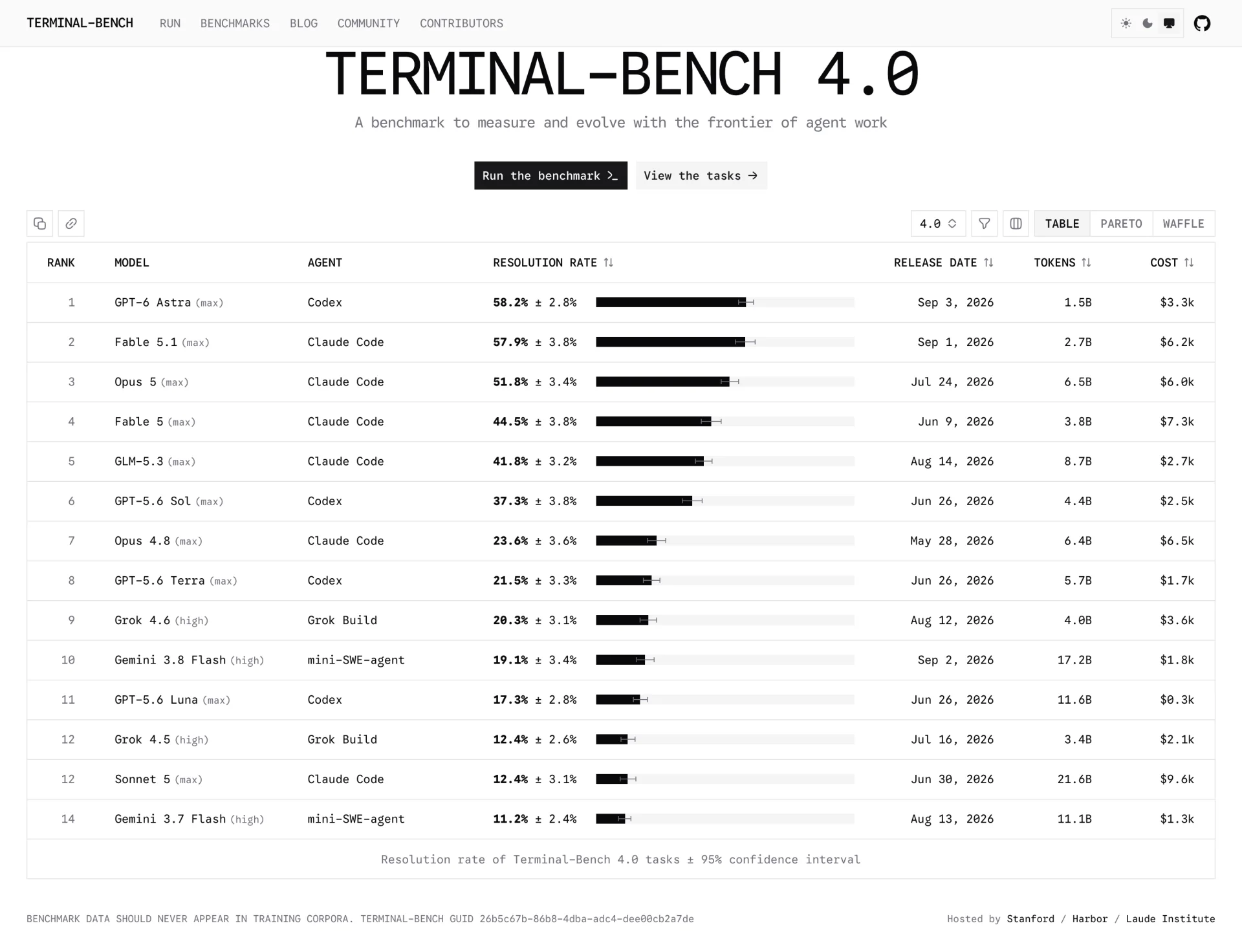
The best closed model scores 58.2%, so the gap between the best open weights and the best closed model is about 16 points.
The problem is size. GLM-5.3 has 744B total parameters, and Unsloth’s published requirements put it at 372-475GB at 4-bit. Only one consumer machine has that much memory: the 512GB Mac Studio.
Most people do not need that machine, because the small models have got good.
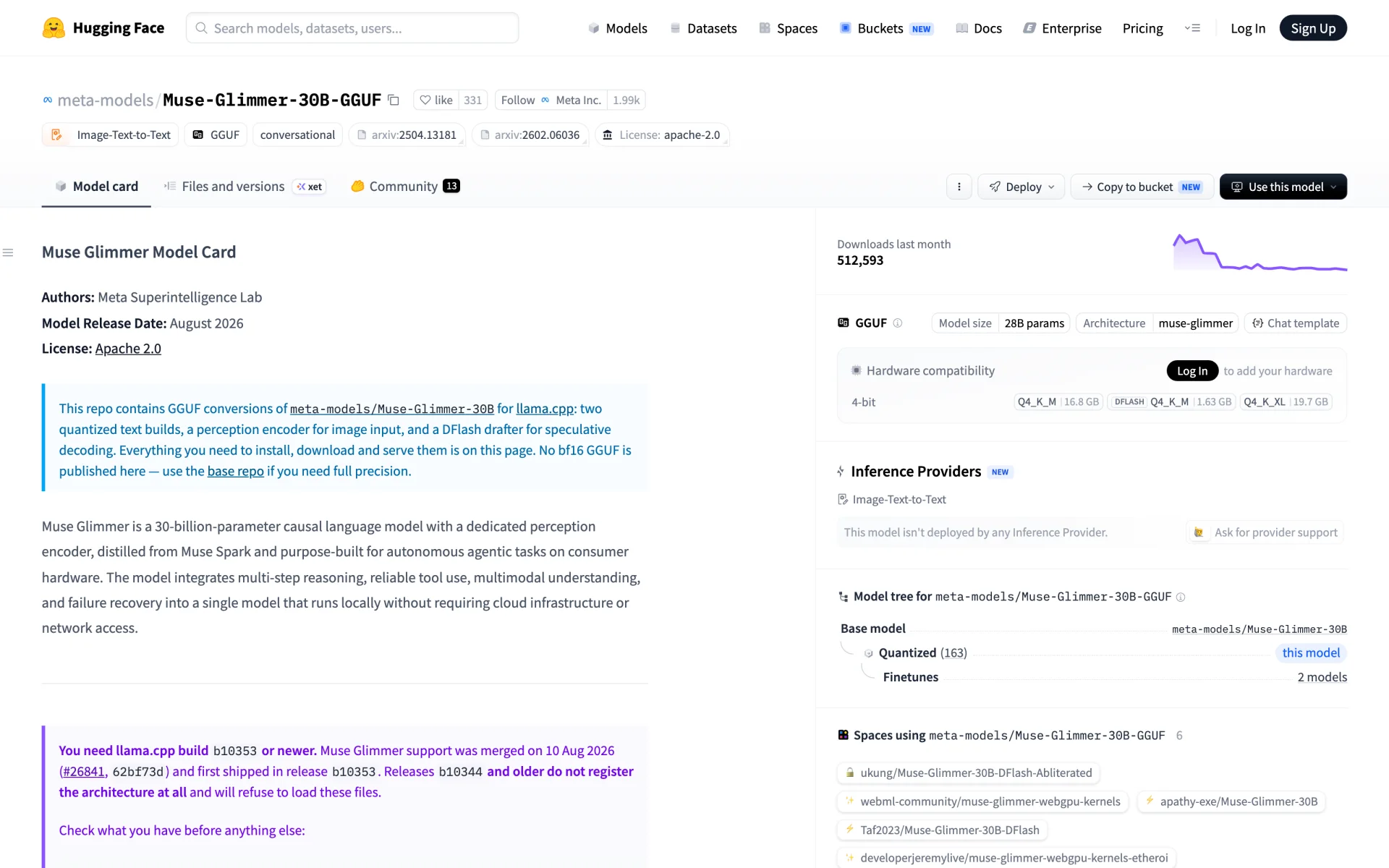
Meta’s Muse-Glimmer-30B is, in its own model card’s words, “purpose-built for autonomous agentic tasks on consumer hardware”. It scores 76.0 on SWE-bench Verified, 51.7 on TerminalBench 2.1 and 75.5 on MCP Atlas, it is Apache 2.0, and the recommended build is 16.8GB. Meta ships a 1.63GB DFlash drafter for speculative decoding alongside it and publishes measured speeds: 74.9 tok/s on an RTX 5090 rising to 233.4 with the drafter, against 26.6 rising to 50.2 on an M5 Max. Its KV cache is the cheapest of anything here, about 13 KiB per 1,000 tokens, because only 13 of its 52 layers use global attention. The whole stack including the vision encoder and drafter fits in about 21.5GB.
Qwen3.8-27B is the other one to know: 27.8B dense, Apache 2.0, 16.5GB at Q4_K_M, and by a wide margin the most-run open model anywhere, with 6.7M downloads of the base repo and 10.7M of Unsloth’s GGUF conversion in the last 30 days. Alibaba’s own table has it beating Opus 4.6 Max on SWE-bench Pro, 61.7 to 53.4.
Both fit on a single 32GB card with room left over for a long context. For most people, that one fact decides the budget.
| Model | Size / active | Weights at 4-bit | Total at 128k ctx | Smallest box that fits |
|---|---|---|---|---|
| Muse-Glimmer-30B | 29.6B dense | 16.8 GB | 18.5 GB | 24GB card |
| Qwen3.8-27B | 27.8B dense | 16.5 GB | 25.1 GB | 32GB card |
| Qwen3-Coder-Next | 80B / 3B MoE | 48.5 GB | 51.7 GB | 64GB Mac, 2x 32GB cards |
| gpt-oss-120b | 117B / 5.1B MoE | 63.4 GB (MXFP4) | 68.2 GB | Strix Halo 128GB, DGX Spark |
| GLM-5.3-Flash | 320B / 18B MoE | 199.7 GB | 201.4 GB | Mac Studio M5 Ultra 256GB |
| DeepSeek-V4-Flash | 284B / 13B MoE | 166.9 GB (native FP4/FP8) | 173.0 GB | Mac Studio M5 Ultra 256GB |
| GLM-5.3 | 744B / 40B MoE | 372-475 GB | ~480 GB | Mac Studio M5 Ultra 512GB only |
| Kimi-K3 | 2.8T / 104B MoE | 594 GB at 1-bit | 597 GB | Nothing. Needs a cluster |
DeepSeek-V4-Flash deserves a note: at 166.9GB it is in its native FP4-expert and FP8-attention format, not a lossy community quant, and it is MIT licensed with a 1M context. It ships with no chat template at all, so use Unsloth’s unsloth/DeepSeek-V4-Flash-0731 mirror, which adds one.
Notice which column decides the machine. Total parameters set the memory you need. Active parameters set how fast it writes. GLM-5.3-Flash at 320B total needs a 256GB machine, but activates only 18B, so it generates roughly twice as fast as GLM-5.3 on the same hardware.
Do not go below 4-bit
On Aider’s polyglot benchmark against DeepSeek-V3.1, going from full precision to 4-bit costs 1.9 points (71.6 to 69.7). Two-bit costs 5.8. One-bit costs 15.9. Meta’s own figures for Muse-Glimmer are tighter: 0.2% average degradation for the 19.65GB dynamic build, 1.0% for the 16.76GB one.
The evidence that matters for agents is different. Unsloth built a test called Divergence-300 that compares a quantized model’s greedy 32-token output against BF16 across 300 held-out agentic prompts, and found a cliff between UD-Q2_K_XL and UD-IQ2_S: roughly 25% agreement falling to under 8-10%. Their conclusion: “This sharp drop off means tool calling and non thinking modes break down.” A quant that looks like it retains 77% of quality on top-1 accuracy scores 8% on the divergence test.
llama.cpp’s own docs carry the matching warning about cache quantization: “Beware of extreme KV quantizations (e.g. -ctk q4_0), they can substantially degrade the model’s tool calling performance.”
For chat, 2-bit is a reasonable trade. For an agent it is not. A model that produces slightly malformed tool calls does not degrade gracefully, it fails the task. Use 4-bit weights and a q8_0 cache as your minimum.
The four numbers that decide a build
Listed in the order that matters for an agent.
Capacity decides what you can load. Budget roughly 0.5 to 0.6 GB per billion total parameters at 4-bit. Total, not active: a mixture-of-experts model uses a fraction of its weights per token, but the router can pick any expert at any step, so all of them have to be resident. We covered why in What is Mixture of Experts in LLM Models.
Bandwidth sets generation speed, and generation is most of an agent’s wall-clock time. Divide bandwidth by the bytes read per token, then take 60-80% of that for a realistic figure. For a mixture-of-experts model, the bytes per token follow the active parameter count.
Prefill compute sets how fast the model reads an uncached prompt. On a warm cache you barely touch it. On a cold one it decides whether you finish at all.
Concurrency decides how many agents run at once. One developer with one agent is a batch size of one. Three agents in parallel worktrees, or a team on one endpoint, is not.
There is one more number worth checking per model, because it no longer follows from the parameter count: how fast the KV cache grows. Muse-Glimmer-30B uses about 13 KiB per 1,000 tokens, since only 13 of its 52 layers are global attention. MiniMax-M2.7 uses roughly 248 KiB for the same 1,000 tokens. That 19x difference is 1.6GB versus 31GB of extra memory at 128k context, which can matter more than the weights.
The comparison
Prices checked 8 September 2026 and they move weekly. Apple prices are from Apple’s configurator; GPU prices are live B&H listings; the 3090 is an eBay four-month average.
| Machine | Price | Memory for models | Bandwidth | Best fit | Verdict for agents |
|---|---|---|---|---|---|
| Radeon AI PRO R9700 | $1,799 | 32 GB GDDR6 | 640 GB/s | 30B class at 128k | Best value. Fastest generation per dollar, and fastest prefill too. Expect to spend time tuning the backend |
| Used RTX 3090 | ~$1,300 | 24 GB GDDR6X | 936 GB/s | 30B class, shorter context | Still capable, but no longer cheap. The budget CUDA option |
| Mac Studio M5 Max 36GB | $2,499 | ~28 GB usable | 460 GB/s | 30B class | Silent, idles at 9W. Slower generation than a 32GB card |
| Strix Halo 128GB (Minisforum / GMKtec) | $3,499-$3,799 | ~110-120 GB on Linux, 96 GB on Windows | 256 GB/s (~215 measured) | gpt-oss-120b, 35B MoE | Cheapest way to get 128GB. Run MoE models only; dense models are too slow |
| RTX 5090 | ~$4,300 | 32 GB GDDR7 | ~1,792 GB/s | 30B class at 128k | Fastest single card. Draws 575W and needs a 1000W power supply |
| DGX Spark (GB10) | $4,699 | ~120 GB | 273 GB/s | gpt-oss-120b | CUDA in a 1.2 kg, 240W box. Generates more slowly than a card costing a third as much |
| Mac Studio M5 Max 128GB | $5,099 | ~112 GB usable | 614 GB/s | gpt-oss-120b comfortably | Best balance of memory and speed. 2.9x the measured bandwidth of Strix Halo |
| Mac Studio M5 Ultra 96GB | $5,499 | ~84 GB usable | 1.2 TB/s | gpt-oss-120b, 80B MoE | Buy the 128GB M5 Max instead, unless you need the extra bandwidth |
| Mac Studio M5 Ultra 256GB | $9,499 | ~224 GB usable | 1.2 TB/s | GLM-5.3-Flash, DeepSeek-V4-Flash | The best choice if you want models above 100GB |
| Mac Studio M5 Ultra 512GB | Late October, unpriced | ~472 GB usable | 1.2 TB/s | GLM-5.3 at 4-bit | The only machine that runs the best open model. Roughly 25 tok/s on it, so expect minutes per thinking turn |
| RTX PRO 6000 Blackwell | ~$16,500 | 96 GB GDDR7 ECC | GDDR7, 600W | gpt-oss-120b, team serving | Fastest machine here. Only worth it if several people share it |
| Dual EPYC + 512GB DDR5 | $6,000-$15,000 | 512 GB-1 TB | ~460 GB/s | Batch work only | Avoid. Single-digit tokens per second, and a second CPU makes it slower |
One comparison on identical settings
Headline pp512 numbers are measured on a 512-token prompt, which makes every machine look good. Both prefill and decode slow down as context grows, and agents work at large context sizes. The local-llm-benchmarks.dev project runs an actual coding workload instead: a 64MB source corpus fed in 2048-token chunks, measured at nine context depths. Three of these machines ran the same model under the same settings, so this is the fairest comparison available.
Qwen3.6-35B-A3B at Q4, llama.cpp, no speculative decoding, at 32k of context:
| Machine | Price | Generation at 32k | Prefill at 32k | Cold 30k prompt |
|---|---|---|---|---|
| Radeon AI PRO R9700 (Vulkan) | $1,799 | 111 tok/s | 2,113 tok/s | 14 s |
| DGX Spark (CUDA) | $4,699 | 46 tok/s | 462 tok/s | 65 s |
| Strix Halo 128GB (ROCm) | $3,499+ | 33 tok/s | 462 tok/s | 65 s |
Read the generation column first, because that is the one you pay on every token the model writes. The R9700 generates 2.4x faster than a DGX Spark that costs 2.6x as much, and reads prompts 4.6x faster on top of that. If your model fits in 32GB, the 32GB card is the better buy on both counts.
Two things move these numbers a lot:
Speculative decoding gives you generation speed for free. Turning on MTP drafting takes the Strix Halo from 33 to 79 tok/s of generation at 32k, and the R9700 from 111 to 177, with no cost to prefill. Since generation is what you wait on, this is the highest-value setting in the whole guide, and most people never turn it on.
Backend choice changes the result by 2-4x, and no backend wins everywhere. On the R9700, Vulkan RADV beat ROCm 7.14 at every depth on this model (2,113 versus 1,246 tok/s of prefill). On Strix Halo running dense models, ROCm beat Vulkan AMDVLK by 4.6x. You have to benchmark your own model on your own machine. That testing time is the real cost of going with AMD.
The machines, one at a time
Radeon AI PRO R9700, $1,799. 32GB, 640 GB/s, 300W, new with a warranty. It generates faster per dollar than anything else on this list, and reads prompts faster per dollar too. Puget Systems measured a pair of them running vLLM with tensor parallelism at 320 tok/s aggregate across 8 concurrent requests, so it scales to a small team, and 2x R9700 gets you 64GB for about $3,600 against roughly $8,600 for two 5090s. The downside is real. You need to test ROCm against Vulkan for each model you run, the AMD kernels change quickly, and almost every tutorial you find assumes NVIDIA.
RTX 5090, about $4,300. The fastest single card you can buy for this, with the entire CUDA ecosystem behind it and nothing to configure. On Meta’s own numbers it runs Muse-Glimmer-30B at 74.9 tok/s, or 233.4 with the DFlash drafter, which is the fastest generation figure in this guide. If you would rather pay $2,500 more than spend a weekend on driver setup, buy this one. Budget for 575W and a 1000W power supply.
Used RTX 3090, about $1,300. Still 24GB and 936 GB/s. But at $1,300 with no warranty, against a new $1,799 R9700 with 32GB and a warranty, the usual advice to buy a used 3090 no longer holds.
Strix Halo 128GB, $3,499 to $3,799. The Framework Desktop is the best-known version at $3,449 but has been out of stock; GMKtec’s EVO-X2 at $3,499 and Minisforum’s MS-S1 Max at $3,799 are shipping. It is the cheapest way to hold a 100GB-plus model, and on Linux you can hand roughly 110-120GB to the GPU (Windows caps at 96GB via Adrenalin). Run MoE models only: Qwen3.6-35B-A3B with MTP does 79 tok/s of generation at 32k, while dense models drop to 6.5-10.6 tok/s. Also use llama.cpp, not vLLM. On this hardware vLLM starts fast and collapses with depth, dropping from 8,769 tok/s of prefill at zero context to 150 at 64k.
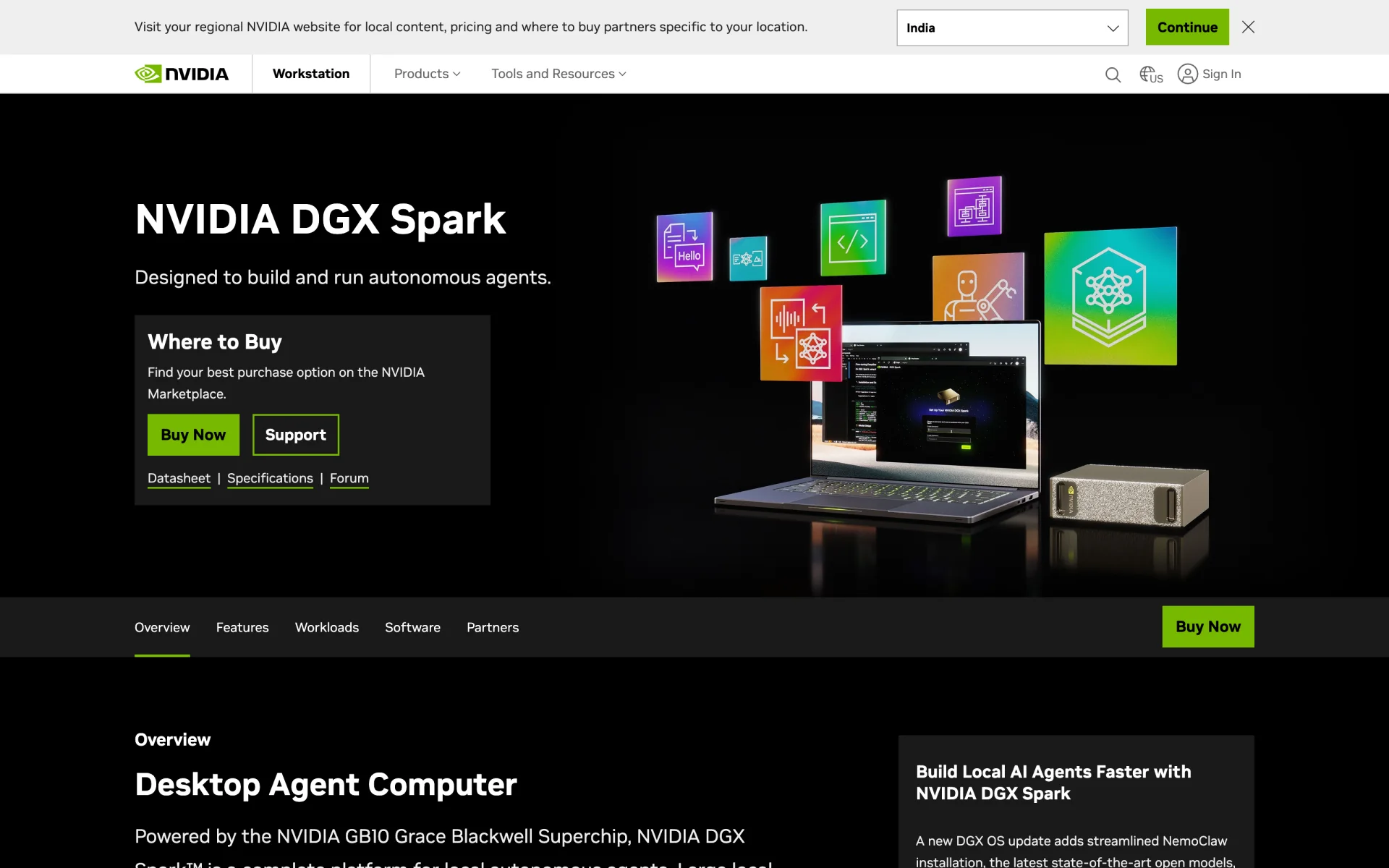
DGX Spark, $4,699. 128GB, 273 GB/s, 1.2 kg, 240W, and NVIDIA now markets it explicitly as a “Desktop Agent Computer”.
It gives you CUDA in a small, quiet box, which matters if you are writing CUDA code rather than only serving models. What it does not give you is speed. Its 273 GB/s is the binding constraint, and on the same model at the same depth it generated 46 tok/s against the R9700’s 111. Note also that NVIDIA’s own $4,699 Founders Edition with 4TB is far cheaper than the OEM versions, where ASUS wants $7,999 for the same capacity.
Mac Studio M5 Max, $2,499 to $5,099. At $5,099 the 128GB build gives you 614 GB/s, which is 2.9x the measured bandwidth of a Strix Halo box at $1,500 more, and that bandwidth is what sets generation speed. Nobody has benchmarked a Studio-class M5 on a 120B model yet, but scaling from a measured M2 Ultra running gpt-oss-120b at 79.7 tok/s on 800 GB/s puts the M5 Max at roughly 60 tok/s on the same model. The M5 generation also fixed Apple’s old weakness on the other axis: Apple’s footnotes put M5 Max time-to-first-token at roughly 3.8x an M4 Max on an 8K prompt, and its own MLX research measured 3.3x to 4.06x gains across six models while generation improved only 1.19x to 1.27x. In the llama-bench thread the M5 Max scores 3,220 on pp512, three and a half times the M4 Max and more than double an M3 Ultra with twice the GPU cores. It is silent, idles at 9W, and needs no driver setup.
Mac Studio M5 Ultra, $5,499 to about $18,300. 1.2 TB/s, up to 512GB, and the first quad-die Apple chip.
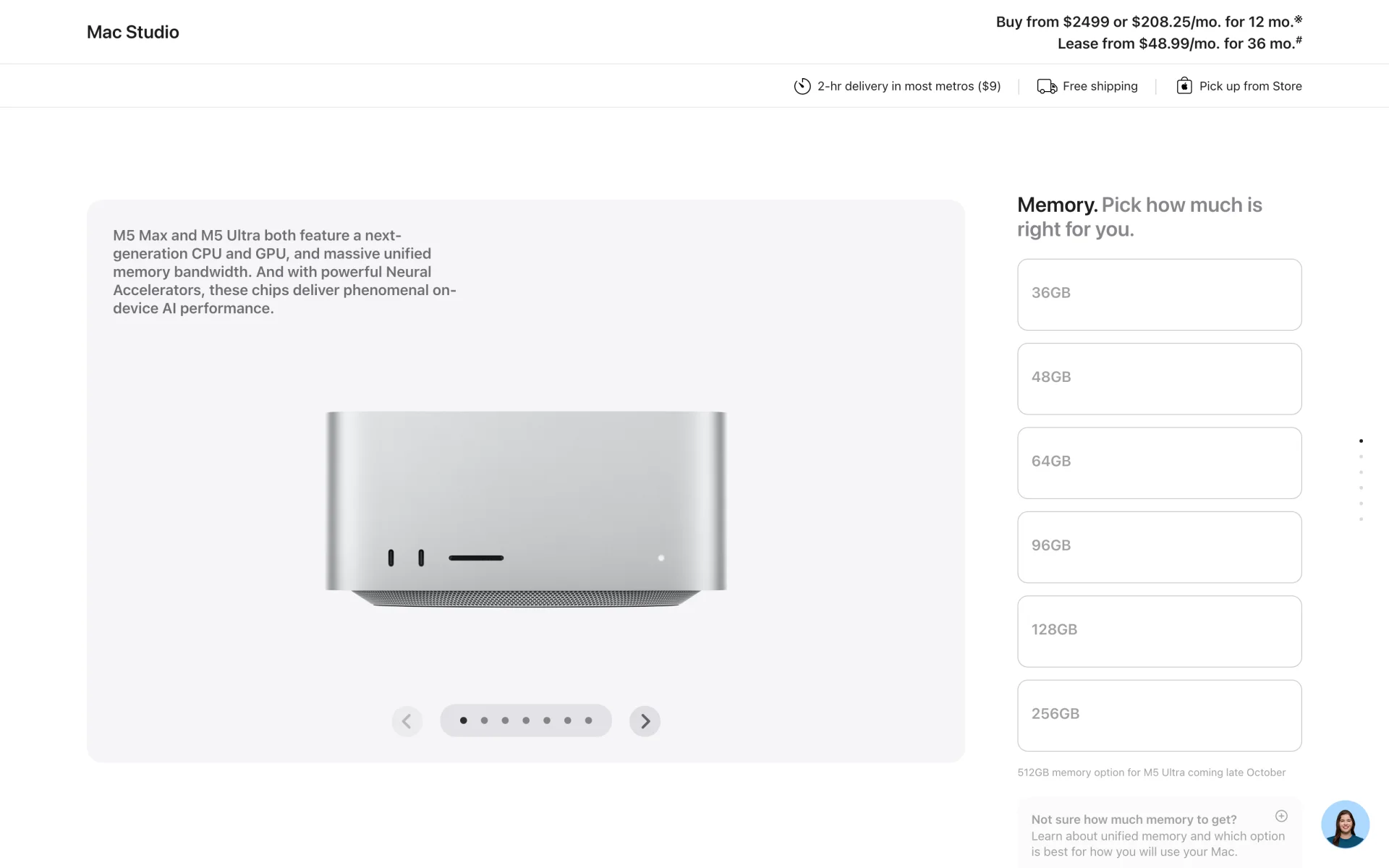
The 96GB at $5,499 is hard to justify against the 128GB M5 Max at $5,099. The 256GB at $9,499 is the real machine: it fits GLM-5.3-Flash at Q4 and DeepSeek-V4-Flash in its native precision, both with a million-token context, and 1.2 TB/s against an 18B active parameter count is a genuinely usable generation speed. The 512GB build is the only consumer hardware that runs GLM-5.3 itself, and as the screenshot shows it is not orderable yet.
Be clear about what the 512GB buys. On a 40B-active model, 1.2 TB/s works out to roughly 25 tok/s, so a long thinking trace still takes minutes. Nobody outside Apple has benchmarked a Studio-class M5, since it ships on 22 September, and Apple’s “4.3x peak AI compute” is a marketing TOPS figure rather than a measured inference number. On the previous generation, an M3 Ultra 512GB ran DeepSeek R1 671B at about 17 to 18 tok/s while drawing under 200W, which is impressive for the power budget.
Dual EPYC with 512GB of DDR5: no. The memory alone is now $5,800 to $6,800. Pure CPU inference on DeepSeek 671B runs at 2.8 to 6.2 tok/s, which for a reasoning model means a thinking trace measured in tens of minutes. The ktransformers hybrid path with one GPU improves prefill to 97-286 tok/s but leaves generation around 13 tok/s. And measurements in llama.cpp’s own discussion thread show the second socket often makes generation slower, with one 671B run at 6.2 tok/s single-socket against 4-5 dual. It is fine for offline batch jobs. It is not suitable for agents.
Intel: not yet. Arc Pro B60 24GB is genuinely cheap VRAM at $650-800 and vLLM officially supports it, but Level1Techs measured a 3.6x throughput gap against a comparable NVIDIA card at the same power budget.
The serving stack matters as much as the box
Three things changed recently, and most guides have not caught up.
Ollama no longer has its own inference engine. Its source now states that “All GGML models are served via the upstream llama-server subprocess”. It is a llama.cpp distribution with a friendlier CLI, plus an MLX engine on Apple Silicon. That is fine, except it hard-codes a minimal flag set: it never passes --cache-ram or --cache-reuse, it ships -np 1 so you get no parallel slots, and it truncates long conversations from the front, which throws away the cached prefix. On an M4 Pro with 64GB, Qwen3-Coder-30B-A3B runs at roughly 130 tok/s under MLX and 43 under Ollama.
llama.cpp can now run tools itself. It ships --tools read_file,grep_search,exec_shell_command,write_file,edit_file, sandboxed execution via --tools-runtime docker:<image>, --mcp-servers-config, and a native Anthropic /v1/messages endpoint alongside the OpenAI one. It also supports speculative decoding through --spec-type, which is how you use that DFlash drafter.
Prefix caching is on by default, but --cache-reuse is not. Plain caching only helps when the new prompt shares an exact prefix with the old one. --cache-reuse N lets llama.cpp keep using a cached prefix when the prompt changes somewhere in the middle, instead of discarding the whole thing. Agent transcripts change in the middle constantly, so this flag is the difference between a warm turn and an accidental cold one.
A setup that works:
# One binary, one model, OpenAI- and Anthropic-compatible endpoints.
llama-server -hf meta-models/Muse-Glimmer-30B-GGUF:Q4_K_M \
  --jinja \
  --ctx-size 131072 \
  --cache-type-k q8_0 --cache-type-v q8_0 \
  --cache-reuse 256 \
  --parallel 2 \
  --api-key "$LLM_KEY" \
  --port 8080
Muse-Glimmer needs llama.cpp build b10353 or newer; older builds do not register the architecture and refuse to load the file.
To check that caching is actually working, read timings.cache_n against timings.prompt_n in the completion response. The first is how many prompt tokens were reused, the second how many were processed. If the second one stays large turn after turn, something in your prefix is changing.
Wiring it into an editor, and the two gotchas
Tool-call formats differ per model family, and a mismatch breaks every turn. Qwen3-Coder emits <tool_call><function=NAME><parameter=KEY>, GLM-5.3-Flash uses <arg_key> and <arg_value>, MiniMax uses <minimax:tool_call><invoke name=...>. If the server’s parser does not match the model, the harness receives raw XML as message text and the agent fails on its first tool call. Use --jinja, now the default in llama.cpp, or set --tool-call-parser explicitly.
Context gets truncated without warning. In one Crush discussion, tool calling was broken across Devstral, Qwen3-Coder and Gemma 4. The cause was Ollama serving at its default 4096-token window even though the models advertised much larger ones, which cut off the tool definitions themselves. Setting OLLAMA_CONTEXT_LENGTH=128000 fixed it. Ollama’s own FAQ still quotes 4096.
Harness by harness, as of September 2026:
- Claude Code speaks the Anthropic Messages API only, but llama.cpp, vLLM and Ollama all speak it back now. Set
ANTHROPIC_BASE_URL=http://localhost:8080. Two gotchas: model discovery only keeps IDs containing “claude” or “anthropic”, soqwen3-coder:30bis silently dropped from the picker, and custom model IDs needCLAUDE_CODE_MAX_CONTEXT_TOKENSset. - Codex CLI has the best built-in support for local models, with
--ossandollamaandlmstudioas built-in provider IDs. Custom providers needwire_api = "responses". - Goose embeds llama.cpp directly, so it needs no separate server, and
GOOSE_TOOLSHIM=trueconverts text output into tool calls for models without native support. - OpenCode, Cline, Continue, Zed and Crush all take a plain OpenAI-compatible base URL.
- Cursor cannot use a local model at all. Its provider set is closed and, as LiteLLM’s integration notes put it, “Cursor sends the requests from its own servers, not from your machine”. It also refuses private addresses. The only way to point Cursor at your own box is to give that box a public HTTPS URL.
Our guide to open source CLI coding agents goes deeper on the harnesses themselves.
Reach your model from anywhere with Pinggy
There are two cases where a machine on your desk needs a public URL. One is an editor like Cursor that will only talk to a publicly reachable endpoint. The other is you on a laptop, away from the workstation running the model.
Pinggy gives you one over SSH, with no firewall rules, port forwarding or static IP:
ssh -p 443 -R0:localhost:8080 free.pinggy.io
That returns an HTTPS URL forwarding to localhost:8080, which you paste into the harness as its base URL. The endpoint is now public, so keep the --api-key from the llama-server command above and send it as a bearer token. If you run Ollama on port 11434 instead, we have a walkthrough for forwarding the Ollama API.
Does it pay for itself?
Usually not. The good reasons to self-host are not about money.
Electricity is cheap for this. At the June 2026 US residential average of 18.34 cents per kWh, a single RTX 5090 tower under load eight hours a day costs about $32.56 a month. A Mac Studio is around $12.85, and roughly $1.20 a month if you leave it idling with a model resident, because Apple’s idle figure is 9W.
The hardware is the expensive part, and the right thing to compare it against is a subscription, not API list prices. Against a $200/month plan, a $5,000 machine takes about 30 months to break even, which is most of its useful life. Against Z.ai’s GLM coding plan at $18/month, the electricity alone costs more than the subscription and the machine never pays back.
The argument that does hold up follows from the caching section. Anthropic’s own sample session shows 940,000 of roughly 991,000 input-side tokens served from cache, and cache reads bill at 0.1x the input rate. Most of an agent bill is paying to re-read context you already sent. On a machine you own, that re-reading is free, because the KV cache is already sitting in memory.
The other reasons are simpler: your code never leaves your network, and nobody changes your rate limits.
Where local still loses
The 16-point quality gap is real, and it is larger once you account for what actually fits on your hardware. GLM-5.3 scores 41.8% on Terminal-Bench and needs 372-475GB. The best open model and the best model you can run are not the same thing.
Vendor benchmark tables are not comparable across labs. The same Gemma-4-31B scores 52, 60.6 and 66.6 on SWE-bench Verified in three different vendors’ tables. One lab’s self-reported number for its own model came in 19.8 points above an independent lab’s run of it. Treat any single vendor’s numbers as marketing until someone independent reproduces them.
Reasoning models are expensive in wall-clock time on slow hardware. This is the flip side of the whole argument. If decode dominates, then a machine at 25 tok/s makes every thinking turn a multi-minute wait, and there is no configuration trick that fixes it. Speculative decoding is the only real lever, and it buys 1.5-2x, not 10x.
Offloading MoE experts to system RAM helps generation but not agents. A single RTX 4090 running a 125B MoE with the experts in system RAM manages about 104 tok/s of prefill, roughly 100x slower than the same GPU with everything in VRAM. A 20,000-token cold context then takes about three minutes to read before the model writes anything.
Concurrency is a CUDA advantage. vLLM and SGLang batch many requests against one copy of the weights far more efficiently than MLX does. One person with one agent will not notice. A team on one endpoint will.
Dense models above about 30B are too slow on unified memory. A dense 27B on Strix Halo generates at 9.3 tok/s at 32k of context and 6.5 tok/s at 64k. You can load a 4-bit dense 405B on a 512GB Mac, but it is too slow to be worth using.
Conclusion
Buy in this order: enough memory to hold the model, then generation speed, then prompt-processing speed. Prompt caching keeps reading off the critical path on every turn except the cold ones, and reasoning models spend most of a turn writing.
For one developer running one agent, that points at the Radeon AI PRO R9700 at $1,799, or an RTX 5090 at around $4,300 if you would rather not benchmark backends. If you need models a 32GB card cannot hold, the Mac Studio M5 Max 128GB at $5,099. If you specifically want to run GLM-5.3, the 512GB M5 Ultra is the only machine that fits it, and it does not ship until late October.
Before you spend anything, check that prompt caching is working in your stack. It is worth more than the difference between most of the machines on this list.
Related reading on this blog: Self-Hosting LLMs on the 512GB M5 Ultra Mac Studio for the Apple-specific memory math, Picking the Right Hardware to Run LLMs Locally for the general non-agentic picture, Best Open Source Self-Hosted LLMs for Coding for what to run, and How to Self-Host Any LLM for setup.
References
How prompt caching works, and why it decides the answer
- vLLM, Automatic Prefix Caching - cached prefixes “skip the computation of the shared part”, and caching helps prefill only, never decode.
- llama.cpp server README -
cache_promptdefaults to true;timings.cache_nandtimings.prompt_nare how you check it is working. - Anthropic, how Claude Code uses prompt caching - the exact-prefix-match rule and the full list of actions that invalidate the cache.
- Anthropic, manage costs - the sample session showing 940k of 991k input-side tokens served from cache.
Measurements the hardware picks rest on
- local-llm-benchmarks.dev - coding-workload depth curves for Strix Halo, R9700 and GB10. The only cross-platform numbers measured at real context depth.
- llama.cpp CUDA benchmarks and Apple Silicon benchmarks - the community
llama-benchtables behind the 18x prefill and 3.6x decode spreads. - Artificial Analysis - time to first token against time to first answer token, which is where the cost of reasoning models shows up.
- Terminal-Bench 4.0 - the live agent leaderboard, and the source of the 16-point open-versus-closed gap.
- Apple, Exploring LLMs with MLX on M5 - Apple’s own statement that prefill is compute-bound and decode is bandwidth-bound.
The cold-cache failure mode
- llama.cpp #25213 - a coding agent resuming a long session and spending 698 seconds on prompt evaluation.
- Cline #6549 and Roo Code #12244 - the 300-second Undici
headersTimeoutthat overrides whatever timeout you configure.
Prices
- Tom’s Hardware on DDR5 pricing and Framework’s running memory-pricing log - why everything here costs more than it did last year.
- GPU Poet for used RTX 3090 street prices; Apple’s Mac Studio configurator for the Apple figures.