Picking the Right Hardware to Run LLMs Locally in 2026
Updated on Jun 4, 2026 · 16 min read
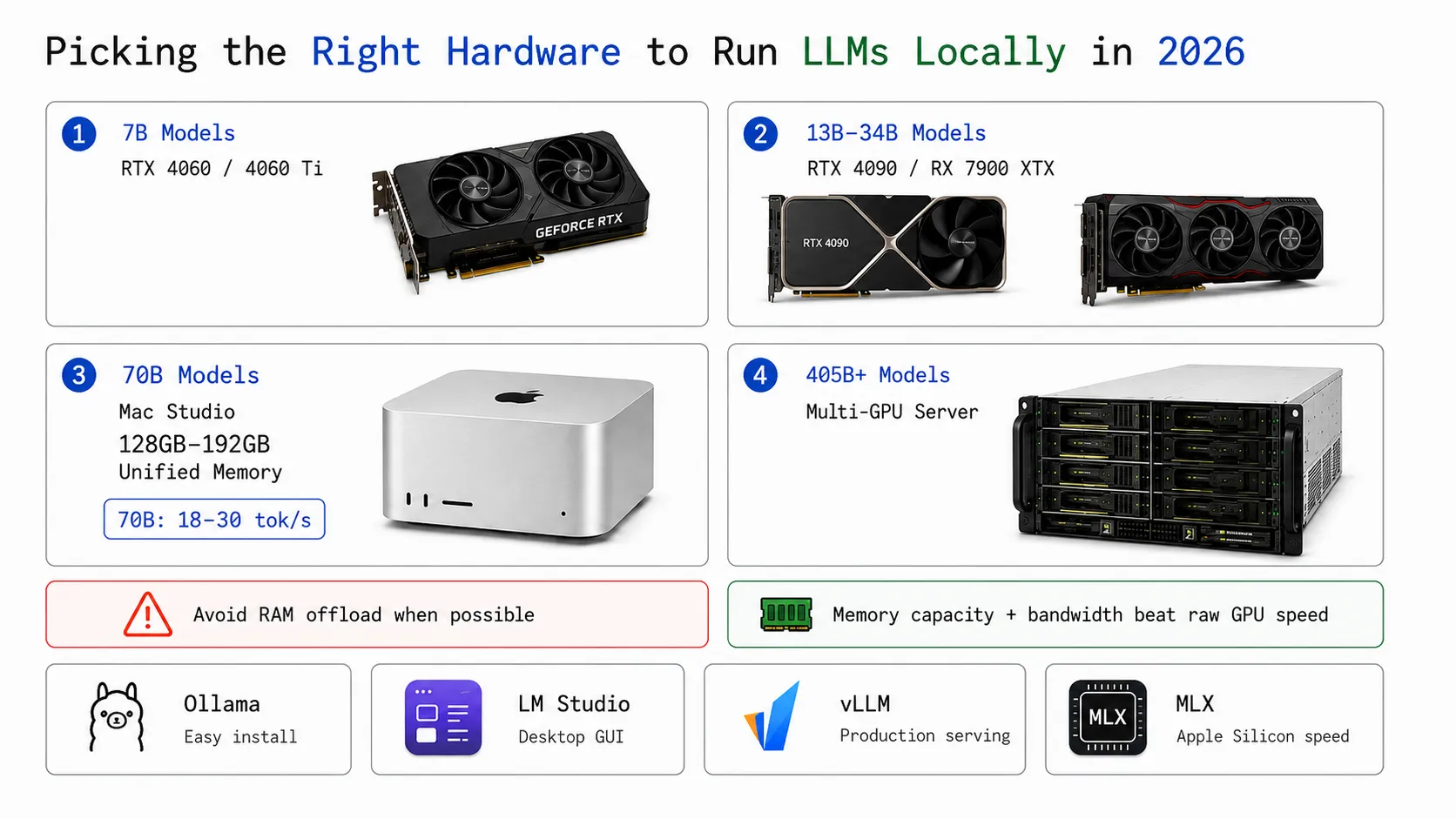
Running an LLM locally used to mean settling for something that felt like typing into a blender. That’s no longer true. A mid-range gaming GPU now runs Llama 3.3 70B at speeds that are genuinely useful for coding and document work, and a Mac Studio with 192GB of unified memory fits the same model in full precision without any quantization. The question is just which hardware makes sense for what you actually want to run.
This guide covers every tier - from a $340 GPU for personal 7B inference, through the large unified-memory systems that changed what’s possible for 70B models at home, up to multi-GPU enterprise setups.
Summary
By model size:
- 7B models: RTX 5060 Ti 16GB (≈$500) or RTX 4060 8GB (≈$340)
- 13B-34B models: AMD RX 9070 XT 16GB (≈$670) or RTX 5080 16GB (≈$1,000)
- 70B models: AMD Ryzen AI Max+ 395 systems (from ≈$1,500, 12-15 tok/s), Mac Studio M4 Max (from ≈$2,600, 20-28 tok/s), or Mac Studio M3 Ultra 192GB (≈$3,999, 25-30 tok/s)
- 405B+: Two linked NVIDIA DGX Sparks (≈$4,699) or multi-GPU server
Key rule: Memory capacity and bandwidth beat raw GPU speed. A card that fits your model entirely beats a faster card that offloads to RAM. Among unified-memory systems, bandwidth is what separates them - AMD Ryzen AI Max+ 395 systems (~256 GB/s) hit 12-15 tok/s on 70B at Q4_K_M, while the DGX Spark (273 GB/s) gets only 2.7 tok/s running 70B at FP8 (a much heavier load). Apple Silicon (546-819 GB/s) leads the pack at 20-30 tok/s.
Best inference software:
The Bottleneck: Memory Bandwidth
Before looking at specific hardware, there’s one concept worth understanding: LLM inference is bottlenecked by memory bandwidth, not compute. When the model generates a token, it loads the entire weight matrix from memory once. The rate at which it can do this - in GB/s - determines tokens per second, not teraflops.
This is why hardware choices that look obvious on paper don’t always play out as expected. An RTX 4090 has 1,008 GB/s of GDDR6X bandwidth, the M3 Ultra has 819 GB/s, and the DGX Spark - marketed as a personal AI supercomputer - has 273 GB/s of LPDDR5X. That bandwidth difference is the reason the DGX Spark only manages 2.7 tok/s on Llama 3.1 70B (confirmed by NVIDIA’s own Ollama benchmark), while the M3 Ultra hits 25-30 tok/s on the same model. Capacity matters for whether the model fits at all; bandwidth determines how fast it runs once it does.
How Much Memory Do You Need?
GGUF quantization lets you trade a small amount of quality for dramatically lower memory usage. Q4_K_M is the standard recommendation - roughly half the memory of FP16 with quality most users can’t distinguish in practice.
| Model Size | Q4_K_M | Q8_0 | FP16 |
|---|---|---|---|
| 7B | ~5 GB | ~8 GB | ~14 GB |
| 13B | ~9 GB | ~14 GB | ~26 GB |
| 34B | ~20 GB | ~34 GB | ~68 GB |
| 70B | ~42 GB | ~70 GB | ~140 GB |
| 405B | ~220 GB | ~405 GB | ~810 GB |
Quick shorthand: model_size_B × 0.6 gives you the approximate Q4_K_M requirement in GB. Context window also adds overhead - a 128K context can nearly double memory usage for large models.
Consumer GPUs
NVIDIA’s RTX 40 and 50-series dominate this category. The CUDA ecosystem - Ollama, LM Studio, vLLM, TensorRT-LLM, llama.cpp - targets CUDA first, and that software maturity matters as much as the hardware specs.
At the entry level, the RTX 5060 Ti 16GB (≈$500) is the new budget recommendation for 2026 - it’s a Blackwell card with FP4 support, handles 14B at Q8 comfortably, and has better efficiency than its 40-series predecessors. The older RTX 4060 8GB (≈$340) is still available and fine for 7B models at 40-60 tok/s, but the 5060 Ti 16GB gives you twice the VRAM for not much more money.
The mid-range picks are the RTX 5080 16GB (≈$1,000 MSRP, though often more in practice) and the RTX 4090 24GB. The 5080’s 960 GB/s GDDR7 bandwidth is competitive, but its 16GB VRAM limits you to 13B at Q8 - the 4090’s 24GB handles 20B and below without any offloading. The 4090 is now harder to source - NVIDIA stopped production in October 2024 - and street prices run $2,400-$3,500. If you find one below $2,000, it’s worth it; otherwise the 5080 or a used 4090 are the practical options. The RTX 4090 hits 120+ tok/s on 8B models fully in VRAM. The catch is 70B: the model needs about 42GB and about 18GB offloads over PCIe to system RAM, bringing real-world decode speed on Llama 3.1 70B to 8-18 tok/s.
The RTX 5090 32GB (≈$3,000-5,000 - never sold close to its $2,000 MSRP) has 1,792 GB/s of GDDR7 bandwidth and fits 34B at Q8 entirely in VRAM. At current market prices it’s hard to recommend over two cheaper cards or a Mac Studio for most setups.
For budget buyers, a used RTX 3090 ($800-1,050) delivers 24GB of VRAM for roughly 87% of the 4090’s throughput. Used pricing has climbed from a year ago but it remains the most practical 24GB option under $1,000.
AMD has two strong options in 2026. The RX 9070 XT (16GB GDDR6, ≈$500 MSRP) is the cleaner recommendation - RDNA 4 architecture, ROCm support is official from launch, and it’s the safest AMD card for LLM work on Linux. The older RX 7900 XTX (24GB) has risen to ≈$800 used / $1,339 new, reducing its value case. ROCm 7.2 added FP8 support for both cards, and Ollama, LM Studio, and llama.cpp all run well. Windows support remains inconsistent - Linux is strongly preferred for AMD inference.
Large Unified Memory Systems
This is the category that changes the calculation for 70B models. On a standard PC with a 24GB GPU, you can’t fit a 70B model without offloading to RAM and taking a serious speed hit. Systems with large unified memory - where CPU, GPU, and neural engine all share the same pool - eliminate that ceiling entirely. Load a 70B model at Q8 into 96GB of unified memory and every layer runs at memory bus speeds.
The critical insight from benchmarks: capacity tells you whether the model fits; bandwidth tells you how fast it runs. The systems below range from 128GB to 192GB of unified memory and from ~256 GB/s to 819 GB/s of bandwidth - which is why tokens-per-second on the same 70B model varies by more than 10x across them.
| System | Memory | Bandwidth | Llama 70B tok/s | 8B tok/s | Price |
|---|---|---|---|---|---|
| Mac Studio M3 Ultra (192GB) | 192 GB unified | 819 GB/s | 25-30 (Ollama/MLX) | ~80 | from $3,999 (96GB base) |
| Mac Studio M4 Max (128GB) | 128 GB unified | 546 GB/s | 20-28 (Ollama/MLX) | ~60 | from $3,200 |
| AMD Ryzen AI Max+ 395 (Strix Halo, up to 128GB) | up to 128 GB unified | ~256 GB/s | 12-15 (Q4_K_M, ROCm) | ~50-60 | from ~$1,999 (system) |
| AMD Ryzen AI Max+ 495 (Gorgon Halo, up to 192GB) | up to 192 GB unified | ~256 GB/s | TBA - Q3 2026 | TBA | Q3 2026 |
| NVIDIA RTX Spark (up to 128GB) - upcoming | up to 128 GB LPDDR5X | ~300 GB/s | TBA - Fall 2026 | TBA | Fall 2026 |
| NVIDIA DGX Spark (128GB) | 128 GB LPDDR5X | 273 GB/s | 2.7 (FP8, confirmed by Ollama) | ~924 (NIM/FP4) | $4,699 |
| RTX 4090 (24GB) - for context | 24 GB GDDR6X | 1,008 GB/s | 8-18 (with CPU offload) | ~120-128 | $2,400-3,500 |
Mac Studio M4 Max (128GB)
The M4 Max delivers 546 GB/s of bandwidth and 20-28 tok/s on Llama 3.3 70B - better than a 4090 on 70B, not because Apple Silicon is faster but because the model fits entirely in memory without offloading. It runs 70B at Q4 or 32B at Q8 with room to spare, draws 200-400W total (versus 350W for the 4090 GPU alone), and doubles as a quiet, capable daily workstation. Configurations with 64GB or 96GB start from around $2,200-$2,600.
As of Ollama 0.19 (March 2026), Ollama on Apple Silicon uses MLX as its inference backend, so you no longer need to choose between them - Ollama now delivers MLX performance automatically.
Mac Studio M3 Ultra (192GB)
The M3 Ultra is the highest single-machine unified memory option available outside enterprise hardware. Its 819 GB/s bandwidth pushes decode speed to 25-30 tok/s on 70B, putting it in the same range as an H100 for single-user inference at a fraction of the cost. 192GB fits Llama 3.3 70B at full BF16 precision (140GB) with headroom, or handles 405B at Q2. The Mac Studio with M3 Ultra starts at $3,999 (base 96GB config; 192GB is a BTO option).
The tradeoff worth knowing: MLX doesn’t yet support the batching efficiency that vLLM provides on NVIDIA hardware. Serving 20 concurrent users, an H100 will pull ahead significantly. For one developer or a small team, the Mac Studio is the better deal by a wide margin.
NVIDIA DGX Spark (128GB LPDDR5X)
The DGX Spark launched at $4,699 as NVIDIA’s “personal AI supercomputer” - a Grace Blackwell Superchip with 128GB of unified memory, 1 petaFLOP of AI performance, and pre-installed Ollama and TensorRT-LLM. On small models, the Blackwell tensor cores are exceptional: around 924 tok/s on Llama 3.1 8B via NVIDIA NIM at FP4. That number is real and impressive.
On 70B, the LPDDR5X bus at 273 GB/s becomes the ceiling. NVIDIA’s own official Ollama benchmark records 2.7 tok/s on Llama 3.1 70B FP8. That is not a misconfiguration - it’s the result of reading about 42GB of model weights through a 273 GB/s pipe, once per token. The Blackwell tensor cores sit mostly idle because they can’t be fed fast enough.
So the DGX Spark is genuinely the right choice if you need CUDA compatibility, NVIDIA NIM containers, fine-tuning workflows, or sub-8B inference at very high throughput. For interactive 70B inference, a Mac Studio M3 Ultra costs less and runs 10x faster. Two DGX Sparks linked over 10 GbE (≈$4,699) do cover 405B models at Q2-Q3 via distributed inference, which is otherwise impossible at this price point. OEM versions from Dell, ASUS, Acer, and MSI ship at comparable prices for different form factors.
AMD Ryzen AI Max+ 395 (Strix Halo)
The Ryzen AI Max+ 395 is AMD’s answer to Apple Silicon for local LLM inference - a monolithic APU with 16 Zen 5 CPU cores, 40 RDNA 3.5 compute units (Radeon 8060S), and a 50+ TOPS XDNA 2 NPU, all sharing up to 128GB of LPDDR5X unified memory. Up to 96GB of that can be allocated as VRAM via AMD Variable Graphics Memory, which means you can load a 70B model at Q4_K_M (~42GB) entirely on the GPU without any CPU offload - something no discrete 24GB card can do.
Real-world benchmarks from community testing (Framework Desktop, Corsair AI Workstation 300, ASUS ROG Flow Z13) land at 12-15 tok/s on Llama 3.3 70B Q4_K_M with a properly configured ROCm stack, and around 50-60 tok/s on 8B models. That’s slower than a Mac Studio M4 Max but meaningfully faster than any 24GB GPU doing CPU offload - and the hardware starts around $1,500 for bare mini-PC kits, well below any Apple Silicon option.
The catch is software maturity. ROCm is required for GPU-accelerated inference above 30B parameters - without it, Ollama defaults to CPU-only and performance collapses. ROCm 7.x works reliably on Linux; Windows is inconsistent and not recommended for serious LLM work on Strix Halo. With ROCm properly installed, Ollama, LM Studio, and llama.cpp all work well. One practical tip: set HSA_OVERRIDE_GFX_VERSION=11.0.0 if your distro ships an older ROCm that doesn’t recognize the 8060S.
You can find Strix Halo systems in multiple form factors: laptops (ASUS ROG Flow Z13, ASUS ProArt PX13), mini-PCs and small desktops (Framework Desktop, Minisforum AI370, Corsair AI Workstation 300), and AMD’s own Ryzen AI Halo developer platform (available at Micro Center, pre-orders from June 2026). If you’re comfortable with Linux and the ROCm setup, this is the most affordable route to comfortable 70B inference.
AMD Ryzen AI Max+ 495 (Gorgon Halo)
The Gorgon Halo generation steps up the Strix Halo platform in two important ways: memory capacity and GPU clocks. The flagship Ryzen AI Max+ 495 pairs 16 Zen 5 CPU cores (up to 5.2 GHz) with a 40 CU Radeon 8065S (RDNA 3+) and supports up to 192GB of unified memory - of which 160GB can be allocated as dedicated GPU memory. That’s enough headroom for Llama 3.3 70B at full BF16 precision (~140GB), or 300B+ parameter models at Q4 quantization.
The 495 is about 10% faster than the 395 in CPU workloads and carries a slightly higher GPU clock (3.0 GHz). The memory subsystem is still LPDDR5X, so peak bandwidth stays in the same ~256 GB/s range - don’t expect dramatically higher tok/s than a 395 for the same model size. The value is the expanded headroom: you can run models at higher precision without quantization dropping quality.
The Gorgon Halo lineup (Ryzen AI Max PRO 400 series) was introduced in May 2026 and is scheduled to ship in systems from ASUS, HP, and Lenovo in Q3 2026. AMD’s next-generation Ryzen AI Halo developer platform (mini-PC) will also get a Gorgon Halo upgrade in Q3. Pricing for consumer systems hasn’t been confirmed; expect a premium over equivalent Strix Halo configurations given the memory upgrade.
NVIDIA RTX Spark (Coming Fall 2026)
Announced at Computex 2026, the RTX Spark is NVIDIA’s counterpart to Apple Silicon and AMD’s Strix Halo - a single-chip superchip combining a 20-core Arm CPU (built with MediaTek) and a Blackwell GPU with 6,144 CUDA cores on a TSMC 3nm package, with up to 128GB of LPDDR5X unified memory and ~300 GB/s of bandwidth.
The pitch is clear: thin Windows laptops (14mm, ~3 lbs, 14" and 16" OLED models) with the full CUDA ecosystem, 1 PFLOP of FP4 AI performance, and the ability to run 120B+ parameter models locally. It’s the first serious attempt to bring the DGX Spark concept - unified CUDA memory for local LLM inference - to a consumer laptop form factor.
On small models, the Blackwell tensor cores with FP4 support should deliver very high throughput - similar to the DGX Spark’s impressive 924 tok/s on 8B via NIM. For 70B inference, the ~300 GB/s LPDDR5X bandwidth is the same constraint the DGX Spark faces, so expect similar ballpark performance on large models. Actual benchmarks will have to wait for launch. RTX Spark laptops and small desktops are scheduled to arrive Fall 2026 from ASUS, Dell, HP, Lenovo, Microsoft Surface, and MSI.
Professional and Enterprise GPUs
When you’re serving a team rather than a single user, consumer GPUs hit real limits: no ECC memory, shorter warranties, and software tested primarily for single-user workloads. The professional tier solves these.
The current professional workstation card is the RTX PRO 6000 Blackwell (96GB GDDR7 ECC, ≈$8,565), which superseded the RTX 6000 Ada in March 2025. 96GB is enough for 70B at Q8 entirely in VRAM, and the Blackwell architecture adds FP4 support and 2.5x better AI training throughput over Ada. The older RTX 6000 Ada (48GB GDDR6 ECC, ≈$6,800) is still a capable card at a lower price point if you find one - it fits 70B at Q4_K_M in VRAM and handles multi-user serving well via vLLM. The L40S (48GB, ≈$7,500-10,000 new) occupies the same 48GB tier but is data center-tuned, with cloud rental around $0.50-7.58/hr.
The H100 SXM (80GB HBM3, 3.35 TB/s) is where production workloads live. Single-stream 70B inference lands around 25 tok/s, but the real advantage is concurrent throughput via vLLM - dozens of users sharing one GPU without proportional slowdown. H100 SXM hardware now runs $35,000-40,000 per card; cloud pricing runs $1.99-8/hr. The H200 (141GB HBM3e, 4.8 TB/s) extends this to models like DeepSeek V3.2 671B at Q2, which requires 8x H200 nodes.
Storage, RAM, and Multi-GPU
A few practical points that usually get underestimated.
System RAM acts as overflow when GPU VRAM fills up. Running a 42GB 70B model on a 24GB card means about 18GB offloads to RAM over PCIe. If RAM is also too small, layers spill to disk and latency jumps from seconds to minutes. Provision at least 2x your GPU VRAM in system RAM - 64GB is the minimum for a 4090 setup, 128GB is more comfortable.
Storage determines model load time. A 70B model at Q4 is about 40GB on disk. A PCIe 4.0 NVMe (Samsung 990 Pro, WD Black SN850X, around 7,000 MB/s) loads it in 5-10 seconds. A SATA SSD at 550 MB/s takes over a minute. Get at least 2TB of PCIe 4.0 NVMe; 4TB if you plan to keep several large models on hand.
Multi-GPU gives you additive VRAM, which matters for models that don’t fit in a single card. Two RTX 4090s pool to 48GB - enough for 70B at Q8 - but PCIe interconnect between consumer cards means scaling efficiency is only 70-78%. You get roughly 1.4-1.5x throughput, not 2x. Professional cards with NVLink (RTX 6000 Ada, A100, H100) scale more cleanly at 85-93% per added card.
Cloud vs. Owning Hardware
For infrequent use, renting wins easily. An RTX 4090-equivalent on a decentralized cloud provider runs $0.29-1.00/hr - far cheaper than buying hardware you’d use a few hours a week.
The math changes at sustained utilization. A team spending $5,000/month on cloud GPU inference pays $60,000/year. A pair of RTX 4090s at ≈$3,400 amortizes in under two months at that spend rate. The rule of thumb: below 70% sustained utilization, cloud is cheaper over three years. Above 80%, owned hardware typically breaks even within four to twelve months.
Getting Started with Ollama
Once you have hardware, running a model takes under five minutes. Install Ollama:
curl -fsSL https://ollama.com/install.sh | shPull and run a model. For a 128GB+ unified memory system, Llama 3.3 70B fits without offloading:
ollama pull llama3.3:70b
ollama run llama3.3:70b
For a 12-16GB GPU, Qwen3 14B is more appropriate:
ollama pull qwen3:14b
ollama run qwen3:14b
Ollama automatically uses your GPU (NVIDIA, AMD, or Apple Silicon) and exposes an OpenAI-compatible API at localhost:11434. Point Cursor, Continue.dev, or Open WebUI at that endpoint and you’re done. On Apple Silicon, Ollama 0.19+ uses MLX as its backend automatically - no separate MLX setup needed.
For a chat frontend, Open WebUI runs in Docker:
docker run -d -p 3000:8080 \
  --add-host=host.docker.internal:host-gateway \
  -v open-webui:/app/backend/data \
  --name open-webui \
  ghcr.io/open-webui/open-webui:main
That gives you a ChatGPT-like interface at localhost:3000. Our guide on open-source ChatGPT alternatives covers more frontend options if you want something beyond the basics.
Access Your LLM from Anywhere with Pinggy
Once Ollama is running locally, you might want to reach it from another device or share it with a teammate. Pinggy creates a secure public tunnel with a single SSH command - no firewall rules, port forwarding, or static IP needed.
ssh -p 443 -R0:localhost:11434 free.pinggy.io
This gives you a public HTTPS URL for your Ollama instance. The same approach works for Open WebUI on port 3000 or any other local AI frontend.
Conclusion
For 7B-34B models, NVIDIA GPUs are the value pick - the RTX 5060 Ti 16GB at $500 is the new entry point, the RTX 4090 (24GB) is the ceiling if you can find one. For 70B on a single machine, the AMD Ryzen AI Max+ 395 (~$1,500) fits the full model in unified memory at 12-15 tok/s; the Mac Studio M4 Max or M3 Ultra is faster (20-30 tok/s) and needs zero driver configuration, just at a higher price. The DGX Spark and RTX Spark are interesting but bandwidth-limited for interactive 70B use.
For what to actually run on this hardware, see the best open source LLMs for coding guide and top local LLM tools for inference software comparisons.