In this article
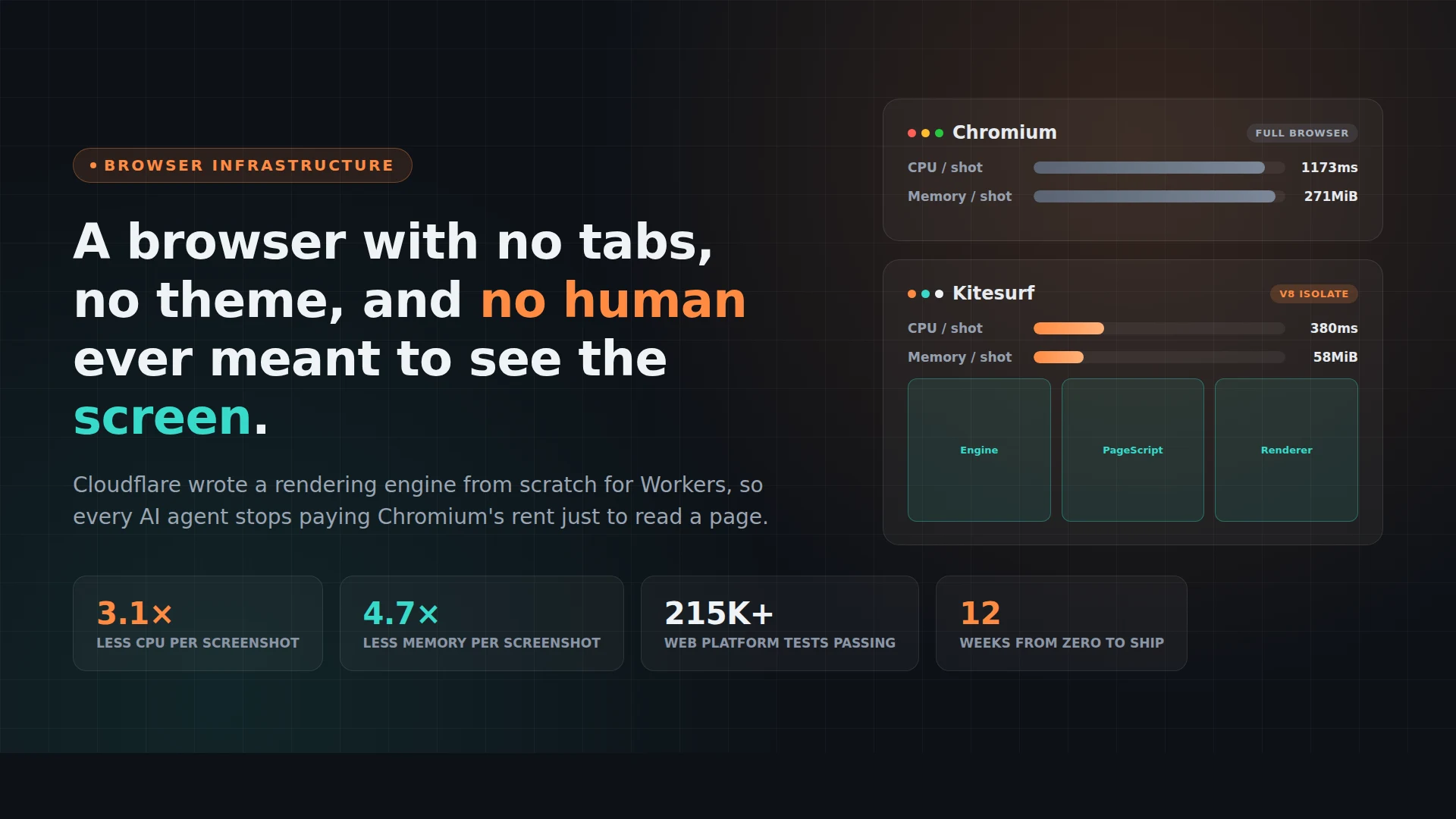
Cloudflare spent twelve weeks writing a browser engine from scratch. Not a wrapper around Chromium, not a fork of Firefox, an actual new rendering pipeline, and it runs inside a Cloudflare Worker rather than as a process on a VM. It’s called Kitesurf, and the thing that makes it worth writing about isn’t that it’s fast. It’s who it’s for: nobody is ever going to look at a Kitesurf tab, because there are no tabs, no theme, no bookmarks bar, and no human on the other end of the session at all.
That’s the actual pitch. Every browser you’ve used, Chrome, Firefox, Safari, Edge, was built around a person clicking, scrolling, and reading. Kitesurf strips all of that out and keeps only what an AI agent needs: parse the DOM, run the JavaScript, return a screenshot or clean HTML, and do it in as little CPU and memory as possible, thousands of times a minute if needed.
Summary
- What it is: a from-scratch browser engine (not Chromium) that Cloudflare built to run inside Workers via V8 isolates, purpose-built for AI agent workloads like screenshots and content extraction rather than human browsing.
- Why it exists: running a full Chromium instance per agent session is expensive in memory and CPU. Kitesurf is Cloudflare’s bet that most agent tasks don’t need a full browser at all.
- The numbers: roughly 3.1x less CPU and 4.7x less memory than Chromium for a screenshot, 3.8x less CPU and 7x less memory for HTML extraction, across a 14-URL benchmark run five times. Chromium still wins on raw wall-clock time (1.7-1.8x faster) because of JIT compilation.
- What it can’t do yet: video playback, WebGL, TLS fingerprinting used by bot-detection challenges, and long authenticated sessions that need persistent state.
- How you use it: it’s a drop-in option inside Browser Run, Cloudflare’s existing headless-browser API, reachable over the same Chrome DevTools Protocol that Puppeteer, Playwright, and MCP browser tools already speak. Add
browser=kitesurfto the endpoint and nothing else changes. - The catch for local development: Kitesurf runs entirely on Cloudflare’s network. It has no route to
localhoston your laptop, so pointing an agent at an app you’re still building means exposing that app publicly first, which is where a tunnel comes in.
Why a browser needs to go on a diet
Chromium is a remarkable piece of engineering and a genuinely bad fit for what most AI agents actually do with it. An agent that needs to screenshot a page, extract its text, or click through a signup form doesn’t need a JIT-compiled JavaScript engine tuned for 60fps scrolling, a GPU compositor, a bookmarks sync service, or extension support. It needs the DOM, computed styles, and a way to run whatever onclick handler is attached to a button.
None of that is optional when you’re running Chromium, though. Cloudflare’s own numbers put a single headless Chromium instance well north of 250MB of resident memory and over a second of CPU time to render a full page and take a screenshot, even on simple sites. Multiply that by however many concurrent agent sessions a product needs, and you end up either provisioning a fleet of beefy VMs and eating the idle cost between requests, or rationing browser access to the point where cheaper models and smaller products get locked out entirely. That second effect is the one Cloudflare calls out directly in its announcement: full-browser access becomes a tax that only well-funded agents can afford to pay repeatedly.
The fix they landed on wasn’t “make Chromium smaller.” It was “write something that was never built to be big in the first place.”
What’s actually running under the hood
Kitesurf is composed of four pieces, and the interesting part is that every one of them is a separate, stateless Cloudflare Worker isolate rather than a single long-running process:
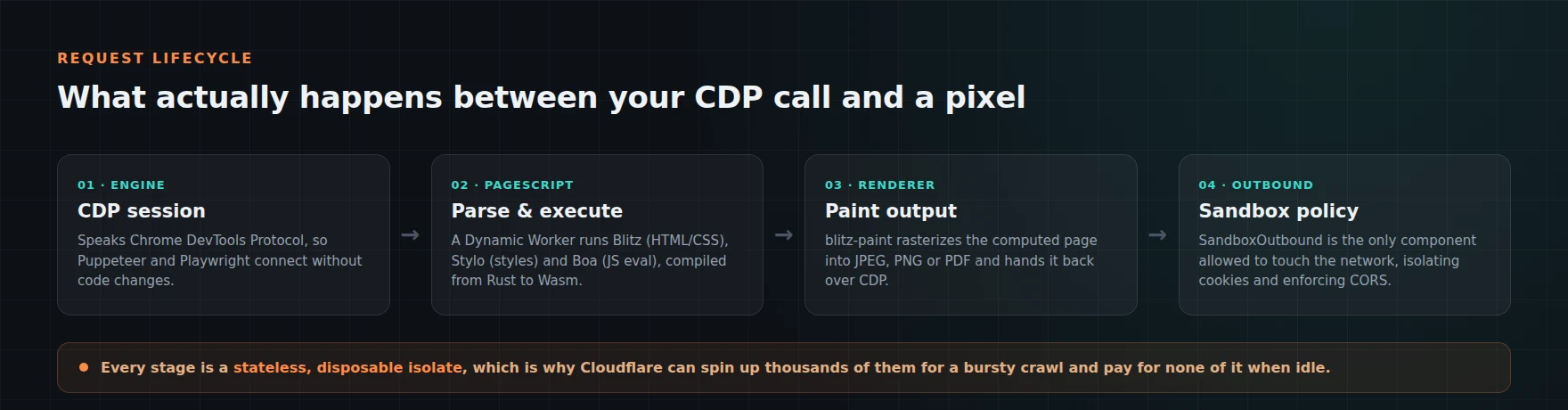
Engine is the front door. It speaks the Chrome DevTools Protocol, which is the same wire protocol Chromium exposes, so tools built against Puppeteer, Playwright, or chrome-remote-interface connect to Kitesurf without code changes. That compatibility choice matters more than it sounds: it means Cloudflare didn’t need the ecosystem to adopt a new API, it just needed to be a convincing enough Chromium impersonator over CDP.
PageScript is where the actual parsing and execution happens, and it’s the part with the most interesting provenance. Instead of writing an HTML parser and CSS engine from zero, Cloudflare reused Blitz (a Rust HTML/CSS rendering engine) for layout, Stylo (Firefox’s own CSS style engine, also written in Rust) for computing styles, and Boa, a Rust-based ECMAScript interpreter, to run page JavaScript, since V8 isolates don’t support native eval. All three are compiled to WebAssembly and run inside a Dynamic Worker, Cloudflare’s mechanism for spinning up an isolated JS execution context on demand.
PageRenderer takes the computed page and rasterizes it with blitz-paint, producing the JPEG, PNG, or PDF that actually gets returned to whoever made the request.
SandboxOutbound is the one component with network access at all. Every other piece treats the page it’s loading as untrusted input by default, which is the correct instinct: a browser engine’s entire job is to execute code from strangers, and Cloudflare designed Kitesurf so that only one narrow component can make outbound requests, enforcing CORS and isolating cookies along the way.
The stateless-isolate design is also the reason this scales the way Cloudflare wants it to. A page load that finishes gets its isolate torn down; there’s no warm pool of long-lived browser processes to keep paying for between bursts of traffic, which is exactly the cost profile that makes agent workloads (bursty, unpredictable, often abandoned mid-session) expensive to run on conventional infrastructure.
The numbers, and where Chromium still wins
Cloudflare ran a benchmark against 14 URLs, five times each, comparing a warm Chromium pool against Kitesurf on the same two tasks agents run most: taking a screenshot and extracting HTML.
| Metric | Kitesurf | Chromium (warm pool) | Kitesurf’s advantage |
|---|---|---|---|
| CPU time (screenshot) | 380 ms | 1,173 ms | 3.1x less |
| Memory (screenshot) | 57.8 MiB | 271.0 MiB | 4.7x less |
| CPU time (HTML extraction) | 229 ms | 877 ms | 3.8x less |
| Memory (HTML extraction) | 39.4 MiB | 273.7 MiB | 7.0x less |
| Wall-clock time (screenshot) | 1,148 ms | 637 ms | 1.8x slower |
| Wall-clock time (HTML extraction) | 820 ms | 472 ms | 1.7x slower |
Those are real, meaningful reductions, and they’re the kind of number that directly maps to a cloud bill. But it’s worth being honest about the part Cloudflare is upfront about too: Chromium is still 1.7 to 1.8 times faster in raw wall-clock terms on the same tasks, mostly because V8’s JIT compiler in a real browser process still beats an interpreted engine running inside a Worker. Kitesurf trades some speed for a much smaller resource footprint, which is the right trade for a workload defined by concurrency and cost rather than any single request’s latency.
The compatibility bar clears higher than a demo would suggest, too. Cloudflare says Kitesurf passes over 215,000 Web Platform Tests, with more added every week, and it renders sites like Wikipedia, Hacker News, and TodoMVC correctly, not just a curated set of easy pages.
What it can’t do yet
The honest limitations list is short but real. Kitesurf currently doesn’t support video playback, WebGL rendering, or the deep TLS fingerprinting some bot-detection systems use to challenge automated clients, so sites that gate content behind that kind of check will still need Chromium (or a specialized bypass tool). Long authenticated sessions that depend on persistent browser state are also not fully there yet, since the stateless-isolate model that makes Kitesurf cheap is in tension with keeping a session alive and warm for a long time.
None of that is disqualifying for the workloads Cloudflare is targeting: page scraping, form-filling, screenshot generation, and the kind of short, bursty browsing an MCP tool call typically needs. It does mean Kitesurf is a complement to Chromium inside Browser Run right now, not a full replacement, and Cloudflare’s own docs frame it that way rather than pretending otherwise.
Actually using it
Because Kitesurf speaks CDP, switching an existing Puppeteer or Playwright setup over is mostly a URL change. A quick screenshot through the REST-style Quick Actions endpoint looks like this:
curl -X POST 'https://api.cloudflare.com/client/v4/accounts/<ACCOUNT_ID>/browser-run/screenshot?browser=kitesurf' \
  -H 'Authorization: Bearer <API_TOKEN>' \
  -H 'Content-Type: application/json' \
  -d '{"url": "https://example.com"}' \
  --output screenshot.png
For MCP clients (Cloudflare specifically calls out compatibility with OpenAI’s tooling here), the setup is a CDP WebSocket endpoint with an auth header, which plugs into something like chrome-devtools-mcp directly:
{
  "mcp": {
    "kitesurf": {
      "type": "local",
      "command": ["npx", "-y", "chrome-devtools-mcp@latest",
        "--wsEndpoint=wss://api.cloudflare.com/client/v4/accounts/<ACCOUNT_ID>/browser-run/devtools/browser?browser=kitesurf",
        "--wsHeaders={\"Authorization\":\"Bearer <API_TOKEN>\"}"
      ]
    }
  }
}
It’s free during the beta, gated by per-account usage limits inside Browser Run, and there’s a public playground at kitesurf.cloudflare.app with an embedded DevTools panel if you just want to poke at it before wiring anything up.
The catch: it can’t see your laptop
Here’s the part that matters if you’re actually building something with this rather than reading about it. Kitesurf runs entirely on Cloudflare’s edge network. It has no concept of your local network, and there’s no flag or config option to point it at localhost or a private IP, because from Cloudflare’s Worker, your laptop simply isn’t reachable.
That’s fine once your app is deployed. It’s a real problem the moment you want an agent, running through Kitesurf, to click through a signup flow, screenshot a dashboard, or fill out a form on the version of your app that’s still running on localhost:3000 on your machine, which is exactly the stage of development where you most want fast, cheap, automated browser checks instead of clicking through the flow by hand every time you change something.
The fix is the same one you’d use for any cloud service that needs to reach into a local dev environment: put a public URL in front of it. Pinggy does this with one SSH command and no account signup for casual use:
ssh -p 443 -R0:localhost:3000 free.pinggy.ioThat opens an SSH reverse tunnel and prints back a public HTTPS URL that forwards straight to the dev server running on port 3000. Point Kitesurf, or the MCP client driving it, at that URL instead of localhost:3000, and the agent can click around, fill in your test form, and screenshot the result exactly like it would against a deployed site, without you deploying anything, standing up a staging environment, or opening a port on your router. When you’re done, Ctrl+C kills the tunnel and the URL stops resolving.
It’s a small piece of plumbing, but it’s the piece that turns “Kitesurf works great against public websites” into “Kitesurf works great against the thing I’m actually building right now.”
Where this sits in the market
Kitesurf isn’t launching into an empty field. Browserbase and Browserless already sell cloud-hosted headless browser sessions as infrastructure, positioned as the layer underneath agent frameworks rather than a competing agent product, and both have grown alongside the same shift Cloudflare is describing: more of the web has no API, so agents increasingly have to drive a real (or real-enough) browser to get anything done. Analysts have been pointing at the same numbers Cloudflare implicitly is: a large majority of the web has no clean API surface, and enterprise adoption of task-specific agents has been climbing fast enough that browser automation has gone from a niche DevOps concern to a genuine infrastructure category with real spend behind it.
What Cloudflare is doing differently isn’t the product category, it’s the unit economics. Browserbase and Browserless run real browsers (mostly Chromium) on servers they manage, and price around session time or compute. Kitesurf’s bet is that if you don’t need a real browser for most of what agents do with one, you can undercut that pricing structure by an order of magnitude on the infrastructure side, and pass at least some of that through, which is a very Cloudflare move: commoditize the layer underneath a category by making the expensive part cheap.
Should you actually switch to it
If you’re running high-volume, low-complexity browser tasks against sites you don’t control, scraping product pages, generating link previews, extracting article text, screenshotting dashboards for a status page, Kitesurf is worth trying now, specifically because it’s free during beta and a one-parameter change if you’re already on Browser Run. The savings compound fast at volume, and the CDP compatibility means the failure mode of “it doesn’t work” is cheap to discover.
If your workload depends on video, WebGL-heavy pages, long logged-in sessions, or getting past aggressive bot-detection challenges, keep using Chromium for now and revisit Kitesurf as its coverage grows; Cloudflare has said it plans to open-source the engine and keep closing the gap on rendering fidelity and CDP coverage. For everything in between, the honest move is to try both against your actual URLs and look at your own numbers rather than trusting a 14-URL benchmark from the vendor that built it, benchmarks like that are directionally useful and never the whole story for your specific pages.
Conclusion
The interesting long-term signal in Kitesurf isn’t the 3x CPU number, it’s that a major infrastructure provider looked at “AI agents need to browse the web” and concluded the answer wasn’t a faster Chromium, it was a browser that never had to carry Chromium’s assumptions in the first place. Whether that bet pays off depends on how much of the agent-browsing workload actually turns out to be simple enough to not need a real browser, and Cloudflare is effectively daring the market to find out at scale, for free, during the beta. If you’re building anything that drives a browser programmatically, that’s a cheap experiment to run this week.