In this article
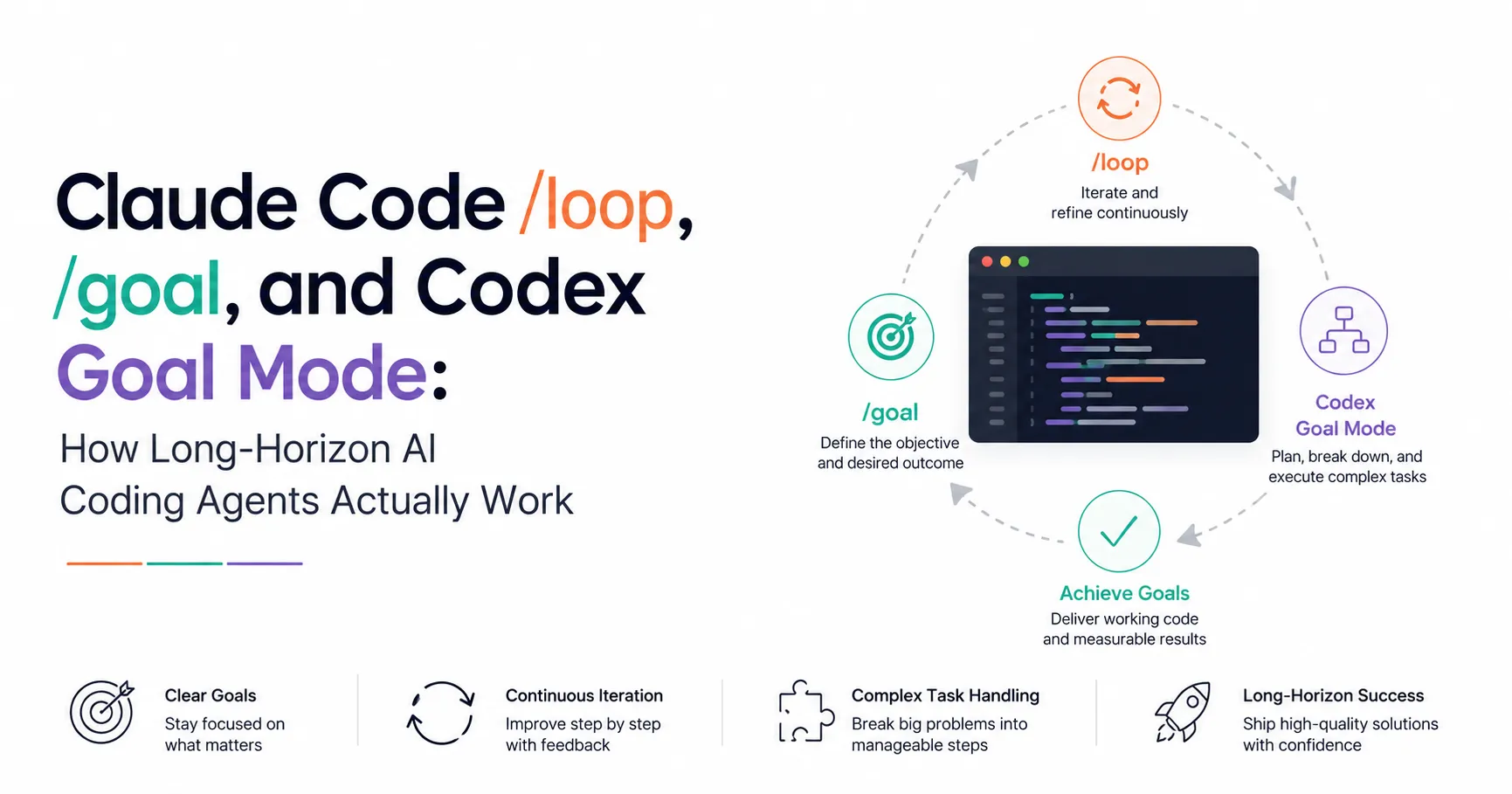
Every AI coding agent eventually runs into the same wall: the task takes longer than one turn, and the human driving it isn’t going to sit there hitting enter for six hours. Migrations, large refactors, flaky test hunts, “keep this PR green until it merges” – these aren’t one-shot prompts, they’re campaigns. In 2026, both Anthropic and OpenAI shipped built-in answers to this. Claude Code has two separate mechanisms, /loop and /goal, and OpenAI’s Codex CLI has its own /goal with a completely different implementation underneath. They solve the same problem – keep the agent working without you in the loop – but they decide when to run the next turn in fundamentally different ways, and mixing them up will cost you either wasted API calls or an agent that quietly stops.
This post breaks down how each one actually works, with the version numbers, config flags, and command syntax verified against the current docs, plus a runnable example for each.
Summary
- Claude Code
/loopis time-driven – runs on an interval you set, or one Claude self-paces. Docs: Run prompts on a schedule. - Claude Code
/goalis condition-driven – a small fast model checks your stated completion condition after every turn. Docs: Keep Claude working toward a goal. - Codex
/goal(Goal Mode) is OpenAI’s version of the same idea, built for objectives spanning hours or days, GA since May 21, 2026. Docs: Follow a goal. - Neither removes the need for review. They skip re-prompting, not the permission system or your job of checking the final diff.
- Pick by trigger: a timer (
/loop) for polling external state, a condition (/goal) for work with a checkable finish line.
Why “one prompt, one turn” breaks down
A normal agent session is a single round trip: you type a prompt, the agent reads files, runs commands, edits code, and hands control back. That model works fine for “add a null check here” or “explain this function.” It falls apart the moment the task has a natural multi-hour shape – a codebase migration that touches 200 files, a test suite that needs three rounds of fix-run-fix, or a PR that needs someone (or something) to keep responding to CI failures and review comments until it’s mergeable.
Before 2026, the workaround was manual: you’d re-paste “continue” every few minutes, or wire up your own shell loop around the CLI. Both Claude Code and OpenAI Codex have since built this directly into the CLI, but they arrived at it from different angles, and Claude Code specifically ships two separate primitives rather than one.
Claude Code’s /loop: run on a timer
/loop is a bundled skill that schedules a prompt to re-run inside your current session. It is explicitly session-scoped – the task lives in the conversation and stops firing when you start a new one (though --resume or --continue restores anything that hasn’t expired).
There are three ways to invoke it, depending on what you supply:
/loop 5m check if the deployment finished and tell me what happenedThis runs on a fixed cadence. Claude converts the interval to a cron expression under the hood – supported units are s, m, h, d – and confirms the schedule and job ID. Seconds get rounded up to the nearest minute because cron has one-minute granularity, and odd intervals like 7m get rounded to the nearest clean step.
Omit the interval and Claude self-paces instead:
/loop check whether CI passed and address any review commentsAfter each iteration, Claude picks a delay between one minute and one hour based on what it just observed – short waits while a build is still running, longer ones once a PR goes quiet – and prints the delay and its reasoning. For this dynamic mode, Claude often reaches for the Monitor tool instead of polling at all: it runs a background script and streams output lines back as they happen, which is both cheaper and faster than re-running a prompt on a timer.
Omit the prompt too, and Claude falls back to a built-in maintenance routine: finish unfinished work, tend to the current branch’s PR (review comments, failed CI, merge conflicts), then run cleanup passes if nothing else is pending. You can override this default entirely by dropping a .claude/loop.md (project-level) or ~/.claude/loop.md (user-level) file with your own instructions – edits take effect on the next iteration without restarting the loop.
To stop a loop that’s waiting on its next fire, press Esc. In self-paced mode, Claude can also end things on its own by calling ScheduleWakeup with stop: true once it judges the work complete – if an iteration doesn’t reschedule, Claude Code adds one 20-minute fallback wakeup and then lets the loop end.
A few limits worth knowing before you rely on this for anything long: recurring loops auto-expire after seven days, a session can hold up to 50 scheduled tasks, and the whole mechanism is disabled if you set CLAUDE_CODE_DISABLE_CRON=1. If you need scheduling that survives independent of any open session – nightly runs, morning triage – that’s what Routines and desktop scheduled tasks are for, not /loop.
Claude Code’s /goal: run until a condition holds
/goal (available from v2.1.139) answers a different question than /loop: not “how often should I check,” but “when am I actually done.” You set a completion condition, and after every turn a small fast model – Haiku by default on the Claude API – reads the condition against the conversation so far and answers yes or no with a short reason. A “no” starts another turn using that reason as guidance; a “yes” clears the goal automatically.
/goal all tests in test/auth pass and the lint step is cleanSetting the goal starts a turn immediately – there’s no separate prompt to send. A status indicator (◎ /goal active) shows elapsed time, and you can check progress any time with a bare /goal, which prints the condition, turn count, token spend, and the evaluator’s most recent reasoning.
The docs are explicit that this only works well if the condition is something Claude’s own output can demonstrate, since the evaluator doesn’t run commands or read files independently – it only sees the transcript. A good condition has one measurable end state, a stated check ("npm test exits 0", not “tests should work”), and any constraints that shouldn’t be violated on the way there. You can bound runtime directly in the condition, e.g. or stop after 20 turns, since the evaluator will read that clause too.
One nuance that trips people up: /goal doesn’t change your permission settings. In the default mode, Claude still asks before running things your settings haven’t already allowed – to let it run genuinely unattended, pair /goal with auto mode. Under the hood, /goal is literally a session-scoped prompt-based Stop hook, which is why it composes cleanly with everything else in the hooks system, and why you can drop to writing your own Stop hook when you need custom evaluation logic /goal doesn’t cover.
/goal also works headless:
claude -p "/goal CHANGELOG.md has an entry for every PR merged this week"With plain text output nothing prints until the condition is met, so add --output-format stream-json --verbose if you want to watch it work rather than wonder if it’s stuck.
/loop vs /goal, side by side
/loop | /goal | |
|---|---|---|
| Next turn starts when | A time interval elapses | The previous turn finishes |
| Stops when | You stop it, or Claude decides the work is done | A model confirms the condition is met |
| Minimum version | v2.1.72 | v2.1.139 |
| Survives session restart | Restored on --resume if unexpired (7-day cap) | Restored on --resume, but turn count and timer reset |
| Best for | Polling external state (builds, deploys, a quiet PR) | Work with a checkable finish line (tests, migrations, backlogs) |
Codex’s /goal: multi-hour and multi-day objectives
OpenAI’s Codex CLI took a single-command approach instead of splitting timer-driven and condition-driven modes: there’s just /goal, and it’s built for the same class of problem Claude Code’s /goal handles, but explicitly scoped to run for “hours or even days” without check-ins. It shipped experimentally in Codex CLI 0.128.0 and reached general availability across the Codex app, IDE extension, and CLI on May 21, 2026, alongside two related features: Appshots (visual context capture) and locked-computer remote execution for tasks that outlast your laptop being open.
If /goal doesn’t show up in your CLI, it’s likely gated behind a feature flag. Add it to ~/.codex/config.toml:
[features]
goals = true
or toggle it for a single run with codex --enable goals. Restart the CLI afterward for the change to take effect. On GA builds this ships enabled by default.
Basic usage mirrors what you’d expect:
/goal Migrate src/utils from CommonJS to ES modules; done when `npm run build` and `npm test` both passOnce a goal is running, a bare /goal checks its status, /goal pause and /goal resume let you step away and come back without losing progress, and /goal clear drops it entirely.
A running goal moves through a small set of states: pursuing while Codex auto-continues, paused if you stop it manually, achieved once Codex self-evaluates that every success criterion holds and writes a final summary, unmet when it hits a concrete blocker it can’t work around, and budget-limited when the token budget runs out mid-task. That last one is a soft stop by design – the active turn finishes cleanly, Codex writes a progress report with whatever it got done, and it exits rather than being killed mid-edit and leaving a half-applied patch.
OpenAI’s own guidance for writing a good goal reads almost identically to Anthropic’s for /goal: state a single objective and an explicit stopping condition, point Codex at the resources it needs to read first (docs, logs, an existing plan), specify the validation commands that prove progress, and decide what “done” looks like before you start. For genuinely long objectives, write the brief to a file and point the goal at that file rather than pasting a wall of text into the command. You can keep steering after the goal starts too – send a follow-up message telling it to use a specific library or avoid an approach, without clearing and restarting the whole thing.
OpenAI’s own framing of the tradeoff is worth repeating rather than paraphrasing: more autonomy makes human review more necessary, not less. A goal that runs unattended for six hours produces six hours of changes nobody has looked at yet. Treat the diff at the end like a PR from a fast, occasionally overconfident junior engineer – not a fait accompli.
Which one to actually reach for
If you’re mid-task and just need to poll something external – “let me know when this build finishes,” “keep an eye on this PR” – that’s /loop. It’s the cheapest and least committal option: no condition to write, no evaluator model running in the background, just a timer.
If the task has a real finish line you can name in one sentence – a migration, a passing test suite, an empty issue queue – reach for /goal, in whichever tool you’re using. It’s the more precise instrument: instead of guessing an interval, you tell the agent exactly what “done” looks like and let a second model police that boundary.
Where the choice gets interesting is scale. Claude Code’s /goal is scoped and cautious – default permissions still apply, and you opt into unattended tool calls with auto mode. Codex’s Goal Mode leans further into “leave it running” as the default posture, with pause/resume/budget-limited states built for genuinely walking away for a day. Neither is strictly better; they reflect different bets on how much you want the agent doing without a human glancing at it.
A minimal example you can run today with Claude Code
Here’s a small, verifiable long-horizon task using Claude Code’s /goal, the kind you can test in five minutes rather than trusting blind:
mkdir goal-demo && cd goal-demo && git init -q
cat > add.js <<'EOF'
function add(a, b) {
  return a - b; // bug: should be +
}
module.exports = add;
EOF
cat > add.test.js <<'EOF'
const add = require('./add');
test('adds two numbers', () => {
  expect(add(2, 3)).toBe(5);
});
EOF
npm init -y -s && npm install --save-dev jest -s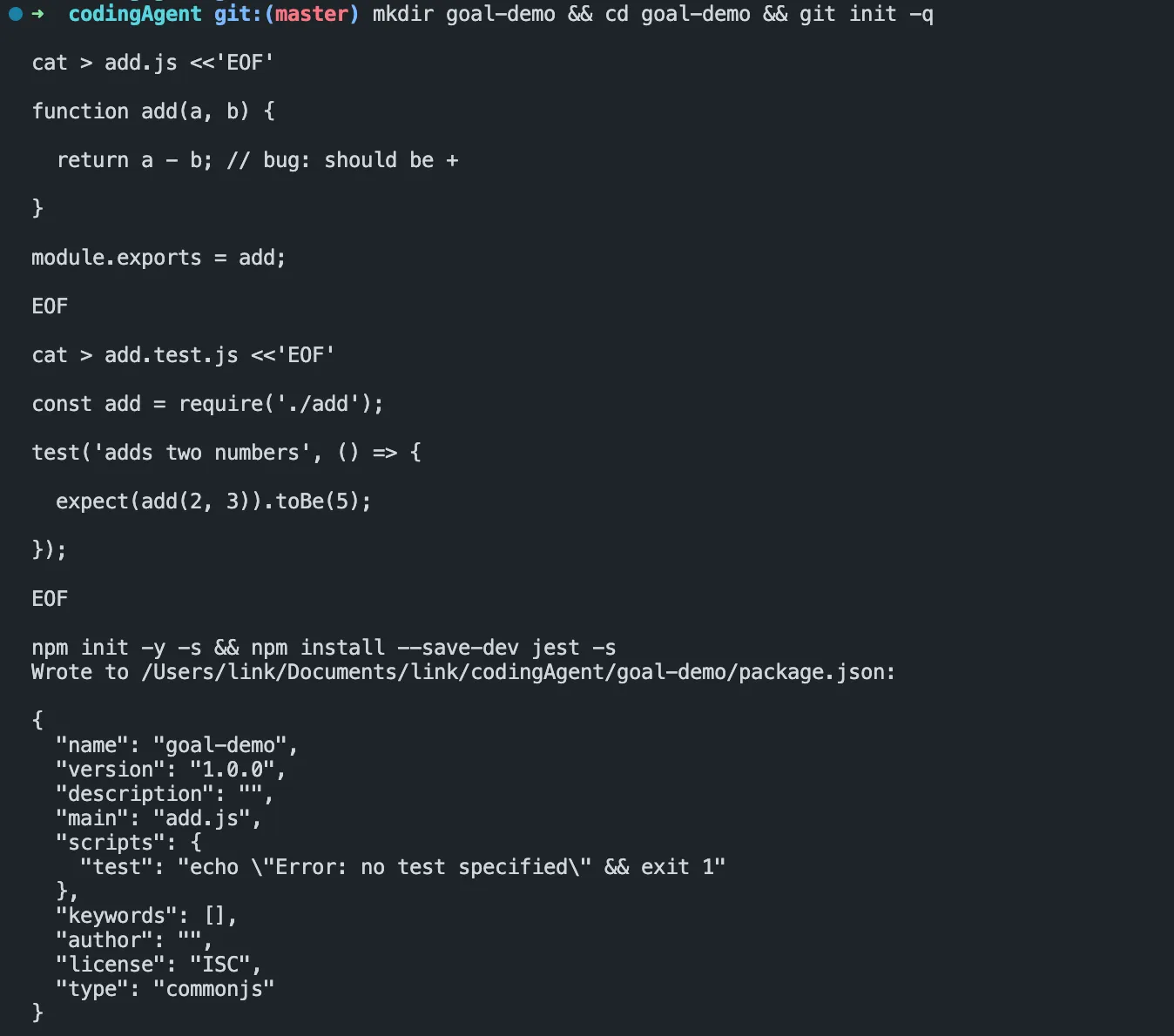
Run npx jest once before you touch Claude Code at all, just to confirm the bug is real:
FAIL ./add.test.js
  ● adds two numbers

    expect(received).toBe(expected) // Object.is equality

    Expected: 5
    Received: -1

Test Suites: 1 failed, 1 total
Tests:       1 failed, 1 total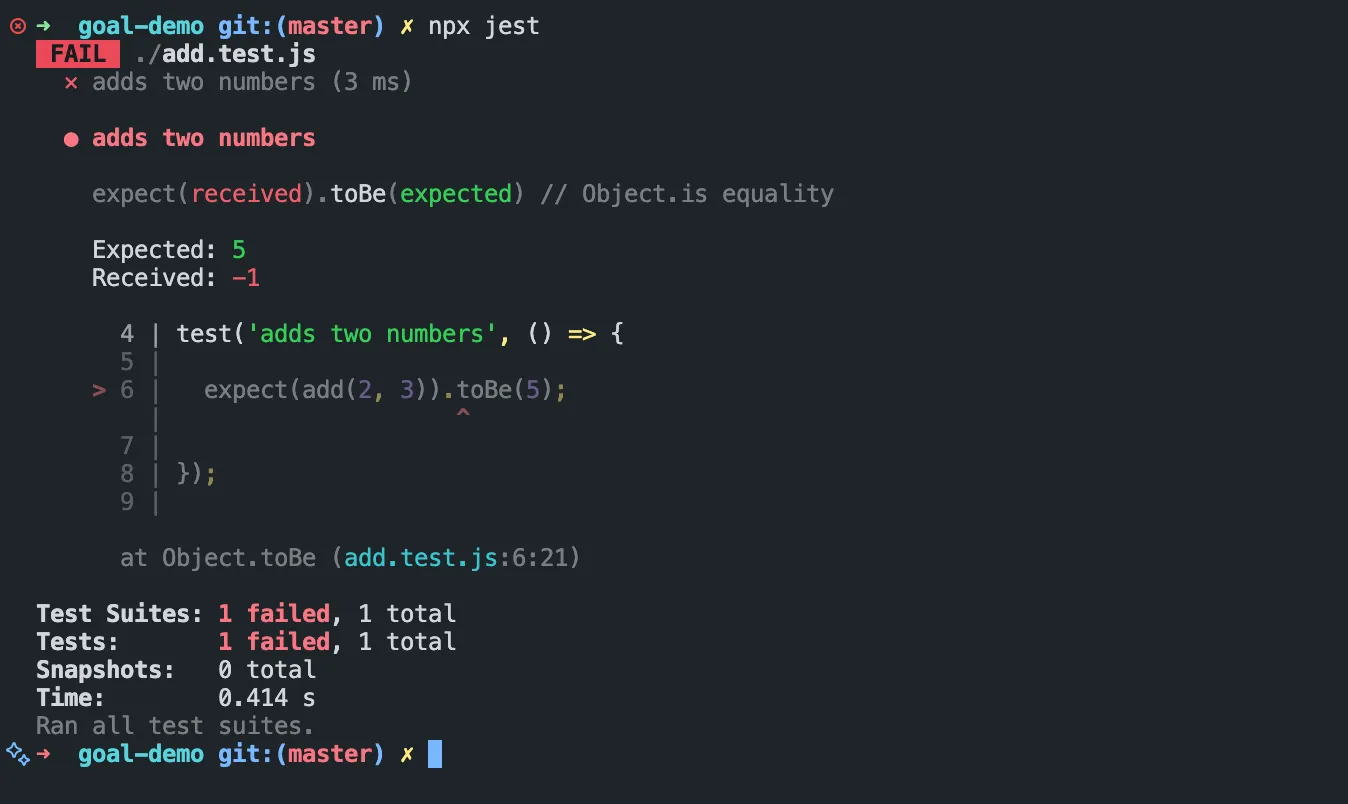
Now, inside a Claude Code session in that same directory:
/goal `npx jest` exits 0Claude reads add.js, spots the - where a + should be, fixes it, and reruns the suite on its own:
Test Suites: 1 passed, 1 total
Tests:       1 passed, 1 total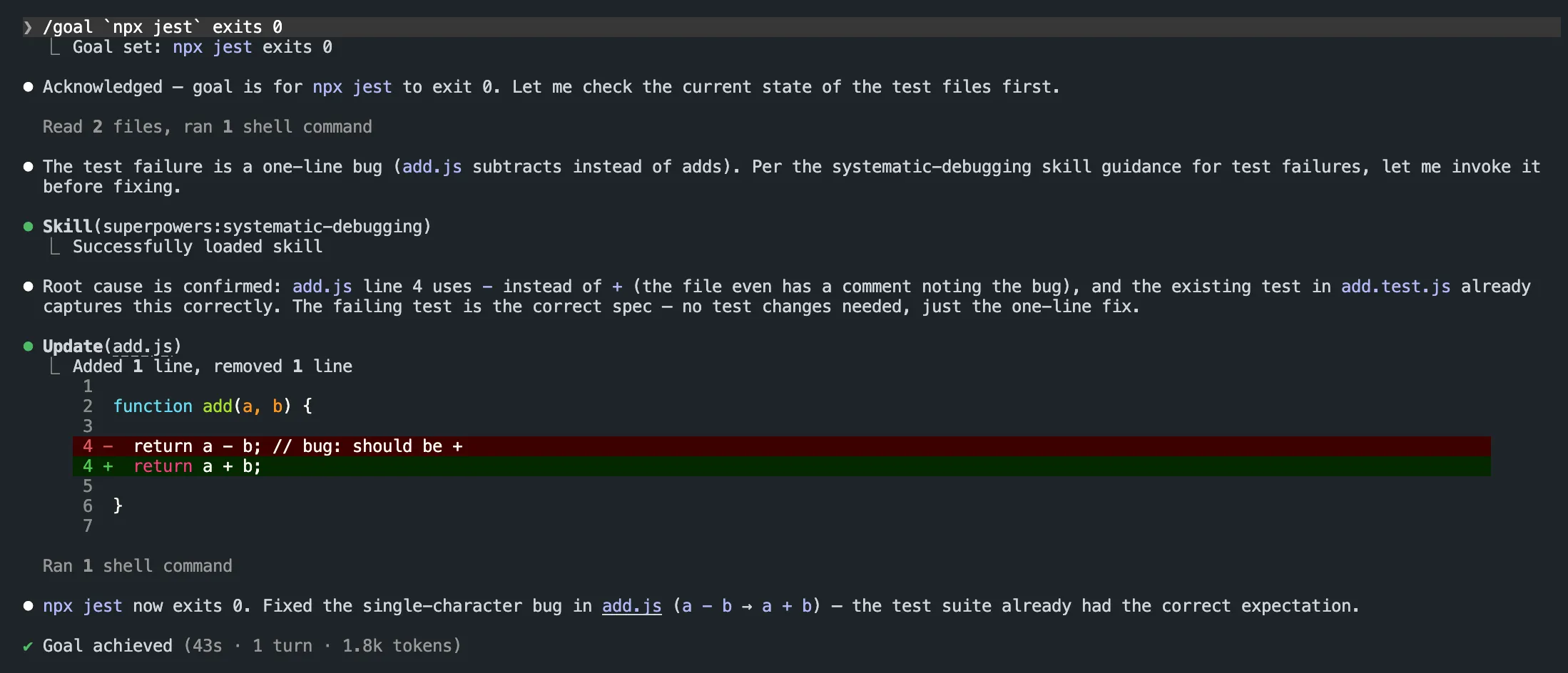
The evaluator sees that output in the transcript, confirms the exit code, and clears the goal – no re-prompting from you in between. The screenshot above is the real thing: Goal set, a one-line diff, then Goal achieved in a single turn. Swap the fixture for your real migration or refactor and the mechanics are identical; the only thing that changes is how long the loop runs before the condition holds.
A minimal example you can run today with Codex
Same idea, different language and a different bug, so you can see Codex’s Goal Mode do the same thing without needing Node or Jest installed. This one only needs Python 3’s built-in unittest:
mkdir goal-demo-codex && cd goal-demo-codex && git init -q
cat > titlecase.py <<'EOF'
def title_case(s):
    return s.lower()  # bug: should capitalize each word
EOF
cat > test_titlecase.py <<'EOF'
import unittest
from titlecase import title_case

class TestTitleCase(unittest.TestCase):
    def test_title_case(self):
        self.assertEqual(title_case("hello world"), "Hello World")

if __name__ == "__main__":
    unittest.main()
EOF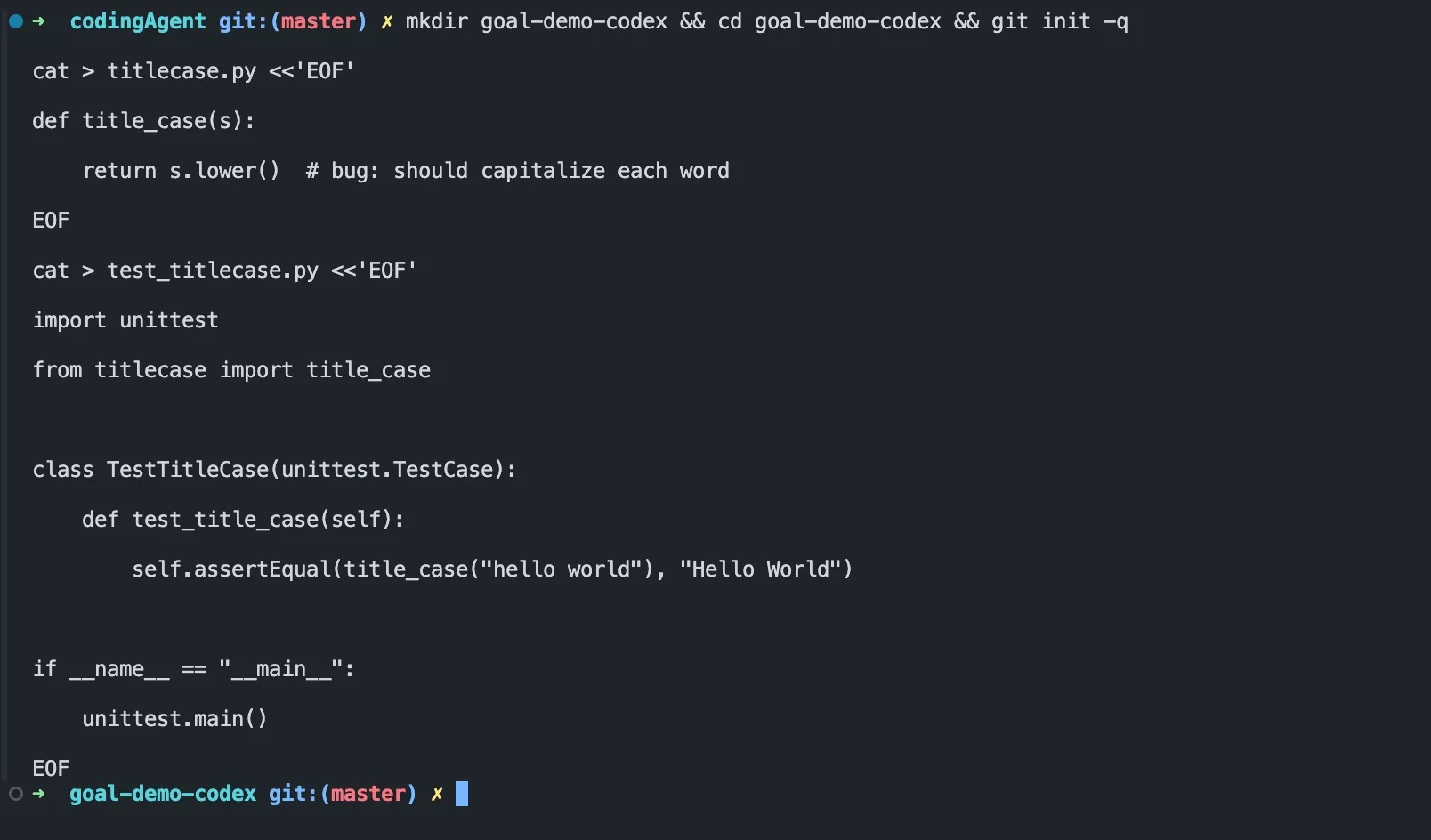
Run it once before Codex touches it, to confirm the bug is real:
$ python3 -m unittest test_titlecase.py -v
test_title_case (test_titlecase.TestTitleCase.test_title_case) ... FAIL

======================================================================
FAIL: test_title_case (test_titlecase.TestTitleCase.test_title_case)
----------------------------------------------------------------------
AssertionError: 'hello world' != 'Hello World'

----------------------------------------------------------------------
Ran 1 test in 0.001s

FAILED (failures=1)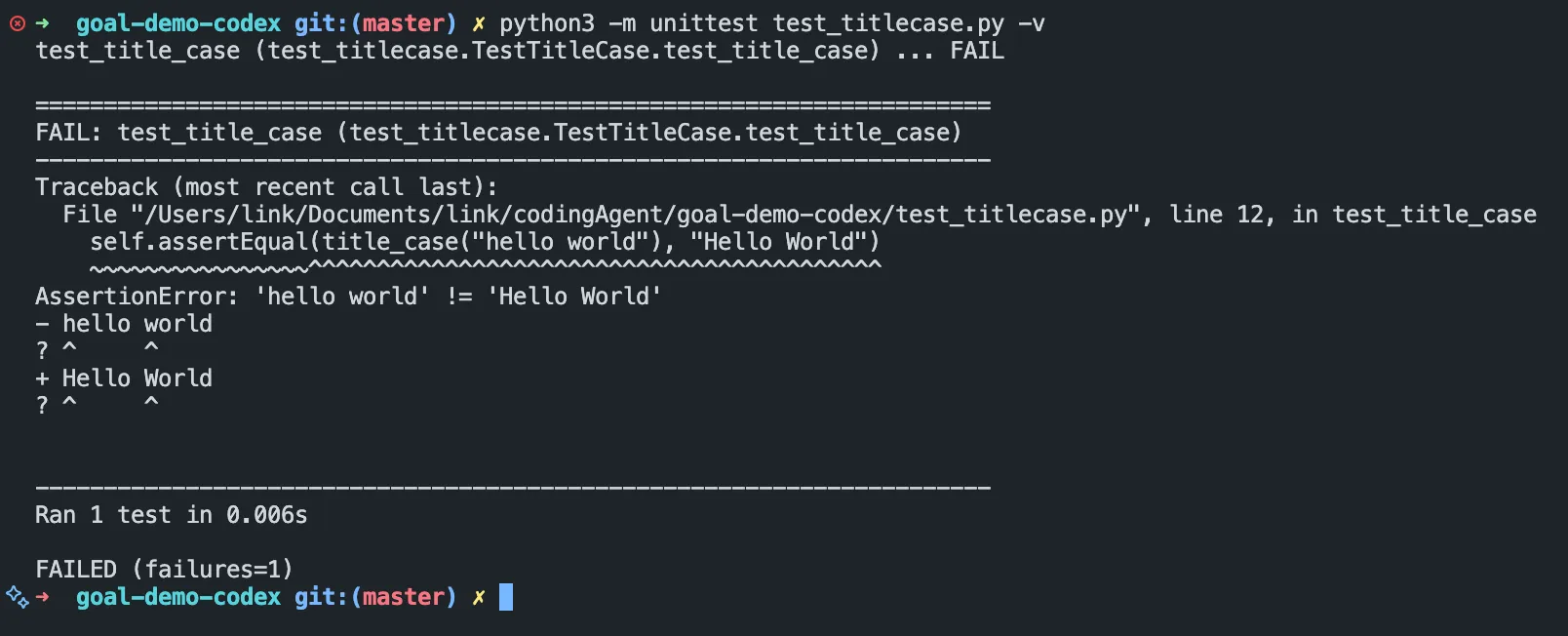
Now, inside a Codex CLI session in that same directory:
/goal `python3 -m unittest test_titlecase.py` exits 0Codex reads titlecase.py, replaces .lower() with .title(), and reruns the test on its own:
$ python3 -m unittest test_titlecase.py -v
test_title_case (test_titlecase.TestTitleCase.test_title_case) ... ok

----------------------------------------------------------------------
Ran 1 test in 0.000s

OK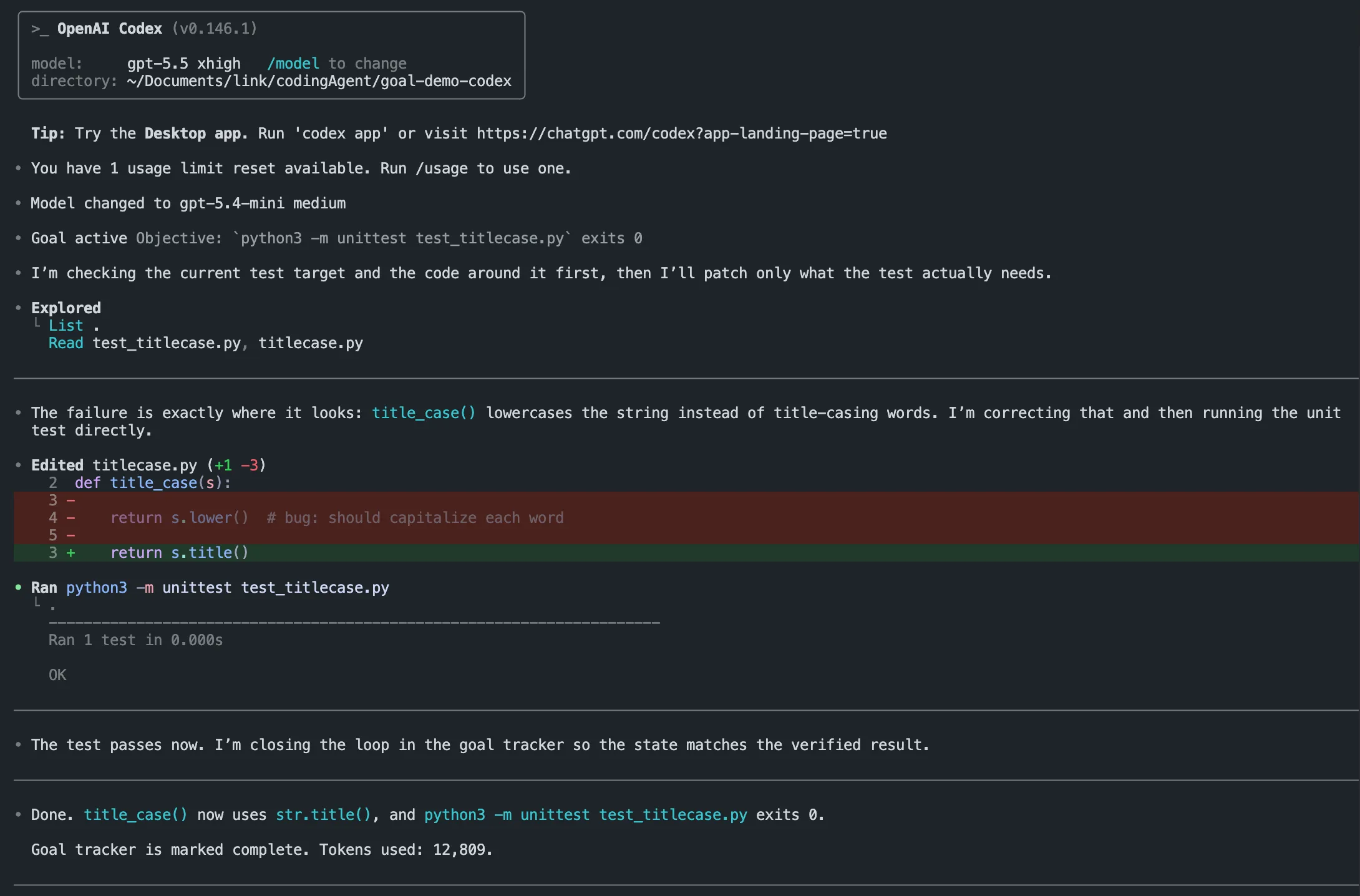
Codex marks the goal achieved once the exit code confirms it, without you re-running anything by hand. The interesting part isn’t the one-line fix – it’s that the same command works whether the fix takes one turn or fifty, since Codex keeps re-running the check itself until it passes or it hits a real blocker.
Keeping an eye on a long-running session
If a /goal or /loop run is going to take hours, you don’t need to stay glued to the terminal. We covered this in remotely managing Claude Code from your phone: a free, open-source web UI lets you check in on a running session, review diffs, and answer a permission prompt from your phone if the agent needs one, without leaving your desk unattended for the whole run. For a broader look at where Claude Code and Codex sit among the rest of the field, see our roundup of the best AI coding tools.
Conclusion
“Autonomous for longer” comes down to a clock or a condition. Use /loop when a timer should drive the next turn, /goal (in Claude Code or Codex) when a checkable finish line should. Either way, an agent that runs unattended for six hours can make six hours of mistakes unattended – write a condition you can verify, cap the runtime, and read the diff before you merge it.