In this article
Web apps can now read instructions aloud, answer questions, and guide people through tasks. Speech makes them easier to use for people who prefer listening, and for anyone whose eyes are busy with something else.
Developers can add these features without building a speech system from scratch. An AI voice generator turns written text into spoken audio through an API call, and the rest is ordinary web plumbing. Here’s how to build a voice-enabled web app with a Node.js backend and a plain JavaScript frontend, along with the parts that usually cause trouble later: streaming, browser autoplay rules, pronunciation and cost.
Summary
Keep the text-to-speech API key on your server and expose one route, /api/speech, that validates the text, maps a voice name to a provider voice ID, and streams the provider’s MP3 back to the browser. Call play() from the click handler itself, because Safari blocks playback that doesn’t come straight from a user gesture. Cap input length, cache clips by a hash of model, voice and text, and log characters per request, since every provider bills per character. If you use OpenAI’s /v1/audio/speech, plan a migration: tts-1, tts-1-hd and gpt-4o-mini-tts shut down on January 6, 2027.
An AI voice generator turns text into speech
An AI voice generator is a tool that turns text into speech. Modern tools can produce speech with a natural pace and tone.
For a web app, the process is simple. A user enters text or triggers an action. Your app sends the text to a voice service. The service creates audio, and the browser plays it.
Under the hood, the hosted services run neural text-to-speech (TTS) models behind an HTTP API. You POST text and a voice ID, and get back MP3, WAV, Opus or raw PCM bytes. The newer ones also stream, so the first chunk of audio arrives before the whole clip is finished.
Browsers ship a free option too, the Web Speech API. MDN lists speechSynthesis as available across browsers since September 2018, and it needs no backend and no key:
speechSynthesis.speak(new SpeechSynthesisUtterance("Your order has shipped."));The catch is that it uses whatever voices the device has, so the same page sounds different on a Mac, an Android phone and a Windows laptop. The API also has no method that hands you the audio, so there’s nothing to cache, download or reuse. For a throwaway read-aloud button that’s fine. Once you need a consistent voice, more languages or a file you can store, you need a hosted API.
Hosted text-to-speech APIs differ on limits and pricing
The big differences between providers show up in three places: how much text one request takes, how you fix a word the model mispronounces, and what you do with text that’s too long for a single request.
| Provider | Max text per request | Pronunciation control | Long text |
|---|---|---|---|
OpenAI /v1/audio/speech | 4,096 characters | No SSML; instructions steers tone on gpt-4o-mini-tts | Split it yourself |
| ElevenLabs | 40,000 chars (Flash v2.5), 10,000 (Multilingual v2, v4), 5,000 (v3) | Pronunciation dictionaries (PLS files), up to 3 per request | Split it, then stitch with previous_text / next_text |
| Murf | 3,000 chars (Gen2 generate) | Inline IPA, or a pronunciationDictionary with IPA or SAY_AS rules | Split it yourself |
| Google Cloud TTS | 5,000 bytes, SSML tags included | SSML <phoneme> (IPA or X-SAMPA) and <sub alias> | synthesizeLongAudio (Preview): up to 1 MB of input, written to Cloud Storage, poll the operation |
| Amazon Polly | 3,000 billed characters (6,000 total; SSML tags aren’t billed) | SSML | StartSpeechSynthesisTask: up to 100,000 billed characters, output to S3, optional SNS notification |
| Azure AI Speech | 10 minutes of audio per request | SSML; HD voices support only some tags | Batch synthesis API: poll the job, download a ZIP |
List prices, checked in November 2026:
- ElevenLabs: $0.04 per 1,000 characters on Flash, $0.08 on Multilingual v2, v3 and v4.
- Murf: 1 cent per 1,000 characters for Falcon 2.1.
- Amazon Polly: $4 per million characters for standard voices, $16 for neural, $30 for generative and $100 for long-form.
- OpenAI: $15 per million characters for
tts-1and $30 fortts-1-hd.gpt-4o-mini-ttsbills by token, at $0.60 per million text input tokens and $12 per million audio output tokens. - Google and Azure: both price by voice tier, so check their pricing pages for the tier you pick.
OpenAI needs a warning of its own. On October 1, 2026 it deprecated tts-1, tts-1-hd and gpt-4o-mini-tts, and all three shut down on January 6, 2027. The suggested replacement, gpt-realtime-2.1-mini, runs on the Realtime API and isn’t supported on /v1/audio/speech, so moving to it means a different integration, not a one-line model swap.
Latency is the other thing to compare. ElevenLabs quotes roughly 75 to 100 ms of model latency for Flash v2.5, and Murf says Falcon 2.1 gets to first audio in under 100 ms. Both figures leave out your network round trip. OpenAI’s docs recommend wav or pcm output when you need the fastest response.
The code below uses ElevenLabs’ streaming endpoint with eleven_flash_v2_5. It’s plain HTTP, the character limit is high and the latency is low. All the provider-specific code sits in one function, so switching to Murf, Polly or Google later means rewriting about fifteen lines.
A frontend, a backend and a voice API
You don’t need a complex setup. Most voice-enabled web apps use three basic parts:
- Frontend: HTML and JavaScript, or a framework like React, to collect text and play audio. Nothing in this guide needs a framework.
- Backend: Node.js or Python to receive requests and keep the API key away from the browser. The examples use Node 22 and Express 5. Node 22 has
fetch,--env-fileandimport.meta.dirnamebuilt in, so there’s nothing extra to install for those. - Voice API: an account with a TTS provider and an API key.
Before you write code, read your provider’s docs for the per-request character limit, the output formats, rate limits and data retention. MP3 is the safe default for an <audio> element. On retention, ElevenLabs offers enable_logging=false for zero retention, but only on enterprise plans.
Build the app in five steps
Step 1: Set up the project
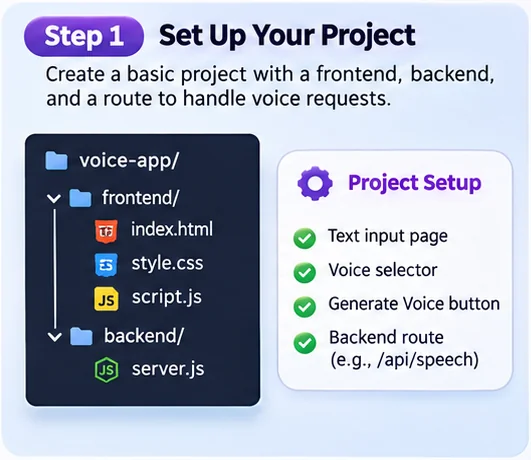
Start with a small project: one page with a text field, a voice selector and a Generate button, and one backend route, /api/speech.
mkdir -p voice-app/frontend voice-app/backend
cd voice-app/backend
npm init -y
npm pkg set type=module
npm install express
printf 'ELEVENLABS_API_KEY=your-key-here\n' > .env
printf '.env\nnode_modules\n' > .gitignore
Keeping the frontend and backend in seperate folders makes each easier to test on its own, and the .gitignore keeps the key out of your repo.
Step 2: Connect a voice API
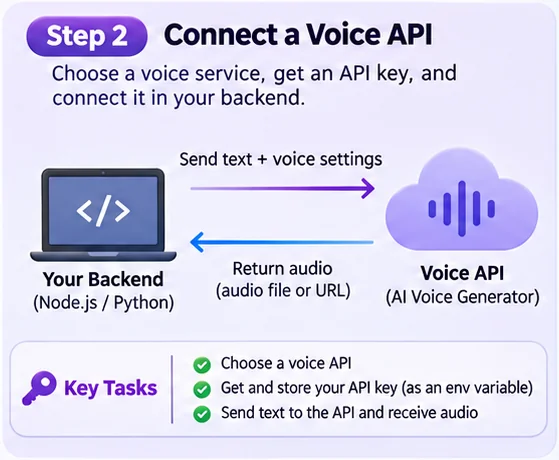
The backend has three jobs. It checks the input, maps a friendly voice name to the provider’s voice ID, and streams the audio back. The API key stays in an environment variable on the server. Never put it in browser code, where anyone can read it from devtools.
// backend/server.js
import express from "express";
import { join } from "node:path";
import { Readable, pipeline } from "node:stream";

const app = express();
app.use(express.json({ limit: "16kb" }));
app.use(express.static(join(import.meta.dirname, "../frontend")));

// The browser sends a name; only the server knows the provider's voice IDs.
const VOICES = { narrator: "YOUR_VOICE_ID_1", support: "YOUR_VOICE_ID_2" };
const MAX_CHARS = 2000;

async function speak({ text, voice }, res) {
  if (typeof text !== "string" || !text.trim() || text.length > MAX_CHARS) {
    return res.status(400).json({ error: `Text must be 1-${MAX_CHARS} characters.` });
  }
  const voiceId = VOICES[voice];
  if (!voiceId) return res.status(400).json({ error: "Unknown voice." });

  const controller = new AbortController();
  const timer = setTimeout(() => controller.abort(), 15_000); // time to first byte only
  const upstream = await fetch(
    `https://api.elevenlabs.io/v1/text-to-speech/${voiceId}/stream?output_format=mp3_44100_128`,
    {
      method: "POST",
      headers: {
        "xi-api-key": process.env.ELEVENLABS_API_KEY,
        "Content-Type": "application/json",
      },
      body: JSON.stringify({ text, model_id: "eleven_flash_v2_5" }),
      signal: controller.signal,
    },
  ).finally(() => clearTimeout(timer));

  if (!upstream.ok) {
    console.error("TTS error", upstream.status, await upstream.text());
    return res.status(502).json({ error: "Speech generation failed." });
  }

  res.type("audio/mpeg");
  // pipeline() tears down the upstream request if the listener leaves early
  pipeline(Readable.fromWeb(upstream.body), res, () => {});
}

app.post("/api/speech", (req, res) => speak(req.body ?? {}, res));
app.get("/api/speech", (req, res) => speak(req.query, res));

app.listen(3000, () => console.log("Listening on http://localhost:3000"));
A few details in there are deliberate:
- The voice allowlist. The browser sends
narrator, not a voice ID, so nobody can point your account at an expensive or cloned voice by editing a request. Voice IDs come from your ElevenLabs voice library. MAX_CHARS. Every provider bills per character, so the cap is also a cap on what a single request can cost.output_formatgoes in the query string, not the JSON body. The ElevenLabs reference lists it under query parameters, next toenable_logging.- The timeout covers the wait for the first byte, not the whole stream.
AbortSignal.timeout()would be shorter to write, but it would also cut off a long clip halfway through playback. A hung provider still fails after 15 seconds. Express 5 passes the rejected promise to its error handler, so the browser gets a 500 instead of a request that never ends. - Streaming the response.
Readable.fromWeb()turns the fetch body into a Node stream, so bytes go to the browser as soon as ElevenLabs sends them. The browser can start playing while the rest of the clip is still being generated.
Some services return audio bytes, while others return a link. Murf’s Gen2 generate endpoint, for example, returns a file URL that stays valid for 72 hours, so download the file if you want to keep it. The two routes at the bottom serve the two frontends in the next step: POST for the simple version, GET for streaming playback.
Run it from the backend folder:
node --env-file=.env server.jsStep 3: Build the user experience
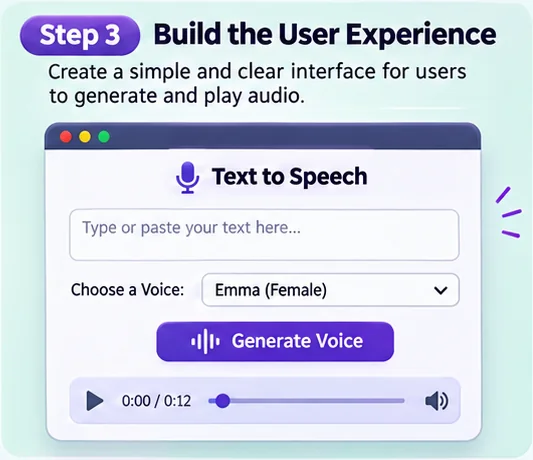
Keep the screen simple. Let users type or paste text, pick a voice, and start generation:
<!-- frontend/index.html -->
<label for="text">Text</label>
<textarea id="text" rows="6" maxlength="2000"></textarea>

<label for="voice">Voice</label>
<select id="voice">
  <option value="narrator">Narrator</option>
  <option value="support">Support</option>
</select>

<button id="speak">Generate voice</button>
<p id="status" role="status"></p>
<audio id="player" controls></audio>
<p><small>Audio on this page is generated by an AI voice.</small></p>
<script src="script.js"></script>
That last line isn’t decoration. OpenAI’s usage policies require you to tell users that a TTS voice is AI-generated, and it’s a good habit whichever provider you use. The role="status" paragraph makes screen readers announce the loading and error messages.
The simplest script POSTs the text, waits for the audio, and hands it to the player:
// frontend/script.js
const $ = (id) => document.getElementById(id);
const player = $("player");

$("speak").addEventListener("click", async () => {
  $("speak").disabled = true;
  $("status").textContent = "Generating audio...";
  try {
    const res = await fetch("/api/speech", {
      method: "POST",
      headers: { "Content-Type": "application/json" },
      body: JSON.stringify({ text: $("text").value, voice: $("voice").value }),
    });
    if (!res.ok) throw new Error((await res.json()).error);
    if (player.src) URL.revokeObjectURL(player.src);
    player.src = URL.createObjectURL(await res.blob());
    $("status").textContent = "";
    await player.play();
  } catch (err) {
    $("status").textContent =
      err.name === "NotAllowedError" ? "Audio ready - press play." : err.message;
  } finally {
    $("speak").disabled = false;
  }
});
This version works in every browser and shows the server’s error messages, but it has two weaknesses. First, res.blob() waits for the whole clip, so the streaming you set up on the server doesn’t shorten the wait at all. Second, play() runs after an await. Chrome allows that, because audio with sound is permitted once the user has interacted with the page. Safari is stricter: WebKit wants play() called directly from a click, touchend or keydown handler, and a blocked play() rejects with NotAllowedError. The catch turns that into a “press play” message instead of a silent failure.
To get the first words playing sooner, point the <audio> element straight at the streaming route:
// frontend/script.js, streaming version
$("speak").addEventListener("click", () => {
  const params = new URLSearchParams({ text: $("text").value, voice: $("voice").value });
  $("status").textContent = "Generating audio...";
  player.src = `/api/speech?${params}`;
  player.play().catch(() => {}); // failures show up as the "error" event below
});
player.addEventListener("playing", () => ($("status").textContent = ""));
player.addEventListener("error", () => ($("status").textContent = "Couldn't play the audio."));
The browser plays the MP3 progressively as bytes arrive, the same way it plays an internet radio stream, so the wait drops to roughly the provider’s time to first chunk. And because src and play() are set inside the click handler, Safari treats playback as user-initiated.
The tradeoffs come from putting the text in a URL. It ends up in server access logs and browser history. Long non-ASCII text also grows fast once it’s percent-encoded: 2,000 Hindi characters come to about 18 KB of URL, which is more than Node’s default 16 KB header limit. And when the server returns a 400, the <audio> element only reports a generic error, which is why the maxlength on the textarea matters here. If your text is short and not sensitive, use the streaming version. Otherwise use POST.
Step 4: Test the full flow
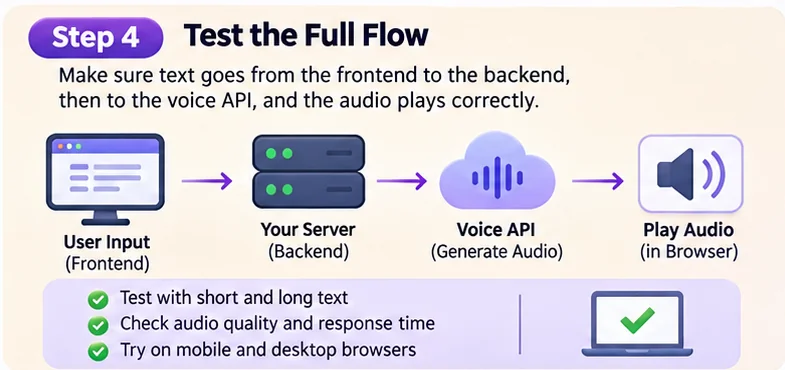
Test the route with curl before you open a browser. The -w flag prints the two timings that matter:
curl -s -o hello.mp3 -X POST http://localhost:3000/api/speech \
  -H "Content-Type: application/json" \
  -d '{"text":"Your order 4471 ships on March 3rd.","voice":"narrator"}' \
  -w 'first byte: %{time_starttransfer}s, total: %{time_total}s\n'
time_starttransfer is the time to the first audio byte, and it decides whether the app feels fast. Run the command with one sentence, then with a 2,000-character paragraph. With streaming, the first-byte time should stay roughly flat while the total grows.
Then listen. Try short sentences, long paragraphs, names, numbers, dates, prices, abbreviations like “Dr.” and “St.”, and URLs. These are the inputs where TTS models disagree with each other most, and where you’ll find out whether you need the pronunciation tools covered further down.
Test on mobile and desktop browsers, and include at least one iPhone because of Safari’s playback rules. Your phone can’t open localhost, so put the app behind a temporary public URL with a Pinggy tunnel:
ssh -p 443 -R0:localhost:3000 free.pinggy.io -T -- b:demo:change-meThat prints an HTTPS URL you can open on any device. The b:demo:change-me part adds basic auth, which matters here, because anyone who finds an unprotected URL can spend your TTS credits. Free tunnels last 60 minutes, and you get a new URL each time you reconnect.
If you use a webhook that needs to reach your local server, the same tunnel can expose a temporary test address. In TTS, webhooks show up with long-form jobs. Amazon Polly’s StartSpeechSynthesisTask writes the finished audio to S3 and can notify an SNS topic, and SNS can deliver that notification to an HTTPS endpoint. If you subscribe the tunnel URL, your laptop will recieve the “job done” message. SNS has a few rules worth knowing before you try:
- It only delivers to HTTPS endpoints whose certificate comes from a trusted CA. Pinggy tunnels use Let’s Encrypt certificates, so they qualify.
- It sends nothing until you confirm the subscription. The first POST is a
SubscriptionConfirmationmessage, and you have to GET itsSubscribeURL. - Messages are JSON, but SNS sends them as
Content-Type: text/plain; charset=UTF-8by default, soexpress.json()skips them. - It accepts credentials in the subscription URL (
https://user:password@your-tunnel-host/hooks/polly), which lines up with the tunnel’sb:option.
// backend/server.js - SNS notifications for finished Polly tasks
app.post("/hooks/polly", express.text({ type: "*/*" }), async (req, res) => {
  const msg = JSON.parse(req.body);
  // Verify msg.Signature against the cert at msg.SigningCertURL before trusting anything.
  if (req.get("x-amz-sns-message-type") === "SubscriptionConfirmation") {
    await fetch(msg.SubscribeURL);
  } else {
    console.log("Polly task finished:", msg.Message);
  }
  res.sendStatus(200);
});
Protect any public test endpoint, and verify the signature before acting on a message. Signature version 2 uses SHA256withRSA, with the signing certificate at SigningCertURL. A webhook route that skips verification will act on whatever anyone sends it.
Step 5: Deploy and monitor
Deploy the frontend and backend to a hosting service you trust, and put ELEVENLABS_API_KEY in the host’s secret settings, not in the repo or the frontend bundle. Before launch, add per-user or per-IP rate limiting to /api/speech, for example with the express-rate-limit middleware.
After launch, log five things for every request: character count, voice, cache hit or miss, the provider’s status code, and time to first byte. Character count multiplied by your provider’s price is your bill, so you can see it coming. Here’s the math for a 1,500-character help article read aloud on ElevenLabs Flash: $0.06 per generation. Without a cache, 10,000 plays cost $600. With a cache, you pay $0.06 once. A run of 429 responses from the provider means you’re hitting its rate or concurrency limits, so add backoff before your users notice.
Cache audio, cap input and disclose the AI voice
Cache repeated audio. Generate fixed messages such as welcome prompts, lesson text and help articles once. Key the cache on everything that changes the output, so upgrading the model doesn’t serve audio from the old one:
import { createHash } from "node:crypto";
const key = createHash("sha256")
  .update(JSON.stringify(["eleven_flash_v2_5", voiceId, "mp3_44100_128", text]))
  .digest("hex"); // look up cache/<key>.mp3 (or an S3 object) before calling the API
Limit input length. The
MAX_CHARScheck and theexpress.jsonsize limit stop very large requests before they cost anything. Provider limits (4,096 characters on OpenAI, 3,000 on Murf Gen2, 5,000 bytes on Google) mean longer text has to be split anyway.Use streaming when available. It cuts the wait to the first words. MP3 is the practical format for
<audio>. Raw PCM is faster to produce, but you have to play it through the Web Audio API yourself.Protect user data. Don’t send passwords, health details or anything else your privacy policy doesn’t cover. Read the provider’s retention terms, and note that ElevenLabs’ zero-retention mode also turns off request stitching.
Keep text visible. Speech should support reading, not replace it. Show the text next to the player, and add captions or a transcript when audio is the main content.
Use timeouts and safe retries. Retry 429 and 5xx responses with exponential backoff, and never retry a 400, because the same input will fail the same way.
Disclose the AI voice. It’s required on OpenAI and expected everywhere else.
Fixes for slow audio, mispronunciations, big bills and blocked playback
Slow audio generation. Long text and busy servers delay results. Split long passages at sentence boundaries, generate the first chunk first, and start playing it while the rest generates. With ElevenLabs, pass previous_text and next_text (or previous_request_ids) when you split, so the intonation carries across each seam instead of resetting at every chunk. If the text itself arrives in pieces, as LLM output does, ElevenLabs’ WebSocket endpoint (/stream-input) takes it chunk by chunk, and Murf offers a WebSocket endpoint for its Falcon model too.
Unclear pronunciation. Brand names, abbreviations and unusual words may sound wrong. Every provider fixes this differently:
- Google, Polly and Azure: SSML. Azure’s HD voices support only part of it (DragonHD voices accept
<phoneme>, Omni voices don’t). - ElevenLabs: pronunciation dictionaries, plus
apply_text_normalizationto control whether numbers and dates get spelled out. - Murf: inline IPA, such as
Welcome to "/mɜːrf/". - OpenAI: no SSML, so you rewrite the text before you send it.
<speak>
  We run <sub alias="engine x">nginx</sub> in front of
  <phoneme alphabet="ipa" ph="ˌkuːbərˈnɛtiːz">Kubernetes</phoneme>.
</speak>
Keep a list of the words your app actually says, such as product names, place names and your company’s acronyms, and run it through the provider whenever you change voice or model.
High API bills. Repeated clicks create extra requests. The frontend above disables the button while a request is running, which handles the impatient user. Per-user quotas handle the abusive one. Caching handles the popular page, and the per-request log tells you which of the three is costing you money.
Browser playback issues. Browsers block audio that starts without a user action:
- Chrome allows audio with sound once the user has interacted with the site (a click or tap), or, on desktop only, once the site’s Media Engagement Index is high enough.
- Safari decides per element, and the
play()call has to come straight from the gesture handler. - Web Audio: an
AudioContextcreated before any gesture starts out suspended, and you have to callresume()after the user clicks.
Make sure playback follows a click or tap, catch NotAllowedError, and fall back to showing the player’s controls.
Add voice where people are listening anyway
Voice helps in many kinds of web apps:
- A learning platform can read lessons aloud. Lesson text rarely changes, so it caches perfectly.
- A support portal can speak answers to common questions.
- A dashboard can announce important updates. Those are short and dynamic, which suits the streaming route.
- An accessibility tool can read instructions for people who find text difficult to follow.
One caution for that last group: many users who need audio already run a screen reader, and audio that starts on its own talks over it. WCAG 1.4.2 requires a way to pause or stop any audio that plays automatically for more than three seconds. Simpler still, don’t autoplay at all.
Build for what your users actually need, not because voice is available.
Start with one route and measure
Adding speech to a web app is now a manageable project for most developers. Start with one /api/speech route, keep the API key on the server, and test on real devices, including an iPhone. Once that works, look at your time to first byte and characters per day before you add more voices or richer interactions such as WebSocket streaming for LLM replies. A useful voice feature should make the app simpler, not more complicated.