In this article
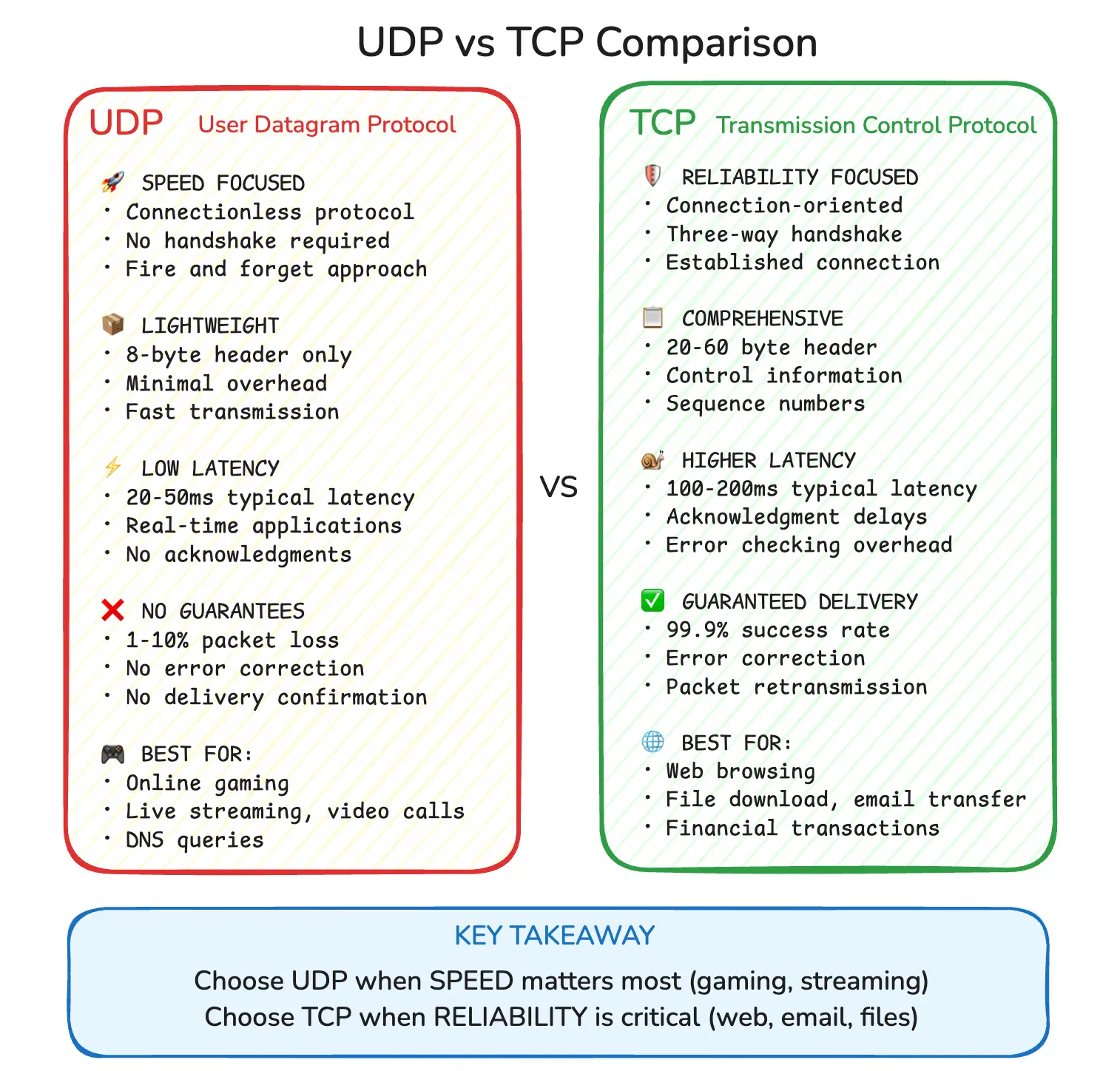
TCP and UDP are the two transport protocols nearly every networked app sits on. The whole difference between them comes down to one question: when a packet goes missing, do you wait for it or carry on without it? TCP waits. UDP carries on. Almost everything else - the handshake, the header size, the list of “good” use cases - falls out of that single choice.
Pick the wrong one and you feel it. Run a game’s position updates over TCP and one dropped packet stalls every update queued behind it. Push a bank transfer over UDP and you might lose half of it with no way to tell. This guide covers how each protocol actually behaves, why the common “streaming uses UDP” line is mostly wrong, and how QUIC (the transport under HTTP/3) quietly rewrote the rules.
Summary
TCP (Transmission Control Protocol)
- Connection-oriented and reliable: opens with a three-way handshake, retransmits lost packets, delivers bytes in order
- Use it for web, email, file transfers, databases, and payments, anywhere a missing byte breaks the result
UDP (User Datagram Protocol)
- Connectionless and unreliable by design: no handshake, no retransmission, fixed 8-byte header
- Use it for real-time voice and video, gaming, and DNS, anywhere a late packet is worse than a lost one
- Use Pinggy to tunnel a local UDP service
The difference that actually matters
- Under packet loss, TCP holds back everything after the gap until it is refilled (head-of-line blocking); UDP hands each packet to your app the moment it arrives
Header size
- TCP: 20-60 bytes. UDP: a fixed 8 bytes
QUIC / HTTP/3
- TCP-style reliability built on top of UDP, minus the head-of-line blocking; around a third of all websites already advertise HTTP/3
What are TCP and UDP?
Both protocols live at the transport layer of the IP stack. Their job is the same: move data between two applications across a network. How they do it is where they split.
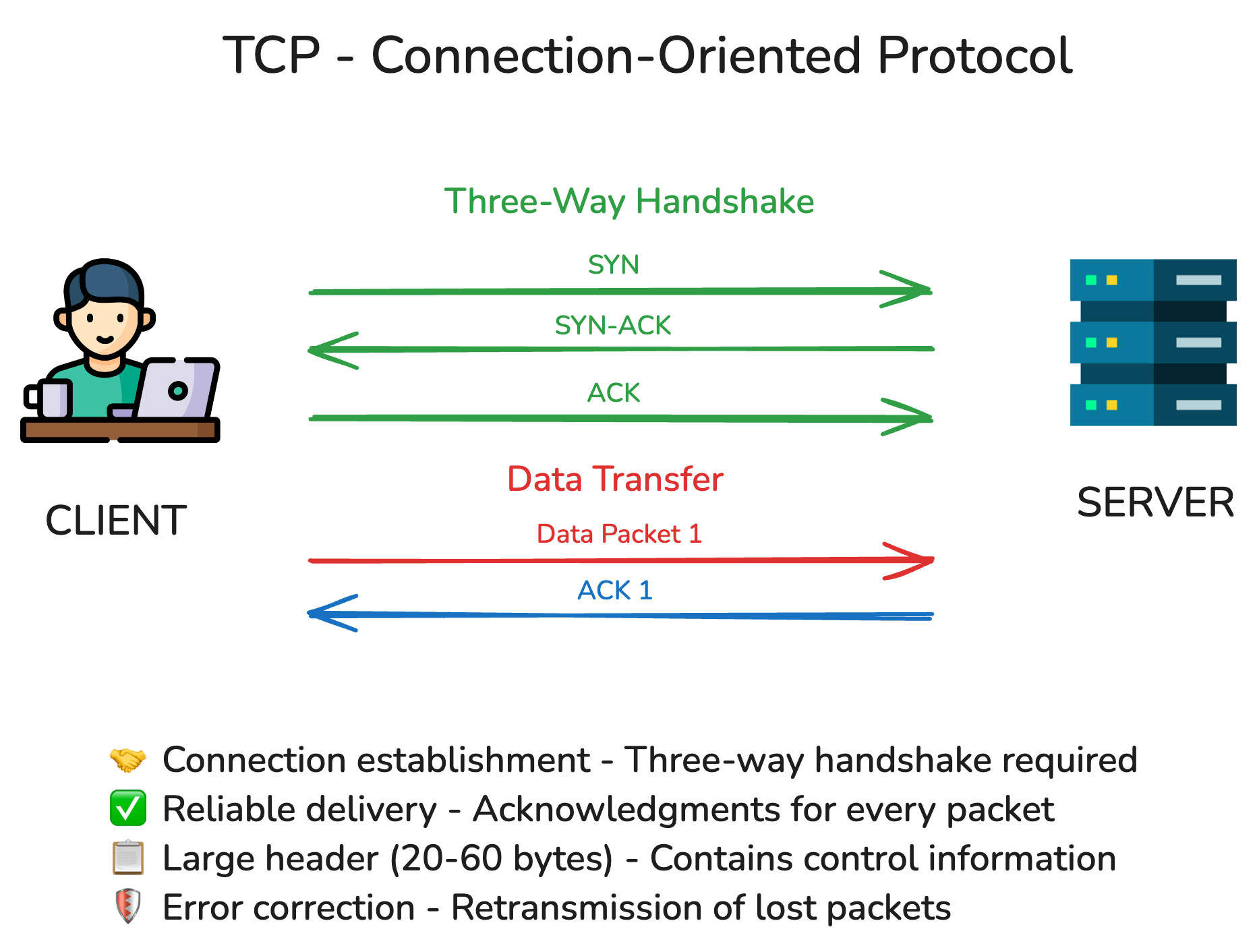
TCP sets up a connection before sending anything. The client and server exchange a three-way handshake (SYN, SYN-ACK, ACK) to agree on starting sequence numbers, then TCP numbers every byte, acknowledges what arrives, retransmits what doesn’t, and reassembles everything in order at the far end. The application sees a clean, ordered byte stream.
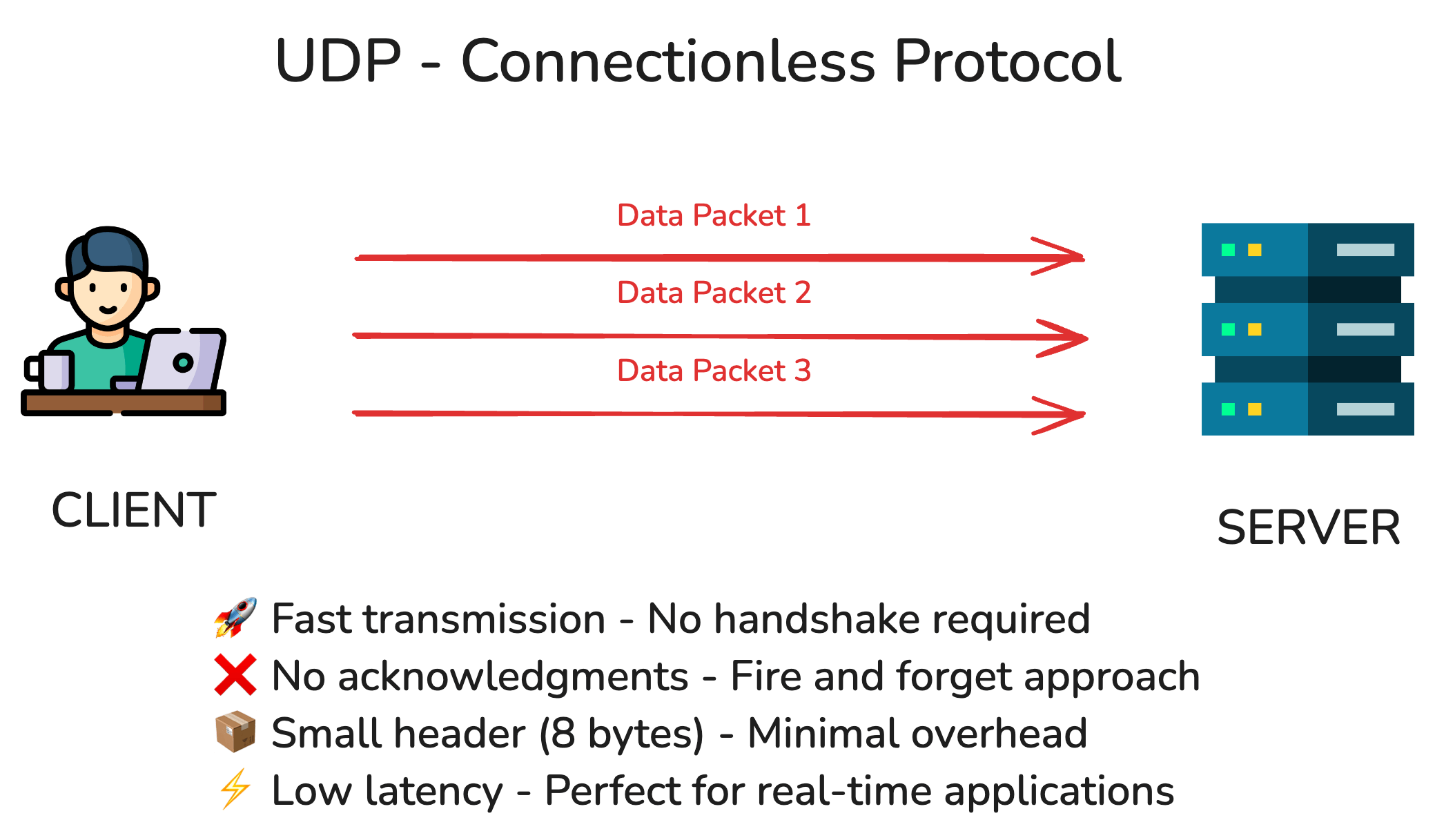
UDP does almost none of that. There’s no handshake and no connection state. You hand UDP a datagram, it adds an 8-byte header (source port, destination port, length, checksum) and sends it. No acknowledgments, no retransmission, no ordering. If a datagram is lost, duplicated, or arrives out of order, that’s your application’s problem to notice and handle.
The core differences
Connection setup TCP needs at least one round trip before any data moves, often more once you stack a TLS handshake on top. UDP sends on the first packet.
Reliability and ordering TCP guarantees delivery and order, or it tears the connection down trying. UDP guarantees neither. A common myth is that “UDP loses 1-10% of packets” - UDP doesn’t lose packets, the network does. The difference is that TCP recovers from that loss and UDP leaves recovery to you.
Flow and congestion control TCP watches for loss and backs off its sending rate to avoid swamping the network or the receiver. Plain UDP has no such brake, which is part of why it’s fast and part of why a badly behaved UDP app can be a bad network citizen.
Header overhead A TCP header is 20 bytes minimum and up to 60 with options. UDP’s is a flat 8 bytes. On a flood of tiny real-time packets, that overhead adds up.
The detail most guides skip: head-of-line blocking
This is the real reason real-time apps avoid TCP. TCP delivers bytes strictly in order. If packet 5 is lost, packets 6, 7, and 8 can already be sitting in the receiver’s buffer, but the application can’t have them until packet 5 is retransmitted and arrives. Everything queues behind the gap. That’s head-of-line blocking.
For a file download, that’s exactly what you want. For a voice call or a game, it’s the worst case: by the time the retransmitted packet shows up, the audio frame or player position it described is already stale. You’d rather skip it and play the next one. UDP lets you do that, because it hands each datagram up as it arrives and never makes a newer one wait for an older one.
Hold onto this idea, because it’s also the thing QUIC was built to fix.
When to use TCP
Reach for TCP when a missing or reordered byte ruins the result.
Web pages and APIs. HTTP/1.1 and HTTP/2 run on TCP. A truncated HTML or JS file is a broken page, so the reliability is non-negotiable. (HTTP/3 moves this onto UDP via QUIC, more on that below.)
Email. SMTP, IMAP, and POP3 all sit on TCP. You don’t want half a message.
File transfers and sync. Downloads, uploads, scp, cloud sync. Every byte has to land, in order, or the file is corrupt.
Databases and payments. Postgres, MySQL, and the like speak TCP, and financial transactions lean on the same guarantees. A dropped write isn’t an option.
When to use UDP
Reach for UDP when timeliness beats completeness and a late packet is useless anyway.
Real-time voice and video. Zoom, Google Meet, Microsoft Teams, and Discord carry call audio and video over UDP, usually via WebRTC and RTP. A lost frame is a tiny glitch; a frame that arrives 300 ms late after a retransmission is worse than no frame at all.
Online gaming. Fast-paced multiplayer games send a steady stream of position and state updates over UDP. They handle loss with their own tricks - interpolation, sending the latest full state, client-side prediction - precisely to dodge the head-of-line blocking TCP would impose. Valve’s GameNetworkingSockets and Glenn Fiedler’s netcode are open-source examples of reliability layers built on raw UDP.
DNS. A name lookup is usually one small request and one small reply, so it goes over UDP on port 53. If the response is truncated or too big, the resolver retries over TCP. DNS-over-HTTPS and DNS-over-TLS use TCP for privacy reasons.
The “streaming uses UDP” myth
You’ll see this claim everywhere, including the older version of this post: Twitch and YouTube Live stream video over UDP. For their main broadcast pipeline, that’s wrong.
Large-scale live streaming mostly runs on TCP. Broadcasters push their feed to the platform with RTMP, which is a TCP protocol. The platform transcodes it and delivers it to millions of viewers with HLS or DASH, which are just segmented files served over HTTP, and that’s TCP too. The reason is scale and reach: HTTP delivery rides on existing CDNs, sails through firewalls, and buffers a few seconds ahead, so the odd retransmission is invisible.
UDP shows up in streaming when latency has to be sub-second: WebRTC (UDP) for interactive, low-latency broadcasts, and SRT (UDP) for contribution feeds. And increasingly the HTTP delivery layer itself runs over QUIC, which brings us back to UDP through the side door.
QUIC: UDP that grew up
For years the choice was binary. QUIC changed that. It’s a transport protocol built on top of UDP that re-implements the useful parts of TCP - reliable, ordered, congestion-controlled delivery - in user space, while fixing TCP’s weak spots.
Two things make it interesting:
- Faster setup. QUIC folds the TLS 1.3 handshake into the transport handshake, so a new connection is ready in one round trip instead of the two or three TCP+TLS needs. A returning client can resume in zero round trips and start sending data immediately.
- No head-of-line blocking across streams. QUIC carries multiple independent streams in one connection, each with its own sequencing. A packet lost on one stream doesn’t stall the others, the exact problem HTTP/2-over-TCP suffered from.
QUIC is the transport under HTTP/3, which around a third of all websites now advertise (Cloudflare, late 2025). If you’ve loaded a Google or YouTube page recently, you’ve almost certainly used it.
How big tech actually picks
The large platforms don’t pick once. They mix protocols by feature, based on whether speed or reliability wins.
Google (Search, YouTube)
Page and video delivery increasingly run over QUIC/HTTP/3, which is UDP underneath. The faster handshake and per-stream independence mean pages and videos start sooner, especially on flaky mobile links.
Microsoft Teams
Calls go over UDP, because a brief audio glitch beats a long delay. The moment you send a chat message or share a file, Teams switches to TCP so nothing is lost.
Netflix
On-demand video streams over TCP/HTTP with adaptive bitrate. A couple of seconds of buffering at the start is fine, and in exchange every byte arrives intact. Live events lean on lower-latency, UDP-based paths to keep viewers closer to real time.
UDP tunneling with Pinggy
If you’re working with UDP, you eventually hit the question of how to reach a local UDP service from outside your network: a game server on your machine, an IoT device, a dev build you want a teammate to test. Pinggy tunnels UDP, forwarding a public endpoint to your local UDP port even when you’re behind NAT, CG-NAT, or a corporate firewall.
Creating a UDP tunnel
Run this in your terminal:
Replace 8000 with the UDP port your service listens on. The command opens an SSH-encrypted tunnel to your local UDP service and hands you a public endpoint that forwards traffic to it, working through CG-NAT and corporate firewalls without any port forwarding on your end.
Use cases for UDP tunneling
Gaming servers: Host a multiplayer game server from your home network and let friends connect from anywhere.
IoT device testing: Reach UDP-based devices for remote testing and monitoring without touching router config.
Real-time apps: Share a voice chat server or a live data feed with people outside your network.
Development and testing: Hand a UDP build to a teammate or client without deploying it anywhere.
Wrapping up
The TCP-versus-UDP decision still comes back to that first question: when a packet drops, do you wait or move on? TCP waits, and that reliability is why the web, email, file transfer, and databases run on it. UDP moves on, and that’s why your voice calls, games, and DNS lookups stay snappy.
But the binary is fading. QUIC took UDP and built TCP’s reliability back on top of it without the head-of-line blocking, and it now carries a third of the web through HTTP/3. So the practical question in 2026 is less “TCP or UDP” and more “what delivery guarantees does this data actually need” - and increasingly, UDP is where the interesting work is happening.
Specifications and further reading
The primary sources: UDP is RFC 768, TCP is RFC 9293 (2022), which obsoletes the original RFC 793 - so link 9293, not 793. TCP keeps a few pieces in separate docs: congestion control (RFC 5681), SACK (RFC 2018), and window scaling and timestamps (RFC 7323). For UDP, RFC 8085 covers usage guidelines. QUIC and HTTP/3 are RFC 9000 and RFC 9114. Read them on datatracker.ietf.org to see live status and “obsoleted by” links.