In this article
Every developer has a moment like this. You wire up a signup flow, OTP verification works on your laptop, everything looks clean in your terminal. Then it hits production and someone spins up 400 fake accounts in an afternoon with a script and a list of burner phone numbers.
It happens more than most teams admit. The frustrating part is that a lot of it is preventable at the exact stage you’re in right now: local development, before the code ever touches a live server.
Summary
- A working OTP flow only proves your app can send a code and check it. It says nothing about fraud resistance.
- Most OTP providers (Viber Business Messages, SMS gateways, Telegram) send delivery callbacks to a public URL. Your laptop behind NAT doesn’t have one.
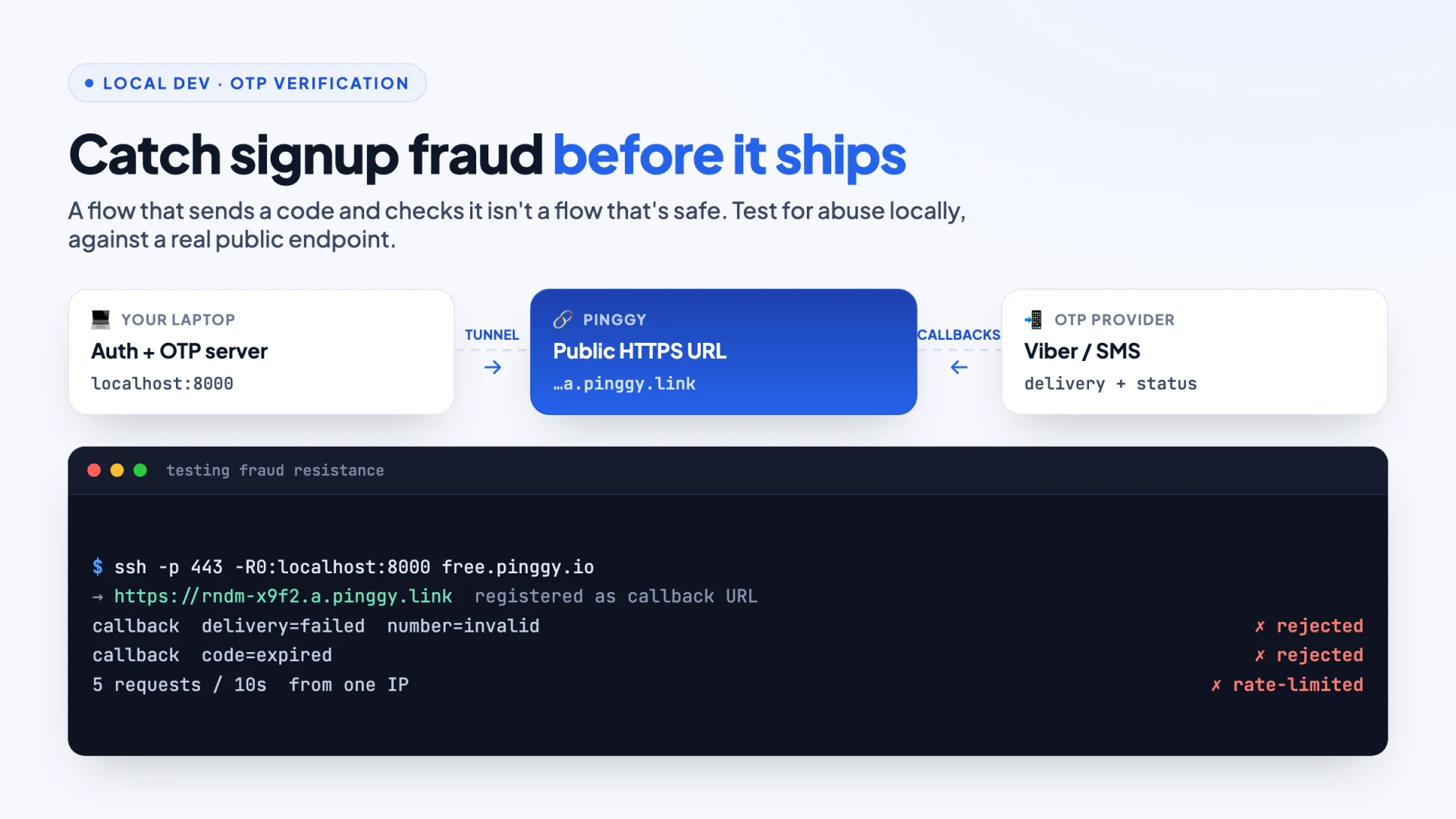
- Expose your local server with a Pinggy tunnel and watch real callbacks land in your terminal:
ssh -p 443 -R0:localhost:8000 free.pinggy.io - Register that HTTPS URL with your OTP provider, then throw abuse traffic at it: repeat requests, expired codes, invalid numbers. The bugs you catch here are the fraud vectors you’d otherwise ship.
The gap between “it works” and “it’s safe”
When you’re building an authentication flow, it’s easy to treat OTP verification as solved the moment the code sends a code and the user types it back correctly. Test passed, ship it. But that’s testing for functionality, not fraud resistance, and those are two very different bars.
A working OTP flow proves your app can send a code and check it against what the user submitted. It doesn’t prove your app can tell the difference between a real person signing up and a bot farm hammering your endpoint with disposable numbers, VOIP lines, or stolen phone identities. Those are separate problems, and they need to be tested separately, ideally before launch, not after your support inbox fills up with “why do I have 200 duplicate accounts” tickets.
This is where local testing earns its keep. If you’re building on any messaging channel - SMS, Telegram, or Viber OTP - the honest way to know your flow holds up is to run it against a public endpoint while you’re still developing, not to mock the response and move on. Viber in particular is a common choice for products with strong user bases across Eastern Europe and parts of Asia, and it comes with the same testing headache as every other messaging-based OTP channel: your local machine can’t receive its callbacks by default.
Why localhost makes this harder than it should be
Here’s the catch. Most OTP providers, Viber’s Business Messages API included, need to send delivery callbacks and status webhooks to a real, publicly reachable URL. Your laptop, sitting behind NAT on your home wifi, doesn’t have one. So developers end up doing one of two things: deploying half-finished auth code to a staging server just to test a webhook (slow, annoying, and a great way to accidentally expose broken code), or skipping the webhook entirely and hoping it works later (worse).
There’s a simpler middle path. Spin up a Pinggy tunnel, point it at your local server, and you get a real public HTTPS URL in seconds. No deploy pipeline, no DNS changes, no waiting.
ssh -p 443 -R0:localhost:8000 free.pinggy.ioThat forwards a random public URL to whatever’s listening on localhost:8000. Pinggy prints something like https://rndm-string.a.pinggy.link. Register that URL with your OTP provider as the callback endpoint, trigger a verification, and watch the delivery status and callback events land in your terminal in real time, exactly like they would in production. It’s the difference between guessing your auth flow works and watching it work.
This matters more than it sounds like it should, because a surprising number of fraud problems trace back to auth flows nobody tested end-to-end before launch. Not because developers are careless, but because testing webhook-dependent flows locally used to be genuinely painful, so people cut corners. Once that friction goes away, so does the excuse.
What “testing for fraud resistance” actually looks like
Once your tunnel is live and your webhook is receiving real events, the useful part starts. Try the things a legitimate user wouldn’t do:
- Request the same code five times in ten seconds. Does your rate limiting actually kick in, or does it just look like it does in your logs?
- Submit an expired code. Does your handler reject it cleanly, or does some edge case let it slip through?
- Watch what a delivery failure actually returns. If a number is invalid or unreachable on Viber, does your app silently mark the user as verified because it only checked for a
200response instead of the actual delivery status?
None of this is exotic. It’s the kind of thing that takes twenty minutes to check once you’ve got a real webhook endpoint to throw traffic at. And it’s the twenty minutes that separates a signup flow that merely works from one that holds up against someone actually trying to abuse it.
The part most teams skip: what happens after signup
Here’s the thing OTP verification can’t do on its own, and it’s worth saying plainly, because a lot of teams treat “we added 2FA” as the finish line. Verifying a phone number confirms someone has access to that number. It does not confirm the account isn’t part of a coordinated pattern: dozens of accounts registered in the same hour, from the same device fingerprint, using sequentially generated numbers, all completing verification because each individual step technically worked.
This is the blind spot that turns into fake-account-detection territory, a genuinely different layer than authentication. Authentication asks “is this a real, reachable identity?” Fraud detection asks “does this pattern of behavior look like a real person, or like something automated at scale?” You need both, and they catch different things. A fraud ring using real, working phone numbers will sail through OTP verification every time, because nothing about that flow is designed to notice the pattern across accounts, only the validity of one code at a time.
The practical takeaway isn’t “go buy more tools.” It’s simpler than that: build and test your verification step with the same rigor you’d want from a fraud-detection layer, even before you have one. Treat your local testing environment as the place where you ask uncomfortable questions about your own auth flow, not just “does this work” but “what happens when someone tries to break it on purpose.”
A workflow that actually holds up
If there’s one habit worth taking from this, it’s small: don’t let “I’ll test the webhook stuff after I deploy” become the default. It’s a two-minute setup to expose your local server publicly, register the tunnel URL with your OTP provider, and watch real events hit your handler before you write a single line of production infrastructure. The bugs you catch this way - the silent failures, the rate-limit gaps, the edge cases in delivery-status handling - are exactly the ones that turn into real fraud vectors once actual traffic starts hitting your app.
Auth code that’s only ever been tested against your own phone number in a clean, happy-path scenario isn’t tested. It’s demoed. There’s a real difference, and the gap between the two is usually where the fraud gets in.