In this article
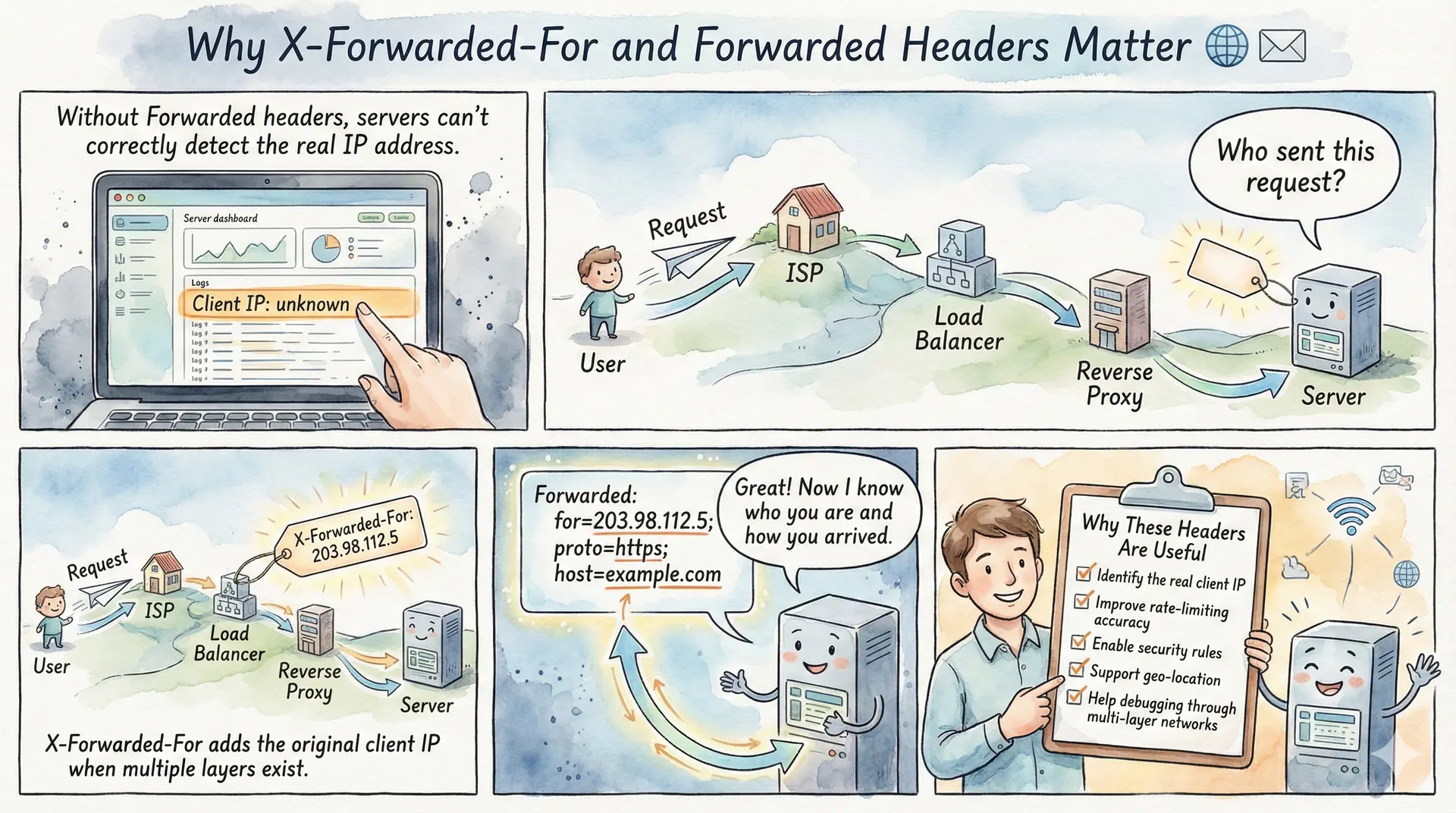
When a client sends an HTTP request directly to a web server, the server can easily identify the client’s IP address from the TCP connection. However, in modern web architectures, requests rarely travel directly from client to server. They typically pass through one or more intermediaries - reverse proxies, load balancers, CDNs, or API gateways. Each of these intermediaries establishes a new connection to the next hop, and in the process, the original client’s IP address is lost. This is where the X-Forwarded-For and Forwarded headers become essential.
These headers provide a mechanism for preserving the original client’s IP address (and other connection details) as requests traverse through proxy infrastructure. Whether you’re implementing rate limiting, logging for security audits, serving geolocation-specific content, or debugging network issues, understanding these headers is crucial for any developer working with web applications.
Summary
What is X-Forwarded-For?
The X-Forwarded-For (XFF) header is a de-facto standard HTTP header used to identify the originating IP address of a client connecting through proxies or load balancers. Each proxy appends the IP address of the previous hop, creating a comma-separated list: X-Forwarded-For: client, proxy1, proxy2.
What is the Forwarded Header?
The Forwarded header is the standardized replacement defined in RFC 7239. It combines functionality from X-Forwarded-For, X-Forwarded-Proto, and X-Forwarded-Host into a single header with a structured format: Forwarded: for=192.0.2.60;proto=https;by=203.0.113.43.
Common Use Cases:
- Logging & Auditing: Record the actual client IP for security analysis and compliance
- Rate Limiting: Implement per-client request limits based on real IP addresses
- Geolocation: Serve region-specific content or enforce geo-restrictions
- Access Control: Allow or deny requests based on client IP whitelists/blacklists
- Fraud Detection: Identify suspicious patterns from specific IP addresses
Security Considerations:
- Never blindly trust X-Forwarded-For headers - clients can spoof them
- Configure your server to trust only headers from known proxy IPs
- Read the rightmost trusted IP, not the leftmost (which is client-controlled)
- Validate all IP address formats before processing
Related Headers:
X-Forwarded-Proto: Original protocol (http/https)X-Forwarded-Host: Original Host header valueX-Forwarded-Uri/X-Forwarded-Prefix: Original path and path prefix. Both caused critical auth-bypass CVEs in 2026X-Real-IP: Single client IP (used by NGINX)Via: Information about intermediate proxies (RFC 9110)
Worth knowing: getting this wrong is a live vulnerability class. Four separate critical CVEs in 2026 came down to trusting a forwarded header that a client controlled.
The Problem: Lost Client Identity
Consider a typical web request flow. A user with IP address 203.0.113.50 makes a request to your application. But before reaching your server, the request passes through a CDN like Cloudflare, then through your load balancer, and finally to your application server. By the time the request arrives at your application, the source IP address is that of your load balancer - perhaps 10.0.0.5 - not the original client.
This creates several problems. Your access logs show only internal IPs, making security analysis nearly impossible. Rate limiting becomes ineffective because all requests appear to come from the same source. Geolocation features break entirely, and fraud detection systems can’t correlate malicious activity across requests.
Client (203.0.113.50) → CDN (198.41.215.10) → Load Balancer (10.0.0.5) → App Server
                                                                              ↓
                                                        Sees: Source IP = 10.0.0.5
                                                        Loses: Original client IP
How X-Forwarded-For Works
The X-Forwarded-For header solves this problem by having each proxy append the IP address of the incoming connection before forwarding the request. The format is simple: a comma-separated list of IP addresses, ordered from left (original client) to right (most recent proxy).
X-Forwarded-For: 203.0.113.50, 198.41.215.10In this example, 203.0.113.50 is the original client IP, and 198.41.215.10 is the CDN’s IP address. The load balancer added these values before passing the request to your application server.
Here’s how the header evolves as a request passes through multiple proxies:
Step 1: Client (203.0.113.50) sends request to CDN
Step 2: CDN adds header and forwards: X-Forwarded-For: 203.0.113.50
Step 3: Load balancer appends CDN’s IP: X-Forwarded-For: 203.0.113.50, 198.41.215.10
Step 4: Application receives request with the complete chain
The application can then parse this header to extract the original client IP for logging, rate limiting, or other purposes.
The Standardized Alternative: Forwarded Header
While X-Forwarded-For is widely used, it was never formally standardized - it’s a de-facto convention that emerged organically. The IETF addressed this by creating RFC 7239, which defines the Forwarded header as a standardized replacement.
The Forwarded header offers several advantages over X-Forwarded-For. It uses a structured key-value format that’s less ambiguous to parse, and it consolidates multiple pieces of information that previously required separate headers.
Forwarded: for=192.0.2.60;proto=https;by=203.0.113.43;host=example.comThe header supports four parameters:
- for: The client IP address (equivalent to X-Forwarded-For)
- proto: The original protocol used (http or https)
- by: The IP of the proxy adding this information
- host: The original Host header value
Multiple proxy entries are separated by commas:
Forwarded: for=203.0.113.50, for=198.41.215.10;proto=https;by=10.0.0.5One notable advantage of Forwarded is its extensibility. Proxies can include custom parameters like secret tokens to verify authenticity:
Forwarded: for=12.34.56.78, for=23.45.67.89;secret=egah2CGj55fSJFs, for=10.1.2.3This makes it easier for backend servers to identify which entries came from trusted proxies, rather than relying solely on counting positions from the right.
Practical Use Cases
Logging and Security Auditing
Accurate client IP logging is fundamental for security operations. When investigating suspicious activity, security teams need to know which client IP was responsible for specific requests. Without proper header handling, your logs would only show internal proxy IPs, making incident response significantly more difficult.
The right way to do this is to let your WSGI or framework layer handle it, and to tell it exactly how many proxies you operate:
# Flask: fix up the request at the WSGI layer, with an explicit hop count.
from flask import Flask, request
from werkzeug.middleware.proxy_fix import ProxyFix

app = Flask(__name__)

# x_for=1 means "there is exactly one proxy in front of me that I control".
# Count the hops you actually operate. Setting it too high lets a client
# inject extra entries and have one of them believed.
app.wsgi_app = ProxyFix(app.wsgi_app, x_for=1, x_proto=1, x_host=1)

@app.route("/")
def index():
    # request.remote_addr is now the client IP rather than the proxy's
    app.logger.info("request from %s", request.remote_addr)
    return ""
What you should not do is reach for request.headers['X-Forwarded-For'].split(',')[0]. That is the leftmost value, it is entirely attacker-controlled, and it is the precise bug behind CVE-2026-32029, covered below.
Rate Limiting
Effective rate limiting requires identifying unique clients. If all requests appear to come from your load balancer’s IP, you can’t implement per-client rate limits. By using X-Forwarded-For, you can rate limit based on the actual client IP.
# NGINX rate limiting using real client IP
set_real_ip_from 10.0.0.0/8;          # Trust internal load balancer IPs
real_ip_header X-Forwarded-For;
real_ip_recursive on;

limit_req_zone $binary_remote_addr zone=api_limit:10m rate=10r/s;
Geolocation Services
Many applications serve different content based on user location - whether for regulatory compliance, content licensing, or user experience optimization. Geolocation databases like MaxMind GeoIP require the actual client IP to determine location accurately.
Access Control and IP Whitelisting
Some applications restrict access to specific IP ranges - for example, admin panels accessible only from corporate IPs. Without proper header parsing, these controls would fail when requests pass through proxies.
Security Considerations: Trust, But Verify
The most critical aspect of working with these headers is understanding that they can be spoofed. A malicious client can send a request with a fake X-Forwarded-For header:
GET /api/resource HTTP/1.1
Host: example.com
X-Forwarded-For: 10.0.0.1, 192.168.1.1
If your application naively trusts this header, the attacker could bypass IP-based access controls, evade rate limiting, or pollute your logs with false data.
The Right Way to Parse X-Forwarded-For
The key insight is that only your trusted proxies add legitimate entries to these headers. When parsing, you should:
- Configure trusted proxy IPs: Define which IPs belong to your infrastructure (load balancers, CDNs)
- Read from the right side: Start from the rightmost IP and work left, stopping at the first untrusted IP
- Validate IP format: Ensure the extracted value is a valid IP address
import ipaddress

TRUSTED_PROXIES = [
    ipaddress.ip_network('10.0.0.0/8'),       # your own load balancers
    ipaddress.ip_network('198.41.128.0/17'),  # one of Cloudflare's ranges
]

def _parse(ip_str):
    try:
        return ipaddress.ip_address(ip_str.strip())
    except ValueError:
        return None

def _is_trusted(ip):
    return ip is not None and any(ip in net for net in TRUSTED_PROXIES)

def get_trusted_client_ip(xff_header, connection_ip):
    """Return the furthest client IP we can actually vouch for."""
    # Step 0, the step most implementations skip: if the machine that opened
    # the connection is not a proxy we trust, then X-Forwarded-For is nothing
    # more than user input. Discard it entirely.
    if not _is_trusted(_parse(connection_ip)):
        return connection_ip

    if not xff_header:
        return connection_ip

    # Walk right to left, dropping the hops we operate. The first address
    # that is not ours is the furthest one we can attribute to anyone.
    for candidate in reversed(xff_header.split(',')):
        ip = _parse(candidate)
        if ip is None:
            # A malformed entry means the chain is unusable from here on.
            return connection_ip
        if not _is_trusted(ip):
            return str(ip)

    # Every hop was inside our own ranges, so nothing untrusted ever touched
    # the header and the leftmost entry really is the client.
    return xff_header.split(',')[0].strip()
Note the ordering. Validating the chain is pointless if you never check who handed it to you, yet that omission is exactly what turned two of the 2026 CVEs below into critical findings.
Common Mistakes to Avoid
Mistake 1: Trusting the leftmost IP
Many developers assume the first IP in X-Forwarded-For is the client. This is only true if you trust all intermediaries, which you shouldn’t. Attackers can prepend fake IPs.
Mistake 2: Not validating trusted proxies
If you accept X-Forwarded-For from any source, attackers connecting directly to your server can completely control the header content.
Mistake 3: Not handling IPv6 Modern networks use IPv6, and your parsing logic must handle both address families:
X-Forwarded-For: 2001:db8::1, 203.0.113.50Note that IPv4-mapped IPv6 (::ffff:203.0.113.50) and bracketed IPv6 with a port ([2001:db8::1]:41237) both show up in real chains. Normalize before you compare against a CIDR list, or your trusted-proxy check quietly fails open.
This Is a Live Vulnerability Class, Not a Theoretical One
It is tempting to read the section above as defensive boilerplate. It is not. Forwarded-header trust bugs produced a run of critical CVEs during 2026, in widely deployed infrastructure, and every one of them reduces to the same root cause: a value the client could set was believed.
- CVE-2026-32029 (OpenClaw, fixed in 2026.2.21) read the leftmost
X-Forwarded-Forvalue for requests arriving from configured trusted proxies. Because the leftmost entry is whatever the client sent, attackers could forge any client IP and steer authentication rate limiting and IP-based access control. This is Mistake 1 above, shipped. - CVE-2026-40575 (OAuth2 Proxy, CVSS 9.1, fixed in 7.15.2) trusted a client-supplied
X-Forwarded-Uriwhen--reverse-proxywas on alongside--skip-auth-routeor--skip-auth-regex. The proxy evaluated its auth rules against one path while a different path reached the application, which is unauthenticated access to protected routes. The fix added a--trusted-proxy-ipflag, which is the same trusted-peer check as Step 0 in the parser above. - CVE-2026-35051 (Traefik, fixed in 2.11.43 and 3.6.14) is the subtlest of the set. With
ForwardAuthandtrustForwardHeader=false, Traefik correctly rebuiltX-Forwarded-For,X-Forwarded-Host, andX-Forwarded-Proto, but leftX-Forwarded-Prefixuntouched, so an attacker-supplied prefix reached the auth service intact. - RustFS evaluated IP-based access policy from
X-Forwarded-ForandX-Real-IPwithout ever confirming a trusted proxy sat in front.
Two lessons worth carrying away. First, sanitizing some forwarded headers is not the same as sanitizing the set - Traefik got the famous three right and still shipped a critical bypass through the fourth. Enumerate every X-Forwarded-* header your stack reads, including X-Forwarded-Uri, X-Forwarded-Prefix, and X-Forwarded-Port, and either rebuild or strip each one at the edge. Second, if a header influences an authorization or rate-limiting decision, treat it as attacker input until a trusted-peer check says otherwise.
Configuring Popular Servers and Load Balancers
NGINX
NGINX provides the ngx_http_realip_module for handling forwarded headers:
# /etc/nginx/conf.d/realip.conf
set_real_ip_from 10.0.0.0/8;
set_real_ip_from 172.16.0.0/12;
set_real_ip_from 192.168.0.0/16;
set_real_ip_from 103.21.244.0/22;   # Cloudflare
set_real_ip_from 2400:cb00::/32;    # Cloudflare IPv6

real_ip_header X-Forwarded-For;
real_ip_recursive on;
Apache
Apache uses mod_remoteip:
<IfModule mod_remoteip.c>
    RemoteIPHeader X-Forwarded-For
    RemoteIPTrustedProxy 10.0.0.0/8
    RemoteIPTrustedProxy 172.16.0.0/12
</IfModule>
AWS Application Load Balancer
AWS ALB automatically adds X-Forwarded-For, X-Forwarded-Proto, and X-Forwarded-Port headers. Your application just needs to parse them, trusting the ALB’s IP range.
Cloudflare
Cloudflare provides several headers:
CF-Connecting-IP: The client IP (single value, easier to use)X-Forwarded-For: Standard header with the proxy chainCF-IPCountry: Two-letter country code for geolocation
For applications behind Cloudflare, CF-Connecting-IP is often the simplest option since it provides a single, verified client IP.
One operational caveat: do not hardcode Cloudflare’s ranges and forget about them. The list changes, and a stale set_real_ip_from block fails in the worst way, by silently attributing every request to the edge instead of the client. Cloudflare publishes the current ranges at cloudflare.com/ips-v4 and ips-v6; pull them on a schedule and regenerate the config rather than pasting them once.
The Forwarded Header in Practice
While X-Forwarded-For remains dominant due to its long history, the standardized Forwarded header is gaining adoption. Here’s how to handle both:
// Express: configure the framework rather than parsing headers by hand.
// The number is how many proxies you operate in front of this app.
app.set('trust proxy', 1);

app.get('/', (req, res) => {
    // req.ip has already skipped your hop, so this is the client
    console.log('request from', req.ip);
    res.end();
});
Watch the argument type here, because it is a footgun. app.set('trust proxy', true) trusts the entire chain and hands you the leftmost value, which is the CVE-2026-32029 bug again. A hop count (1) or an explicit subnet list ('10.0.0.0/8, 198.41.128.0/17') is the safe form. Express does not read the standardized Forwarded header at all, so if your edge emits only that one, normalize it into X-Forwarded-For at the proxy or parse it yourself:
// Minimal RFC 7239 reader for the first "for=" element.
// Only call this once you know the peer is a proxy you trust.
function forwardedClient(req) {
    const header = req.headers['forwarded'];
    if (!header) return null;
    const match = header.match(/for=("[^"]*"|[^;,]+)/i);
    if (!match) return null;
    return match[1].trim().replace(/^"|"$/g, '').replace(/^\[|\](:\d+)?$/g, '');
}
Related Headers
Beyond X-Forwarded-For and Forwarded, several related headers are commonly used:
X-Forwarded-Proto: Indicates the original protocol (HTTP or HTTPS). Essential for applications that need to know if the original connection was secure, even when SSL termination happens at a load balancer.
X-Forwarded-Proto: httpsX-Forwarded-Host: The original Host header value. Useful when proxies rewrite the host for internal routing.
X-Forwarded-Host: www.example.comX-Forwarded-Uri and X-Forwarded-Prefix: The original request path and the path prefix a proxy stripped before forwarding. Forward-auth setups lean on these to decide what is being accessed, which is why both produced critical bypasses in 2026 when they were left client-controlled. If your stack reads them, rebuild them at the edge.
X-Forwarded-Uri: /admin/settings
X-Forwarded-Prefix: /appX-Real-IP: A simpler alternative used by NGINX that contains just the client IP (not a chain). Less flexible but easier to parse.
X-Real-IP: 203.0.113.50Via: Defined in HTTP standards (RFC 9110), indicates the intermediate protocols and proxies. Unlike X-Forwarded-For, it’s primarily for debugging proxy chains rather than identifying clients.
Via: 1.1 proxy.example.com, 1.1 another-proxy.example.netSeeing Both Headers Without Deploying a Proxy Chain
The awkward part of learning these headers is that you need a proxy in front of your app to generate them, which is a nuisance on a laptop. A tunnel is a quick way to get a real one.
Pinggy’s HTTP(S) tunnels run in reverse-proxy mode by default, which means they inject X-Forwarded-For, X-Forwarded-Proto, X-Forwarded-Host, and, usefully for the section above, the standardized Forwarded header:
ssh -p 443 -R0:localhost:8000 free.pinggy.ioPoint that at a handler that dumps request headers and you can watch both formats arrive from real clients on the internet, including the Forwarded header that is otherwise hard to find in the wild because so few edges emit it. A few flags are worth knowing:
x:noreverseproxyturns the injection off entirely, so you can see what your app looks like with the client IP missing.x:xffadds onlyX-Forwarded-For, andx:xff:Source-Addressrenames it, which is handy for testing a parser against a custom header name.x:haproxy:v2switches TCP tunnels to the HAProxy PROXY protocol, which is how you get the client IP when there is no HTTP request to attach a header to.
The trusted-proxy rule from earlier still applies, and this is where people trip. Your application’s peer address is now the tunnel, not the visitor, so the headers mean nothing until you tell the app to trust that hop. Frameworks that validate this strictly will reject the request outright rather than guess: Home Assistant, for instance, answers 400 Bad Request until the tunnel address is listed as a trusted proxy. The advanced options reference has the full flag list.
Conclusion
X-Forwarded-For and Forwarded restore the client identity that a proxy chain would otherwise throw away. Either one works; most modern CDNs and proxies emit both, so pick on parsing convenience.
The part that actually matters is trust. Accept these headers only from proxy IPs you control, check the peer before you read the chain, and work from the right. OpenClaw, OAuth2 Proxy, Traefik, and RustFS all shipped critical CVEs in 2026 by believing a header a client could write.