Run an LLM Inside a Browser Tab: WebGPU and Local Inference in 2026
Nearly every AI feature shipped in a web app today is a round trip: the page collects some text, sends it to a hosted model, and waits for tokens to come back over the network. That design puts a per-token bill, a network hop, and somebody else’s data retention policy between your user and a text box.
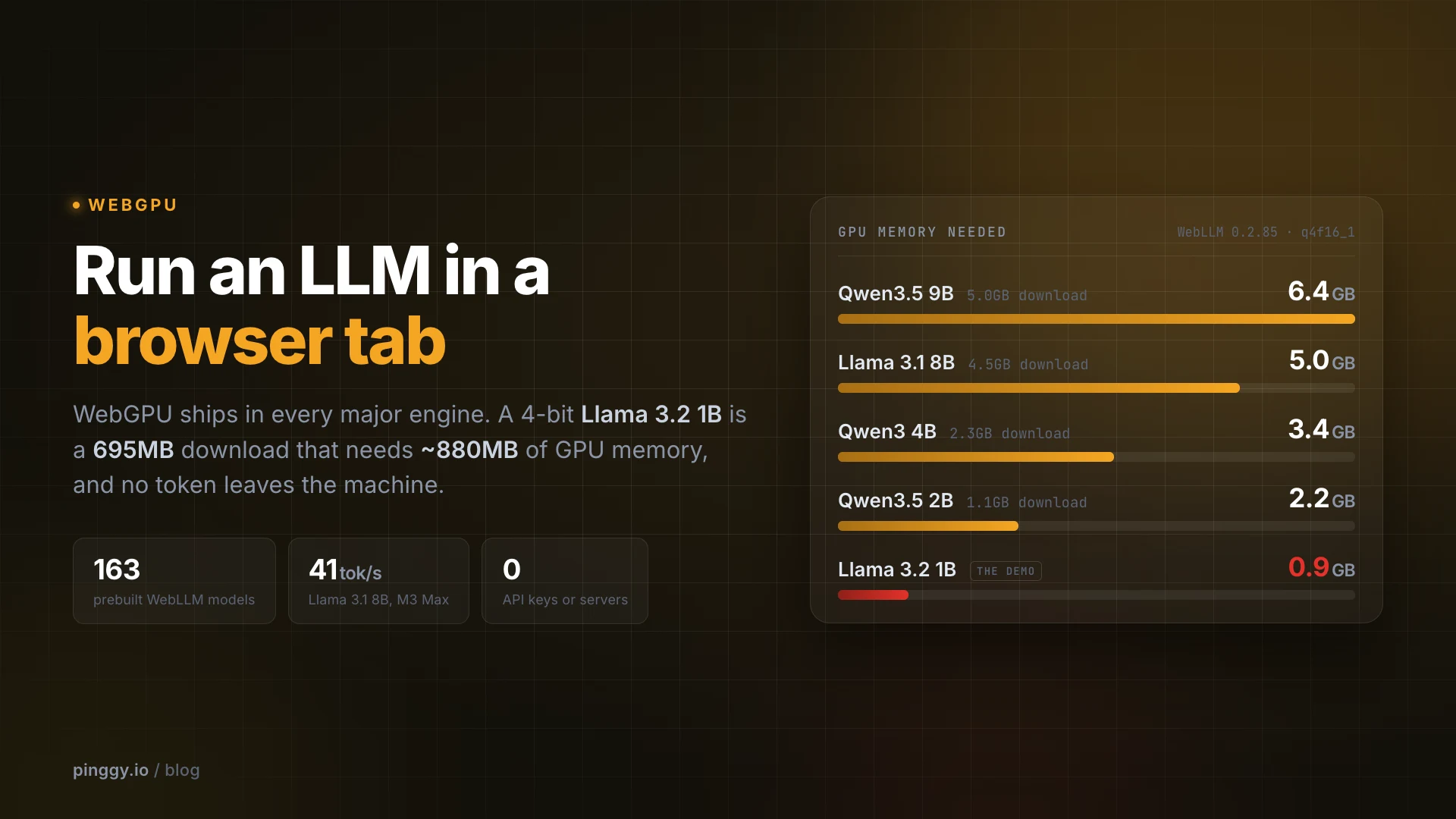
Running the model inside the tab removes all three, and in 2026 that is no longer a science project. WebGPU is available in every major browser engine, the current WebLLM release ships 163 prebuilt model builds, and a 4-bit Llama 3.2 1B is a 695MB download that needs roughly 880MB of GPU memory once it is running. Here is what actually works, the code that does it, and the specific places in-browser inference falls over.
Summary
There are three practical ways to run a language model inside a browser tab today:
- WebLLM (
@mlc-ai/web-llm0.2.85, published 8 September 2026) - WebGPU only, an OpenAI-shapedchat.completions.create()API, and 163 prebuilt model builds ranging from SmolLM2 360M to Llama 2 13B. - Transformers.js (
@huggingface/transformers4.3.0, published 16 September 2026) - WebGPU with a WebAssembly fallback, and far more than chat: embeddings, speech recognition, vision, classification. - Chrome’s built-in Prompt API - the
LanguageModelinterface has been stable on the open web since Chrome 148 (5 May 2026). Nothing to download in your bundle, but it is Chrome-desktop only and Google requires 22GB of free disk and more than 4GB of VRAM.
WebGPU support, per MDN’s compatibility data: Chrome and Edge 113 on Windows, macOS and ChromeOS, with Linux added in 144 (Intel Gen12+ GPUs only); Chrome on Android 121; Safari 26 on macOS and iOS; Firefox 141 on Windows, with Apple silicon macOS arriving in 145 and 147 and Linux still unsupported; Samsung Internet 25.
Budget roughly: Qwen3 0.6B is a 335MB download needing ~1.4GB of VRAM, Llama 3.2 1B is 695MB / ~880MB, Qwen3.5 2B is 1.06GB / ~2.2GB, and Llama 3.1 8B is 4.5GB / ~5GB. Weights land in the browser’s Cache API, so the download is a first-visit cost, not a per-session one.
On speed, the WebLLM paper measured 41.1 tok/s decoding Llama 3.1 8B on a MacBook Pro M3 Max, about 71% of what native MLC-LLM managed on the same machine.
Why the browser works as an inference runtime now
The unlock is WebGPU, not WebAssembly. WASM gave the browser fast CPU execution years ago, but matrix multiplication against a few billion parameters is a GPU job, and WebGL was built for drawing triangles rather than general compute. WebGPU exposes compute shaders and storage buffers directly, which is what makes a transformer’s forward pass practical inside a tab.
The support picture is finally boring, which is the point. Chrome and Edge have shipped it since version 113 in May 2023, Chrome 144 added Linux for Intel Gen12 and newer GPUs, Safari 26 brought it to macOS and iOS in September 2025, and Firefox has had it on Windows since 141. The remaining holes are Firefox on Linux and on Intel Macs, and Firefox for Android.
Two caveats matter before you write any code. First, Firefox does not expose WebGPU inside service workers, so a service-worker-based engine will not run there. Second, WebGPU is secure-context only: navigator.gpu exists on HTTPS pages and on loopback origins such as localhost and 127.0.0.1, and is simply undefined everywhere else. That one rule causes most of the confusion later in this post.
WebNN, the API that would hand this work to an NPU instead, is still behind the #web-machine-learning-neural-network flag in Chrome and Edge and absent from Firefox and Safari, so nothing ships on it today.
The three ways to run a model in a tab
WebLLM is the most direct route to a chatbot. It is built on Apache TVM, compiles model-specific WebGPU kernels ahead of time, and exposes an OpenAI-compatible surface, so engine.chat.completions.create({ messages, stream: true }) behaves like the API you already call. Version 0.2.85 ships prebuiltAppConfig with 163 model entries, including Qwen3 and the newer Qwen3.5 family (0.8B through 9B), Llama 3.2 1B and 3B, Phi-4-mini, gemma3 1B, Ministral 3B and the DeepSeek-R1 distills. Usefully, it needs no cross-origin isolation: there is not a single reference to SharedArrayBuffer in the shipped bundle, because all the compute goes to WebGPU rather than to threaded WASM.
Transformers.js is the better choice when chat is not the whole job. Version 4 rewrote its WebGPU runtime in C++ and runs the same code in browsers, Node, Deno and Bun, and because it rides on ONNX Runtime Web it covers embeddings, ASR, image models and classifiers alongside text generation. You opt into the GPU per pipeline and pick a quantization with dtype, and when WebGPU is missing it falls back to WASM on the CPU instead of failing outright.
import { pipeline } from "@huggingface/transformers";

const generate = await pipeline("text-generation", "onnx-community/Qwen2.5-0.5B-Instruct", {
  device: "webgpu",
  dtype: "q4f16",
});
Chrome’s built-in Prompt API inverts the tradeoff. The model (Gemini Nano) belongs to the browser, so your bundle stays small and there is no multi-hundred-megabyte first load, but you inherit Google’s hardware gate: Windows 10/11, macOS 13+, Linux or ChromeOS, more than 4GB of VRAM, and at least 22GB of free disk on the profile volume, with the model evicted if free space later drops below 10GB. There is no Android or iOS support, and neither Firefox nor Safari implements it. Feature-detect with "LanguageModel" in self and call await LanguageModel.availability() first, since on a fresh profile the model still has to download. Chrome’s docs decline to publish its size, pointing at chrome://on-device-internals instead.
Two more runtimes are worth knowing about. wllama (3.6.1, August 2026) wraps llama.cpp in WebAssembly and will run GGUF models on the CPU when there is no usable GPU, at the cost of needing Cross-Origin-Opener-Policy and Cross-Origin-Embedder-Policy headers for multi-threading. And Google’s MediaPipe LLM Inference API is now in maintenance-only mode, with the LiteRT-LM JavaScript API named as its successor, so new projects should not start there.
A working chat page
This is the whole thing. No build step, no bundler, one HTML file:
<!doctype html>
<html lang="en">
  <head>
    <meta charset="utf-8" />
    <title>Local chat</title>
    <style>
      body { font: 15px/1.6 system-ui, sans-serif; margin: 2rem; max-width: 46rem; }
      textarea { width: 100%; font: inherit; padding: .5rem; }
      h2 { font-size: 13px; letter-spacing: .1em; text-transform: uppercase; color: #6b7280; }
      pre { white-space: pre-wrap; background: #f4f4f5; padding: .75rem; border-radius: .4rem; }
      #out { min-height: 4rem; background: #fff; border: 1px solid #e4e4e7; }
    </style>
  </head>
  <body>
    <h1>Local chat</h1>
    <textarea id="prompt" rows="3">Explain what a reverse proxy does, in two sentences.</textarea>
    <button id="send">Send</button>

    <h2>Engine status</h2>
    <pre id="status">loading the WebLLM runtime...</pre>
    <h2>Response</h2>
    <pre id="out"></pre>

    <script type="module">
      import { CreateMLCEngine } from "https://esm.run/@mlc-ai/web-llm@0.2.85";

      const status = document.getElementById("status");
      const out = document.getElementById("out");

      let engine;
      try {
        engine = await CreateMLCEngine("Llama-3.2-1B-Instruct-q4f32_1-MLC", {
          initProgressCallback: (report) => { status.textContent = report.text; },
        });
      } catch (err) {
        status.textContent = navigator.gpu
          ? `Could not start the engine: ${err.message}`
          : "This browser does not expose WebGPU. Check the support table above, and that the page is on https:// or localhost.";
        throw err;
      }

      document.getElementById("send").onclick = async () => {
        out.textContent = "";
        const started = performance.now();
        let tokens = 0;
        const stream = await engine.chat.completions.create({
          messages: [{ role: "user", content: document.getElementById("prompt").value }],
          stream: true,
        });
        for await (const chunk of stream) {
          const piece = chunk.choices[0]?.delta?.content ?? "";
          if (piece) tokens++;
          out.textContent += piece;
        }
        const secs = (performance.now() - started) / 1000;
        status.textContent = `${tokens} tokens in ${secs.toFixed(1)}s (${(tokens / secs).toFixed(1)} tok/s)`;
      };
    </script>
  </body>
</html>
Save it and serve it with python3 -m http.server 8000, then open http://localhost:8000. Do not open the file with a file:// URL: module imports and the secure-context rule both break there.
On the first run, initProgressCallback narrates a 695MB download split across 22 shards while WebGPU compiles the kernels:
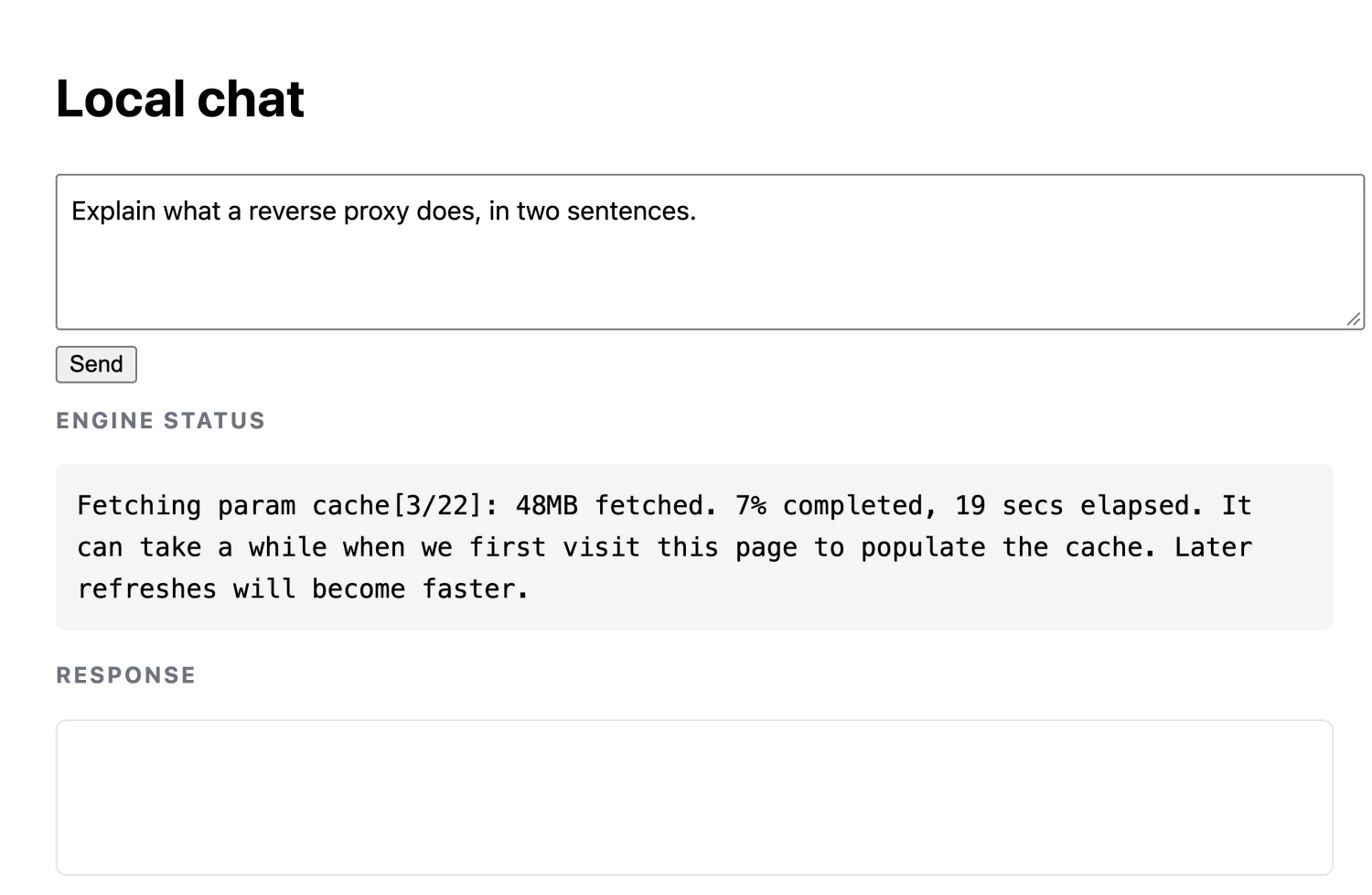
That cold start ran three to five minutes across attempts here. On later visits the weights come out of the Cache API, which is WebLLM’s default cache backend, so startup is dominated by shader compilation rather than network transfer: the same page reloaded in 1.4 seconds. For anything beyond a demo, move the engine into a worker with CreateWebWorkerMLCEngine so token generation stops blocking the main thread.
Once the status line reads Finish loading on WebGPU, generation runs entirely on the local GPU:
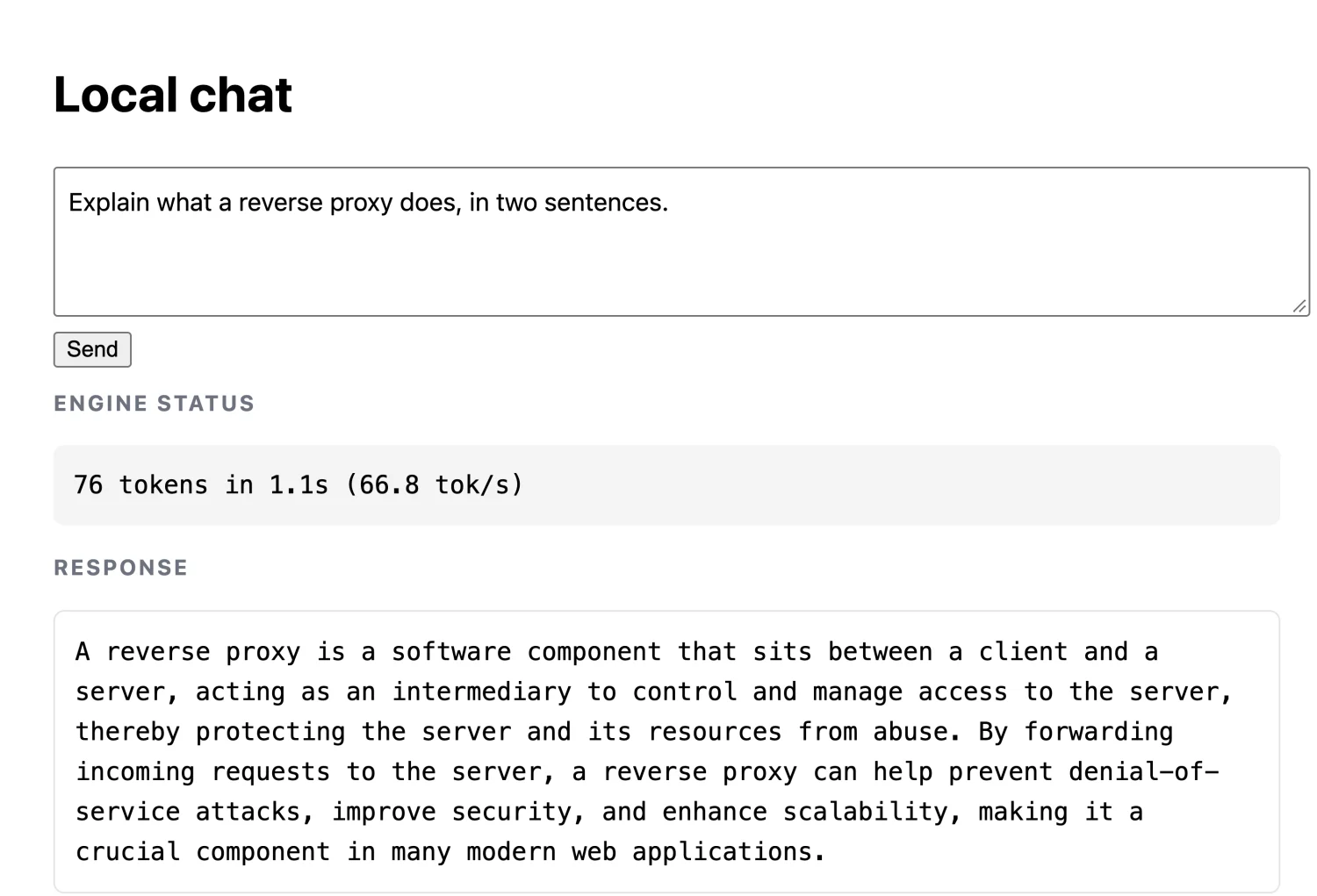
That one produced 76 tokens in 1.1 seconds, or 66.8 tok/s, on an M3 Pro MacBook in Chrome 153. Repeat runs on the same laptop ranged from roughly 27 to 67 tok/s depending on GPU contention, so treat any single figure as a ballpark.
Picking a model that fits
Two numbers matter and they are not the same. The download is what your user waits for once; vram_required_MB is WebLLM’s estimate of GPU memory for weights plus the KV cache at a 4096-token context, and it decides whether the tab runs at all. Both columns come from the model repositories and from prebuiltAppConfig in 0.2.85.
| Model (q4f16_1 build) | Download | VRAM estimate |
|---|---|---|
| SmolLM2 360M Instruct | 204 MB | 376 MB |
| gemma3 1B Instruct | 563 MB | 711 MB |
| Llama 3.2 1B Instruct | 695 MB | 879 MB |
| Qwen3.5 2B | 1,059 MB | 2,245 MB |
| Qwen3 4B | 2,263 MB | 3,432 MB |
| Llama 3.1 8B Instruct | 4,517 MB | 5,001 MB |
| Qwen3.5 9B | 5,038 MB | 6,433 MB |
The q4f16_1 suffix means 4-bit weights with fp16 activations, which needs the shader-f16 WebGPU feature; q4f32_1 is the fp32 fallback for adapters that lack it. Builds with a -1k suffix cut the context window to 1024 tokens, which is the cheapest way to shave several hundred megabytes off the VRAM estimate. If you want a sense of how far this can be pushed, Bonsai 27B runs a 1-bit 27B model in a browser tab at a 3.79GB download, and our guide to small LLMs that fit in 8GB covers the same size tradeoffs outside the browser.
Where it breaks
Memory is the first wall, and it is lower than the numbers above suggest. WebGPU’s spec defaults guarantee only a 256MB maxBufferSize and a 128MB maxStorageBufferBindingSize; anything larger has to be requested explicitly at requestDevice() and granted by the adapter. WebLLM asks for 1GB on both, logs a warning and retries at 256MB and 128MB if the adapter refuses, and throws Cannot initialize runtime because of requested maxBufferSize exceeds limit when even that fails. Adapters vary widely here: Chrome 153 on an M3 Pro Mac reports a 4,294,967,292 byte ceiling for both limits, while a low-end integrated GPU may sit at the spec minimum. When a model does not fit at runtime you usually see the device lost instead of a clean error, which is why WebLLM ships the string WebGPU device was lost while loading the model with a note that it is usually an out-of-memory condition.
The CPU path has its own ceiling. WebAssembly is still 32-bit in practice, capping linear memory at 4GB, and wllama additionally hits a 2GB per-file ArrayBuffer limit that it works around by splitting GGUF files into roughly 512MB chunks. Memory64 has been enabled by default in Chrome since milestone 133, but it is not something you can assume across browsers yet.
Then there is the awkward stuff no API fixes. A multi-gigabyte first download is a real conversion cost, phones throttle under sustained decoding, and a 1B model is not a frontier model, so this suits classification, extraction, rewriting and offline drafting far better than long agentic reasoning.
Testing it on a real phone
This is where the secure-context rule bites. Your laptop opens http://localhost:8000 fine, because loopback origins are trusted. Point your phone at http://192.168.1.50:8000 on the same Wi-Fi and navigator.gpu is undefined, so the page fails before it downloads a single shard. Chrome on Android has supported WebGPU since 121, but it will not hand it to a plain-HTTP origin.
The quickest fix is an HTTPS tunnel to the static server you already have running with python3 -m http.server 8000. In a second terminal:
ssh -p 443 -R0:localhost:8000 free.pinggy.io
Pinggy prints a public https:// URL that forwards to port 8000, which gives the phone a genuine secure context with no certificate wrangling, no router configuration, and nothing to install. Open that URL on the device, and the same WebGPU code path that worked on your desktop runs on the phone’s GPU. The HTTP tunnel docs cover the options worth adding for a longer session, such as keepalive and basic auth.
So when is this the right call?
In-browser inference wins when privacy is the feature rather than a footnote, when a demo has to keep working on a plane, or when per-token cost matters more than absolute quality: classification, redaction before an upload, autocomplete, or summarizing something the user would rather not send anywhere. It is the wrong tool when you need frontier quality, a long context, or predictable performance on unknown hardware, because your users’ GPUs are not your GPUs.
Conclusion
The honest summary for 2026 is that the platform is ready and the models are the limiting factor. WebGPU is in every engine, the runtimes are maintained and moving quickly, and a 1B model in a tab is a 695MB download away.
The shortest useful path is the page above: WebLLM with Llama-3.2-1B-Instruct-q4f32_1-MLC, served on localhost, with the engine moved into a worker before you show it to anyone. Reach for Transformers.js when the job is embeddings, speech or vision rather than chat, and for Chrome’s Prompt API only if Chrome-desktop-only is acceptable. Then check it on a phone over an HTTPS tunnel and size the model for the weakest GPU you care about, because that machine decides whether the feature ships.