The Real Cost of Building and Maintaining an AI Operating System
A marketing team gets an agent drafting campaign copy in a week. The pilot looks cheap because a person is still doing the expensive parts: finding the source material, checking the claims, and copying the approved text into the CMS. Once the company wants the system to take over more of that work, the budget starts to change.
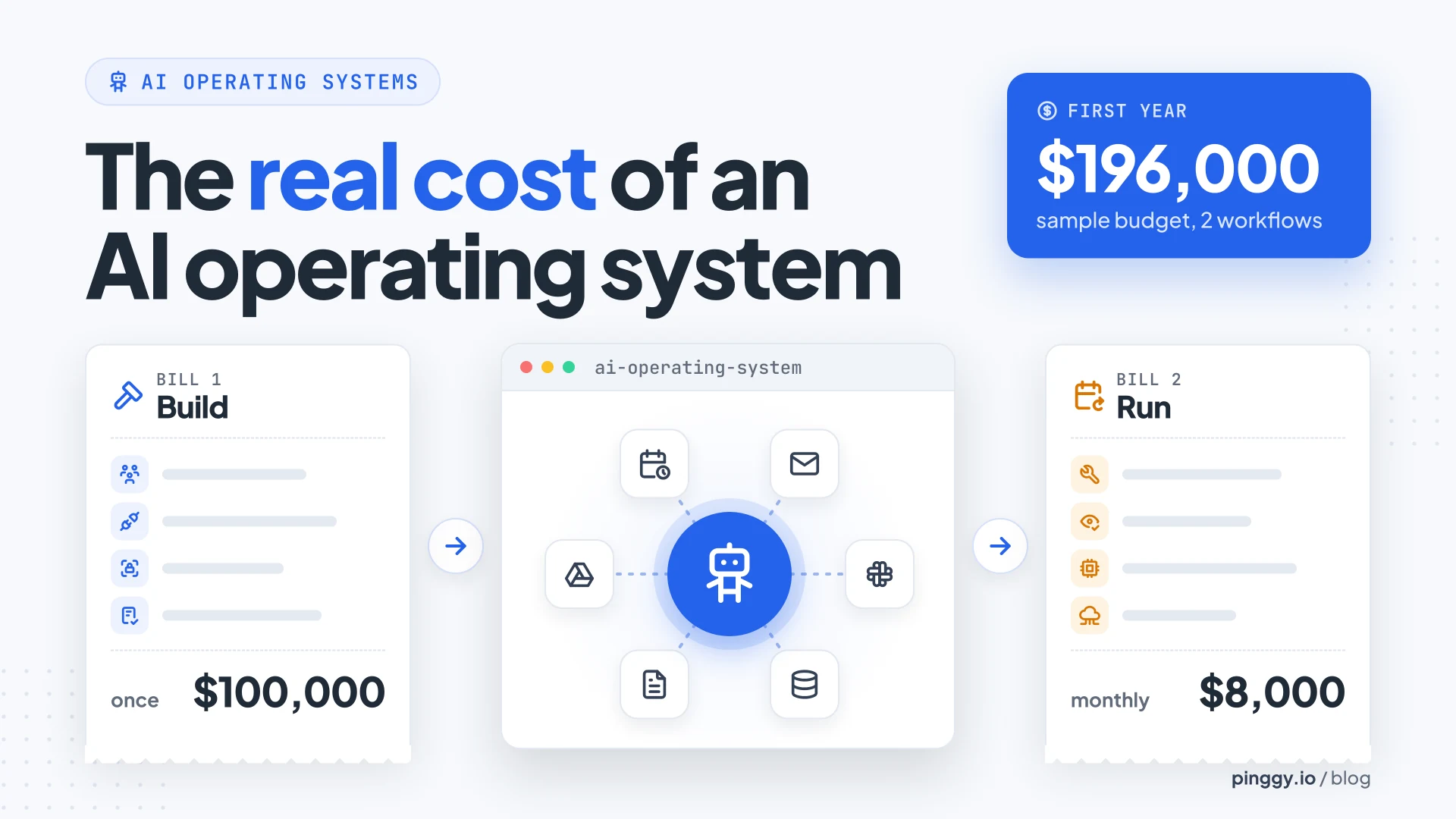
A custom build comes with two bills. The first covers everything needed to put a workflow into production, including app connections and approval steps. The second covers what it takes to keep that workflow useful after launch, when models change, credentials expire, and staff have to deal with failed runs.
Below is where each bill comes from, a sample first-year budget that lands at $196,000, and what the hosted agents from xAI, OpenAI and Meta charge for a much narrower version of the same idea.
Summary
- A pilot hides the expensive work. Someone still finds the inputs, checks the claims and pastes the result. Production adds app connections, approval rules, an identity per agent, and tests for the cases the demo skipped.
- The running bill is mostly people. AWS AgentCore alone bills more than a dozen components separately, yet in the sample budget, models, hosting and software are $2,000 of $8,000 a month. Support, reviews and changes are the rest.
- A sample first-year budget lands at $196,000: $100,000 to build two workflows and $96,000 to run them for 12 months, or $4 per correctly completed case at 2,000 cases a month.
- Delegation multiplies tokens. Anthropic measured multi-agent systems at about 15x the tokens of a chat, enough to turn a $40 monthly model line into $600.
- Hosted agents are cheap per seat but narrow. Grok Bot (from $30 a month), OpenAI Dots (from $100) and Meta Muse (free to $100) absorb hosting and connectors, but publish no per-run cost, have patchy triggers and regions, and don’t run your team’s approval rules.
What a pilot leaves out of the build budget
A pilot shows what an agent can do when someone gives it the right inputs. An AI marketing agent that helps run a campaign every week also needs access to approved source material and a way to hand drafts to an editor.
None of that shows up in the demo. It shows up in the three jobs below, and each one is mostly people’s time rather than compute.
Map the work the team already does
Staff often know exceptions that never made it into a process document. An editor may know which product claims need a second review, and who covers approvals when the regular reviewer is away. Until somebody writes those rules down, the agent can’t follow them. The hours staff spend explaining and testing the workflow belong in the build budget, even though they rarely show up on an engineering estimate.
Connect the apps the workflow uses
A team can paste a brief into a pilot in seconds. An agent running in production might need to find the current brief in a shared drive, create a draft in the CMS, and leave the live page alone. Each of those is a separate connection with its own auth flow, rate limits and permission model, and each one needs setup and testing with the account the agent will actually use, not the admin account someone used for the demo.
Decide where agents can act
The team needs to decide who can approve an action and what happens when the approver says no. That decision affects how the workflow is built, especially when the same agent can both read and change records. Gartner recommends matching oversight to the amount of independence an agent has.
The same May 26, 2026 release puts a number on what happens when teams skip that step: by 2027, Gartner expects 40% of enterprises to demote or decommission autonomous agents because of governance failures, usually found “only after production incidents occur.” Its fix is four autonomy levels with a different amount of control at each:
- Observe: the agent only reads, and controls stay light.
- Advise: it suggests, so outputs get tested for quality and hallucinations.
- Act with approval: a person signs off, which only works if reviewers actually read what they approve.
- Act autonomously: continuous monitoring, guardrails, circuit breakers and fast rollback.
Every step up that ladder is more code to write before launch. A draft-only campaign agent sits at “advise”. An agent that publishes to the CMS on its own sits at the top, and costs the most to build safely.
Where engineering time goes before launch
The first workflow often carries much of the shared setup cost. Later workflows may reuse that setup, but they still need their own rules and tests.
Set up access for each agent
An agent needs an account or identity that the company can manage. A finance agent might be allowed to read invoice records while a separate approval step controls who can change payment details. NIST's work on agent identity and authorization shows why giving agents secure access is an engineering task in its own right.
It’s still a draft concept paper from NIST’s National Cybersecurity Center of Excellence (comments closed on April 2, 2026), but its open questions are the ones a build team hits first: how to identify an agent, how to authorize and delegate its access with OAuth 2.0, and how to log what it did. One of them sums up the problem well: “How do we establish ’least privilege’ for an agent, especially when its required actions might not be fully predictable when deployed?” Answering that for each agent, in each app, is real engineering time.
Save progress and handle failed steps
Longer workflows can stop halfway through when an app times out. The system needs to record completed steps so a retry can pick up without creating a second ticket or sending another email. If the app accepted a change but the agent missed its reply, the workflow may need to check the app before trying again.
That last case is the one that bites. A retry that blindly re-sends the request is how a customer ends up with two refund emails. The usual fix is an idempotency key on every write, or a “look before you act” check against the target app, and both have to be built per connection.
Test the cases the demo skipped
A workflow that passes with clean inputs can still fail on a real request. Tests need to cover missing fields and rejected approvals, along with the records employees handle every day. Someone from the business has to judge the results, because a run can finish successfully and still make the wrong decision. A green status in the logs only means nothing crashed.
What goes into the monthly running cost
A small test rarely gives a full picture of the bill at normal volume. For example, AWS lists separate charges for several AgentCore services, including runtime, memory, and gateway use.
As of November 2026, the AgentCore pricing page lists at least a dozen pieces that are billed separately. Runtime starts at $0.0895 per vCPU-hour plus $0.00945 per GB-hour, Gateway charges $0.005 per 1,000 tool calls, and long-term memory costs $0.75 per 1,000 stored records a month, with Browser, Code Interpreter, Observability, Policy and Evaluations priced on top. Identity is free when it goes through Runtime or Gateway. One detail works in your favour: CPU billing drops to zero while the agent waits on I/O, which AWS says is 30-70% of an agent’s time. None of these numbers is scary on its own. The trouble is that a pilot running ten requests a day tells you almost nothing about how they add up at 2,000 cases a month.
The full monthly list for a custom build usually looks like this:
- Model calls for live runs, repeat attempts, and quality tests.
- Hosting for agents, background jobs, and scheduled workflows.
- Storage for workflow history, files, and any saved agent memory.
- App subscriptions or API charges tied to automated actions.
- Monitoring and log retention across production and test environments.
- Staff time spent reviewing outputs and resolving exceptions.
- Engineering time for support and changes to live workflows.
The last two lines are people. In the sample budget below, they cost three times as much as everything above them combined.
Why maintenance costs continue after launch
A stable workflow has several parts that can change on different schedules: the apps it connects to, the model behind it, and the business rules it follows. Each change can leave the team with work it never saw during the pilot.
App changes can break a working connection
An app owner might rename a CRM field or change which account can access it. The agent can still run and appear healthy while records go to the wrong place. That’s worse than a crash, because nothing alerts anyone. The team needs someone who can trace the problem, fix the connection, and check which records need repair.
New models need to pass old tests
A model update can change how an agent reads an invoice or decides which team should handle a request. The owner needs a set of real cases to run before switching models in production. Keeping those cases current takes time as the business adds new rules or starts seeing different requests. Treat the eval set like any other test suite: it rots if nobody owns it.
Review queues take staff time
A workflow can finish in seconds and leave someone with minutes of work checking it. If reviewers have to reopen source records for most runs, that time can erase much of the savings. Counting time spent on rejected or corrected outputs gives a clearer picture of what the workflow costs.
What a first-year budget can look like
Suppose a company builds a system for two recurring workflows. It budgets 1,000 combined hours for discovery, integration, and testing at an average of $100 an hour. That puts the initial build at $100,000 in this example.
After launch, the company budgets 60 staff hours a month for engineering support, reviews, and small changes. At the same blended rate, that’s $6,000 a month, plus $2,000 for model use, hosting, and software. The monthly budget comes to $8,000, or $96,000 for 12 months in production.
| Line item | Basis | First-year cost |
|---|---|---|
| Discovery, integration and testing | 1,000 hours at $100 | $100,000 |
| Engineering support, reviews and small changes | 60 hours a month at $100 | $72,000 |
| Model use, hosting and software | $2,000 a month | $24,000 |
| Total | $196,000 |
The build plus the first 12 months in production comes to $196,000 under those assumptions. These numbers describe a sample budget, and each company’s own rates and usage determine its total. At 2,000 correctly completed cases per month, the running cost alone would be $4 per completed case. Fold the build in over the first year and it’s $8.17.
Note which number moves the most. Model use, hosting and software are $2,000 of the $8,000. If the 60 staff hours a month turn into 90, the extra $3,000 is more than the entire infrastructure line.
How costs change when more teams use it
Some parts of a custom build get cheaper to reuse. A second workflow may already have access to the same document store and logging system. The team still needs to test what the new agent can see, especially if it handles records from a different department.
Model use can rise faster than case volume when several agents work on the same request. In Anthropic's data, multi-agent systems used about 15 times as many tokens as chat interactions. That figure came from Anthropic’s own work and shows how far a chat-based estimate can be from the cost of a system that delegates work.
The same post puts single agents at about 4x the tokens of a chat, and found that token usage alone explained 80% of the performance difference on its BrowseComp test. Anthropic’s own conclusion is that multi-agent setups only make sense “where the value of the task is high enough to pay for the increased performance.”
Here’s what that looks like in dollars. Say a chat-style run of one case uses 5,000 input and 1,000 output tokens. On Claude Sonnet 5.5 ($2 and $10 per million tokens) that’s about $0.02. Fan the same case out to a multi-agent setup at 15x and it’s about $0.30. At 2,000 cases a month, the model line goes from $40 to $600, before a single retry or quality test runs. It still fits inside the sample budget above, but it’s no longer a rounding error.
Costs also change when a rollout moves from one department’s budget to several. Shared spending can sit with IT, while staff time for approvals and corrections sits with each business team. The FinOps Foundation’s 2026 report identifies AI cost management as the skill its respondents most want to develop. In its survey of 1,192 practitioners, 58% said they want to add AI cost management skills in the next 12 months, well ahead of FinOps tooling at 43%, and 98% now manage AI spend, up from 63% in 2025. When the people whose job is cloud cost say AI spend is the thing they can’t track yet, budget for tracking it from day one.
How Grok Bot, OpenAI Dots and Meta Muse work, and what they cost
The quickest way to see what a platform can absorb is to look at hosted agents you can already buy. xAI’s Grok Bot, OpenAI’s dots and Meta’s Muse each give you an always-on agent with its own cloud computer, app connectors and a schedule, for a monthly fee. They’re built for one person’s work rather than a department’s, but they take three items off the running-cost list above: hosting, the model bill (inside teh plan’s allowance), and keeping app connections working.
| Agent | Starts work on | Who holds your logins | Price (November 18, 2026) | Biggest limit |
|---|---|---|---|---|
| Grok Bot (xAI) | Schedules at least 5 minutes apart, plus Slack, GitHub, Linear, Sentry, PagerDuty, email and webhook events | All bots share one cloud computer, its browser sessions and logins | X Premium $30, Super $100, Ultra $200 a month, usage shared with Grok and Cursor | No separate spend cap; unsigned webhooks |
| OpenAI Dots | Wakes itself, saved schedules, event monitoring on some connected apps | Private sign-in form; research is read-only, actions need permission | ChatGPT Pro $100, $200 or $500 a month; Business Premium $100 per user a month billed annually | No API or webhooks; personal Pro excludes the EEA, UK and Switzerland |
| Meta Muse | Background jobs and crons, unprompted suggestions | A separate agent, Sentinel, holds real credentials; Muse sees stand-ins | Free, Power $20, Maximum $100 a month; card required | No event triggers; US, Canada, Singapore and Australia only |
Prices and limits from each vendor’s docs and pricing pages, checked November 18, 2026. Our proactive AI agents comparison covers how each one decides to start work in more depth.
Grok Bot: a team of bots on one shared computer
xAI shipped Grok Bot in beta on August 11, 2026 and released Grok Bot 1.0 on November 11. You don’t get one agent, you get a team: each bot can hold up to 50 routines, and a routine runs on a schedule (at least five minutes apart) or on an event from Slack, GitHub, Linear, Sentry, PagerDuty, email to the bot’s address, or a webhook. There’s no model picker; Grok Bot chooses a first- or third-party model per task. Of the three, it’s the only one your own systems can trigger directly, which matters if the workflow starts in a ticketing tool rather than a chat window.
It comes with The X Subscription’s Premium ($30 a month), Super ($100) and Ultra ($200) plans, with team seats at the same per-seat price and Team Bots on the Team and Enterprise plans. Bot usage draws from the same weekly pool as Grok and Cursor, and “Each run spends usage”. The docs are blunt about the downside: “The cap does not stop a Bot in the middle of a run,” and “A separate Grok Bot spend cap is not available today.” Usage can be topped up with credits, but xAI publishes no per-run price, so working out a cost per completed case means watching the pool drain.
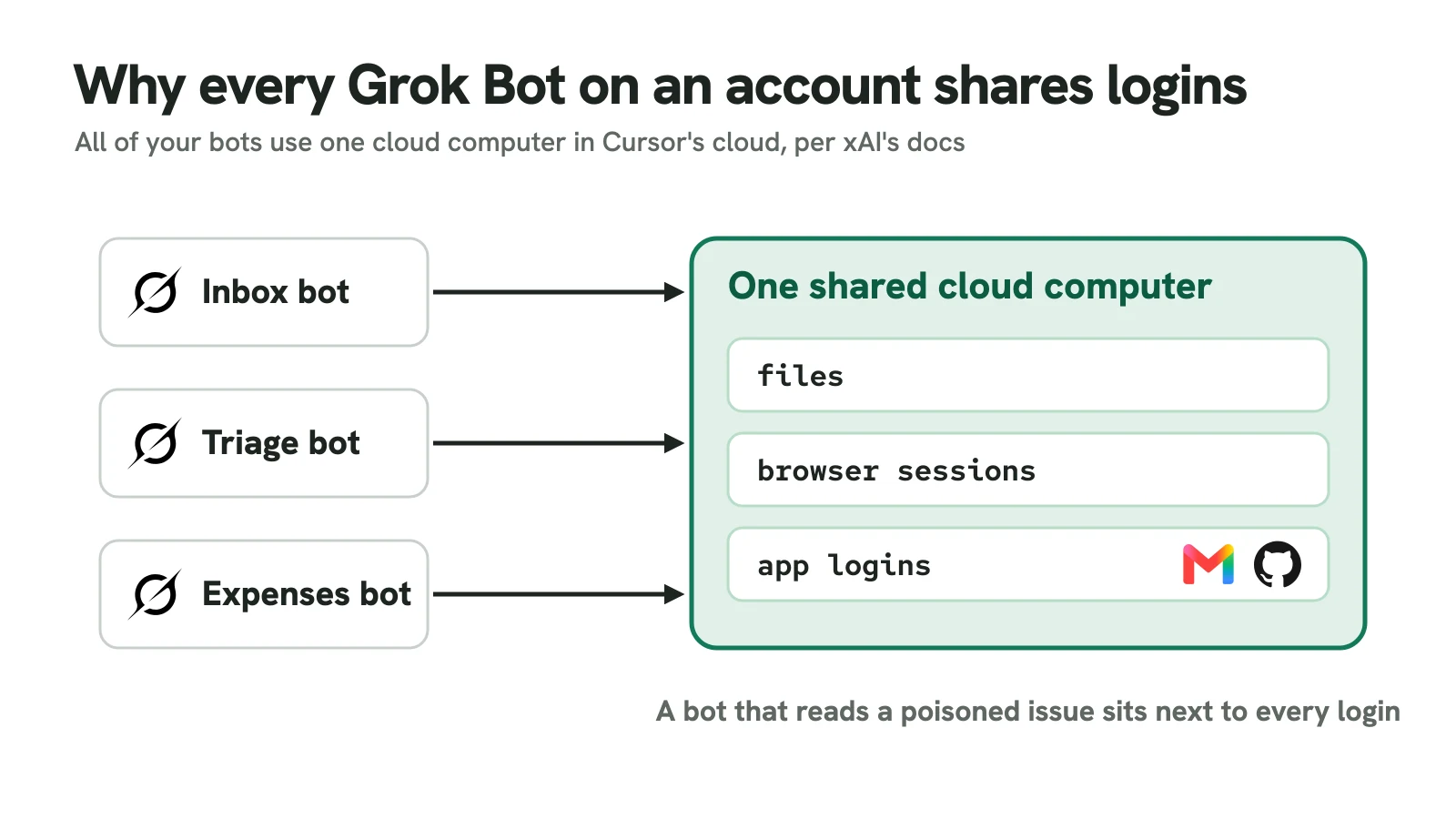
The bigger limit is the computer. “All of your Bots share one cloud computer assigned to your user account,” and “The screens are separate work surfaces, not separate security boundaries,” so browser cookies and signed-in sessions are shared too. A triage bot reading a poisoned GitHub issue sits next to your inbox bot’s Gmail session. Webhooks authenticate with a bearer key and no request signing, and a 200 only means the run started, not that it finished. Auto Review, an independent model that checks risky actions, is on by default, and passwords are filled without being shown to the model.
OpenAI Dots: one coordinator inside ChatGPT
A dot lives in OpenAI’s cloud with its own computer and browser. It launched on GPT-6 Astra, and OpenAI has since added GPT-6.1 Terra, with the dot picking models for different parts of its work. It decides when to pause and wake up, runs saved schedules, and can now watch for events on connected services that support it, such as a new message in a Slack channel. Background research is read-only, and follow-up actions need the matching permissions. You can connect more than one of your own computers and tell the dot which to use. Our guide to using OpenAI Dots as a chief of staff walks through the setup.
Personal access starts with ChatGPT Pro at $100 a month (Pro 200 and Pro 500 raise the limits). Business Premium is $100 per user a month billed annually, or $125 monthly. Enterprise can pay a flat rate based on the type of work a dot does, or pay by consumption, though OpenAI hasn’t published either number and the preview is free. Talking to your dot doesn’t count toward ChatGPT usage limits, but the ChatGPT Work and Codex tasks it hands off count toward those products’ limits, and on Enterprise they’re billed separately at standard rates.
The limits are mostly about reach. There’s no dots API and no webhook, so your CMS or ticketing system can’t hand work to a dot. Personal Pro still excludes the EEA, the UK and Switzerland. OpenAI’s security docs say “Neither dots nor Work with local computer access provides strict zero data retention,” and dots aren’t available in FedRAMP workspaces. One for admins: from November 18, 2026, dots are on by default for Enterprise, Edu and Healthcare workspaces unless the workspace opts out.
Meta Muse: a second agent holds the keys
Muse gives each user a dedicated Muse Secure VM. The agent runs on Muse Spark 1.3 inside a systemd-nspawn container, alongside its sub-agents and cron jobs, and a seperate host-side agent called Sentinel decides what it may do. In Meta’s words, “Muse proposes actions, but only Sentinel can grant permission to perform action.” The agent only ever holds surrogate tokens; Sentinel swaps in the real credential at the network boundary. Payments go through single-use Stripe Link card numbers, each needing your approval.
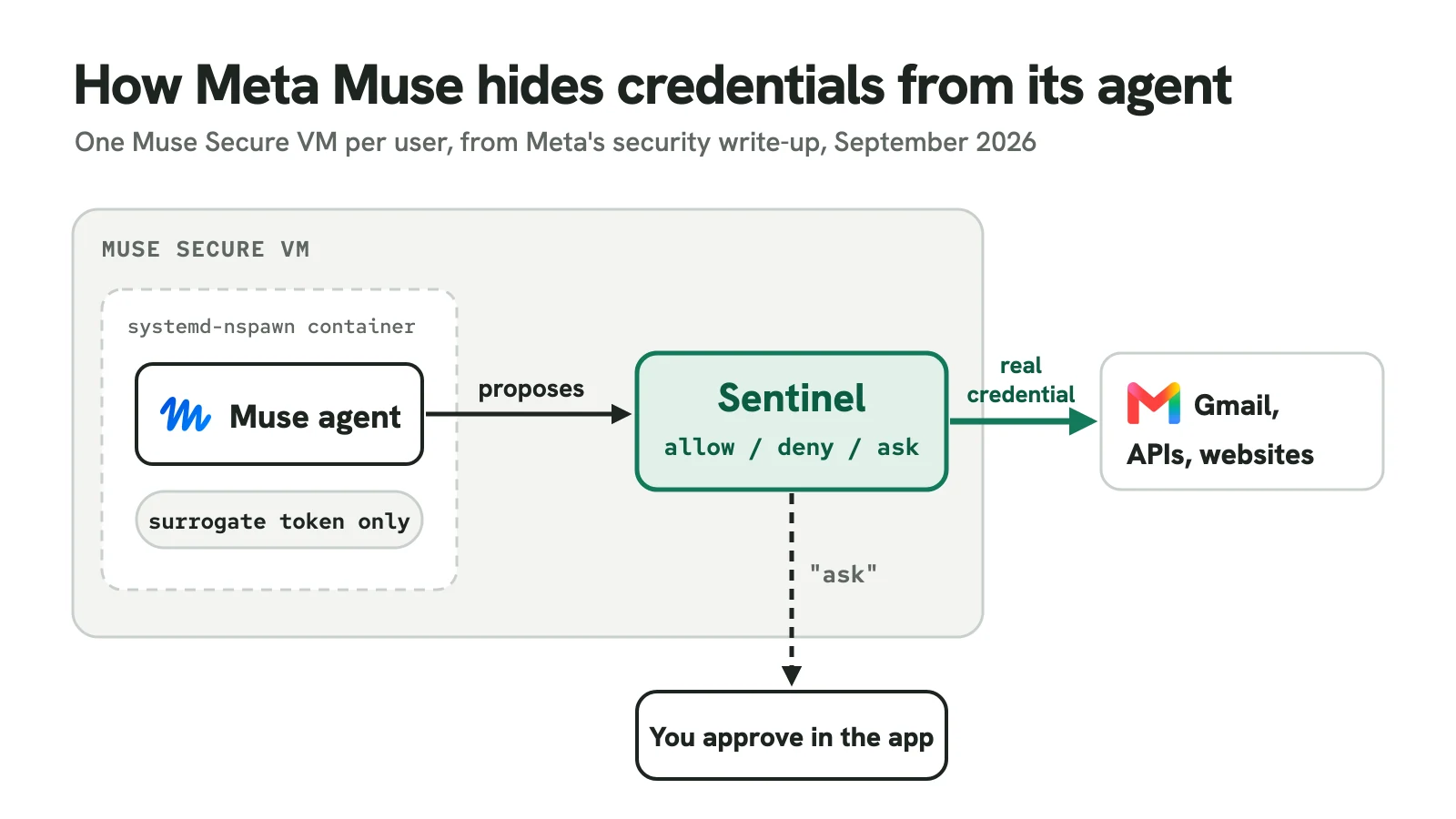
Pricing is the lowest here: a free tier, Power at $20 a month and Maximum at $100, with a card required even on the free tier. Muse for Small Business adds connectors for QuickBooks, Shopify, Slack and Stripe, but Meta lists no separate business price. Of the three designs, Sentinel is the closest to what the NIST paper above asks for: the agent never sees a real credential.
What Muse lacks is a way in. There are no user-facing webhooks or event triggers, so you ask for work in chat or wait for its own suggestions. The Personal Agent Protocol 1.0 that Meta released on November 13 runs the other way: a business publishes a poppy.json file pointing Muse at its website, APIs or MCP server. Muse is available in the US, Canada, Singapore and, since November 17, Australia. Meta restricts staff access to your data “through operational policies”, which “does not prevent Meta from accessing data when necessary”, and the Confidential VM meant to close that gap hasn’t shipped. Training on your conversations is on by default, with an opt-out. Meta also reports paying about $1.2 million in bug bounties for 64 valid findings, the largest $300,000 for a pre-launch bug that exposed conversations and tokens in employee test VMs.
What a hosted agent covers, and what it leaves with you
Line the three up against the two bills and the split is clear. They cover hosting, model calls within the plan, credential storage and upkeep of the connectors they support. They don’t cover mapping your team’s exceptions, approval rules more detailed than “ask before sending”, connections to an internal CMS or database they don’t support, the test cases you run before a model change, or the review time each output still needs.
They’re also priced per person, not per workflow. A $100 seat is tiny next to $8,000 a month, and for one marketer who wants a weekly campaign brief drafted, it may be all they need. But none of them publishes a per-run cost, only Grok Bot accepts triggers from your own systems, and Grok Bot has no spend cap of its own. If the goal is two workflows across departments, with approvals and a cost per correctly completed case you can report on, you’re back to the question in the next section.
When building from scratch is worth the cost
Building a custom system can make sense when the workflow depends on rules, data, or infrastructure that existing platforms cannot support. Comparing that build with an AI operating system on the same workflow makes it easier to see which costs a platform can absorb and which work stays with the business.
A custom build tends to pay off when most of these are true:
- The workflow depends on rules that need custom code.
- An essential internal system needs an integration your team must own.
- Data must stay in an environment the company controls.
- The workflow runs often enough to spread the build cost.
- A failed run has a measurable cost the team can reduce.
- An engineering team has time to maintain the system after launch.
- A business owner can measure the cost per correctly completed case.
Conclusion
The cost of an AI operating system comes into focus once the team accounts for the work that happens after a successful demo. Each connection needs an owner, and someone has to handle the cases that come back incomplete. A budget that includes building the workflow and running it for a full year gives the team a fair basis for deciding what to build.
Before signing off, price one workflow both ways. For the custom build, take the first-year total. For a platform, take the seat or usage cost plus the mapping, review and testing work that stays with your team. Divide each by the cases you expect to complete correctly in that year, and compare the two numbers.