The End of App Switching: Why All-in-One AI Workspaces Are Replacing Tool Stacks
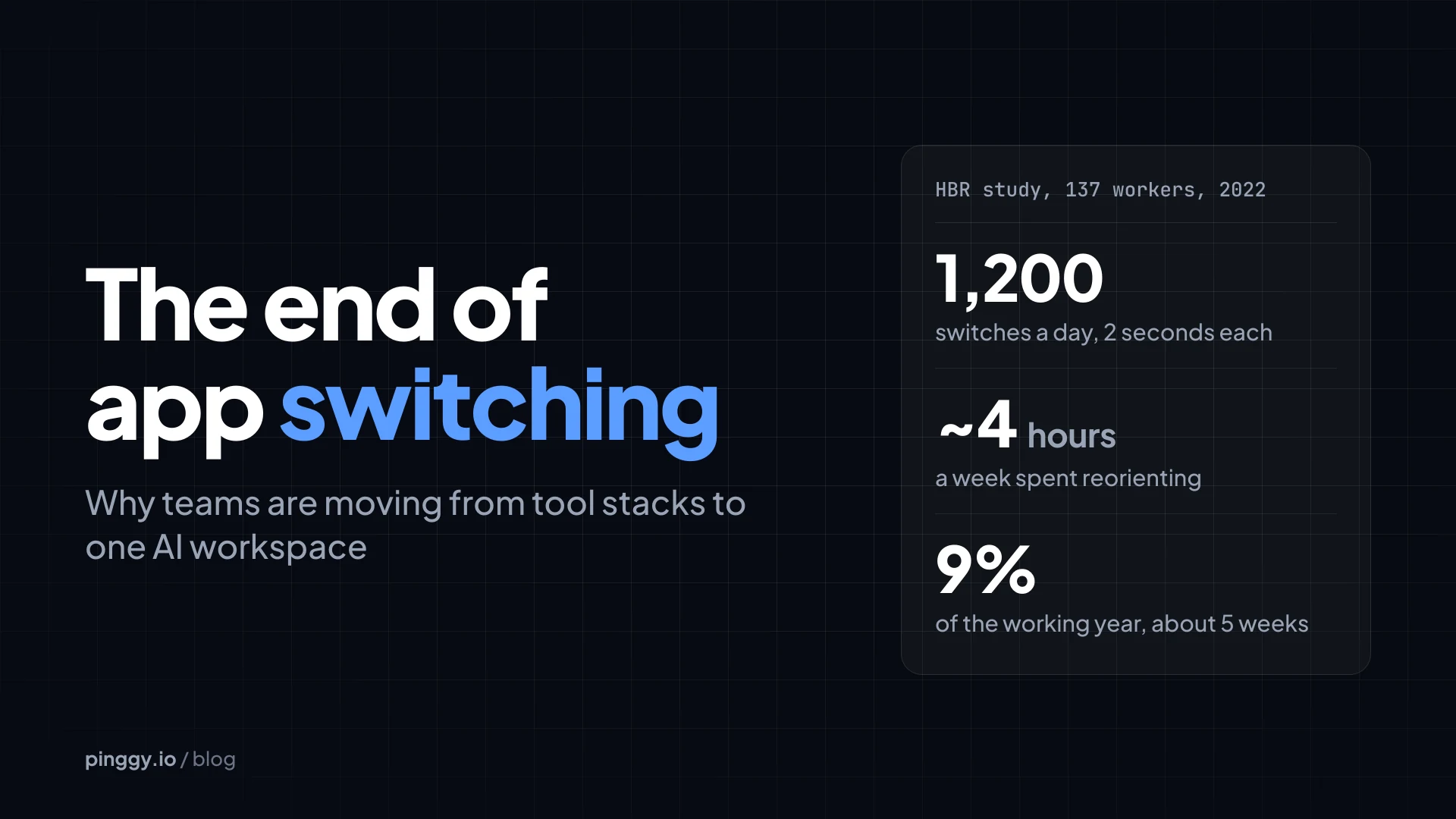
Data: Harvard Business Review, August 2022.
Think about the last project you finished. You probably researched in a browser, took notes in one app, ran numbers in a spreadsheet, built slides in another tool, generated images somewhere else, and asked a chatbot for help in yet another tab. Each tool did its job. But a surprising chunk of your day went to moving information between them.
That pattern is starting to change. A growing number of professionals and teams are replacing their sprawling tool stacks with one AI workspace, a single environment where an AI agent can research, write, analyze data, design, and deliver finished work. This article covers what’s driving the shift, what the research says about the real cost of app switching, and how to decide whether consolidating makes sense for you.
Summary
- App switching adds up. A 2022 Harvard Business Review study of 137 workers found nearly 1,200 app and website toggles a day per person, costing just under four hours a week, or about 9% of the working year.
- The first wave of generative AI made it worse. Teams added a chatbot, a writing assistant, an image generator, a video tool and a note-taker, each with its own login and bill.
- An all-in-one AI workspace is agentic. You describe the outcome, one agent plans the steps and hands back finished files (documents, spreadsheets, slide decks), and context carries from one task to the next.
- Choose on outputs, not demos. Look for downloadable files, persistent context, a plan you can review, clear data policies, export options and transparent pricing. Pilot one recurring workflow for two to four weeks first.
- Keep specialist tools where they earn it: complex financial models, pixel-level design, and systems a regulator requires. The goal is less switching, not zero apps.
The hidden cost of the modern tool stack
App switching feels harmless because each switch takes a moment. The problem is volume. In a study published in Harvard Business Review in 2022, researchers tracked 137 workers across 20 teams at three Fortune 500 companies for up to five weeks. The average worker toggled between apps and websites nearly 1,200 times a day.
Each switch cost only a little over two seconds, but those seconds add up fast. The researchers estimated that workers spent just under four hours a week reorienting themselves after switching. That’s roughly five working weeks a year, or about 9% of annual working time.
Time is only part of it. Gloria Mark, a professor of informatics at the University of California, Irvine, has spent years studying workplace interruptions, and her research found it can take more than 20 minutes to fully get back to an interrupted task. Business professor Sophie Leroy coined the term “attention residue” in a 2009 study to describe what happens when part of your mind stays on the previous task after you switch. So every jump between tools can leave you a little less focused on the work in front of you.
Multiply that across a team of 10 or 50 people, and the cost of a fragmented tool stack gets hard to ignore.
How we ended up with so many apps
The modern tool stack didn’t appear overnight. Over the past 15 years, software moved toward a “best-of-breed” model, where each product solves one job very well. Teams adopted a writing tool, a design tool, a project management tool, a spreadsheet tool, a presentation tool and a communication tool, then relied on integrations to connect them.
Integration platforms helped, but they added their own complexity. Every automated workflow became one more thing to configure, maintain, and troubleshoot whenever an app changed its interface or its pricing.
Ironically, the first wave of generative AI made the problem worse. Instead of cutting the number of tools, it added more. Plenty of teams now pay for a chatbot, an AI writing assistant, an AI image generator, an AI video tool and an AI note-taker, each with its own login, subscription and learning curve. The result is more capability, and more fragmentation.
What an all-in-one AI workspace actually is
An all-in-one AI workspace is a single environment where one AI agent handles many kinds of work from the same conversation. Instead of opening a separate application for each output, you describe what you need and the workspace produces it, whether that’s a research report, a document, a spreadsheet, a slide deck, an image, a video or a website.
That’s different from a traditional software suite. A suite bundles separate applications under one brand, but you still move between them and carry the context yourself. It’s also different from a standard chatbot, which can explain how to build a spreadsheet but usually can’t hand you a finished, working file.
What makes it a true AI workspace is that it’s agentic. You describe an outcome, and the agent plans the steps, picks the right tools, does the work, and delivers a result you can review, edit and download. Because everything happens in one place, the context from your earlier requests carries into the next task.
The model is especially useful for small teams, solo founders, freelancers and students. They rarely have dedicated specialists for design, data analysis or research, so a single workspace that covers all three can noticeably expand what one person gets done in a day.
Why tool stacks are losing ground
A few forces are pushing teams toward consolidation, and each one targets a specific weakness of the traditional tool stack.
Context stays in one place
In a fragmented stack, context lives in your head. You remember which spreadsheet has the latest numbers, which document holds the approved messaging, and which folder has the brand assets. In a unified workspace, the agent can reference your earlier work, uploaded files and stated preferences, so you spend less time re-explaining the project every time you start a new task.
AI agents handle the handoffs
Most wasted time in knowledge work happens between tasks, not during them. Copying figures from a PDF into a spreadsheet, turning that data into charts, and moving the charts into slides are all handoffs. An agentic workspace can run those steps in sequence, which removes much of the manual transfer work that fills the average day.
Simpler costs and administration
Subscription sprawl is expensive and hard to manage. Every extra tool brings a license fee, a security review, an onboarding process and another set of permissions to maintain. Folding several AI subscriptions into one platform can simplify budgeting and take some of the administrative load off IT and operations teams.
Finished output, not just answers
Early AI tools were mostly advisory. They answered questions and offered suggestions, but you still had to build the final deliverable yourself. Today’s AI workspaces are designed to produce the deliverable itself: a formatted document, a working spreadsheet, or a presentation ready for review. That shift from advice to execution is the main reason consolidation now feels practical rather than theoretical.
A real-world example: one project, before and after
Take a common task: preparing a quarterly business review for a small company.
The tool stack approach. You research market trends in a browser with a dozen tabs open. You download sales figures as PDFs from your accounting system and retype them into a spreadsheet. You write formulas, fix the inevitable errors, and build charts. Then you open a document editor to write the summary, switch to a presentation tool to build slides, and visit an image generator for visuals. Along the way, you toggle between apps hundreds of times.
The unified workspace approach. In an agentic platform such as ImagineArt’s Imagine Computer, you start by asking the agent to research recent trends in your market and summarize them with sources. Next, you upload the PDF sales reports and ask the built-in AI spreadsheet maker to turn them into an organized Excel file with working formulas and quarter-over-quarter comparisons. Finally, you ask the same workspace to turn the findings into a written summary and a slide deck.
You still review every output, check the numbers, and refine the messaging. The difference is that you direct the work from a single conversation instead of rebuilding context across six separate tools.
Where spreadsheets fit in a consolidated workspace
Spreadsheets deserve special attention because they sit at the center of so many workflows. Budgets, sales pipelines, project trackers, inventory lists and gradebooks all live in spreadsheets, yet building a reliable one still takes formula knowledge that a lot of people don’t have.
An AI spreadsheet maker changes that. Instead of choosing functions and structuring columns yourself, you describe in plain language what the sheet needs to do. The AI spreadsheet generator in ImagineArt’s Imagine Computer, for example, can work from a prompt, a PDF or raw data, then write the columns, fill in working formulas, and hand back a downloadable .xlsx file. It also offers templates for common needs such as budgets, trackers, gradebooks and pipelines.
A simple prompt shows how this works in practice: “Create a monthly marketing budget for a five-person team with planned spend, actual spend, variance by channel, and a summary row that flags any line more than 10% over budget.” A capable AI spreadsheet maker should return a structured file with those columns, the variance formulas and the flagging logic already in place.
When the spreadsheet lives in the same workspace as your research and documents, the numbers can flow straight into reports and presentations without manual copying. That said, always verify an AI-generated spreadsheet before you rely on it. Spot-check the totals, review the key formulas, and confirm the source data was captured correctly.
What to look for when choosing one AI workspace
Not every platform that claims to be all-in-one delivers on it. Before you consolidate, check each option against these criteria:
- Real, downloadable outputs, such as documents, spreadsheets and slide decks, rather than text you have to reformat elsewhere.
- Persistent context, so the agent remembers your projects, files and preferences across sessions.
- Integrations with the tools you can’t replace, such as email, cloud storage and team chat.
- A plan you can review, so you can approve or edit the agent’s steps before it runs them.
- Clear data privacy and security policies, including how your files are stored and whether they’re used for training.
- Export options that let you take your work elsewhere, which protects you from vendor lock-in.
- Transparent pricing that makes it easy to compare the platform’s cost against your current subscriptions.
Run a short pilot before you commit to a platform. Pick one recurring workflow, do it in the new workspace for two to four weeks, and compare the time spent and the quality of the results against your current process.
When a specialized tool still makes sense
Consolidation isn’t the right answer for every situation. Financial analysts building complex models may still need the advanced features of a dedicated spreadsheet application. Professional designers may prefer specialized design software for pixel-level control. And teams in regulated industries may be required to use specific approved systems.
For most teams, the practical approach is a hybrid. Use one AI workspace for most everyday research, writing, data and presentation work, and keep a small number of specialized tools for the tasks that genuinely need them. The goal isn’t to eliminate every app. It’s to eliminate unnecessary switching.
How to make the transition without disrupting your team
Start by auditing your current stack. List every tool your team uses, what it costs, and which workflows depend on it. You’ll likely find overlapping subscriptions, and tools that only one or two people use.
Next, find the workflows with the most handoffs, such as reporting, content production or client proposals. Those are the best candidates for consolidation because they offer the largest time savings. Migrate one workflow at a time, document the new process, and gather feedback before expanding. Finally, retire redundant tools gradually so no one loses access to important files.
Measure the results as you go. Track the hours spent on each migrated workflow, the number of tools involved, and the quality of the final output. Those simple metrics make it easier to justify further consolidation, or to pull back if a workflow performs better in its original tool.
Final thoughts
The tool stack era solved real problems, but it also created a hidden tax on focus, time and budgets. As AI agents get better at producing finished work across formats, the case for juggling a dozen disconnected apps gets weaker every year.
Consolidating into one AI workspace won’t remove the need for human judgment, careful review, or the occasional specialized tool. What it can remove is the constant switching that fragments your attention. For teams that want to spend less time moving information around and more time on meaningful work, the end of app switching may already be here.