Edge Functions on MicroVMs: Why Netlify Left V8 Isolates
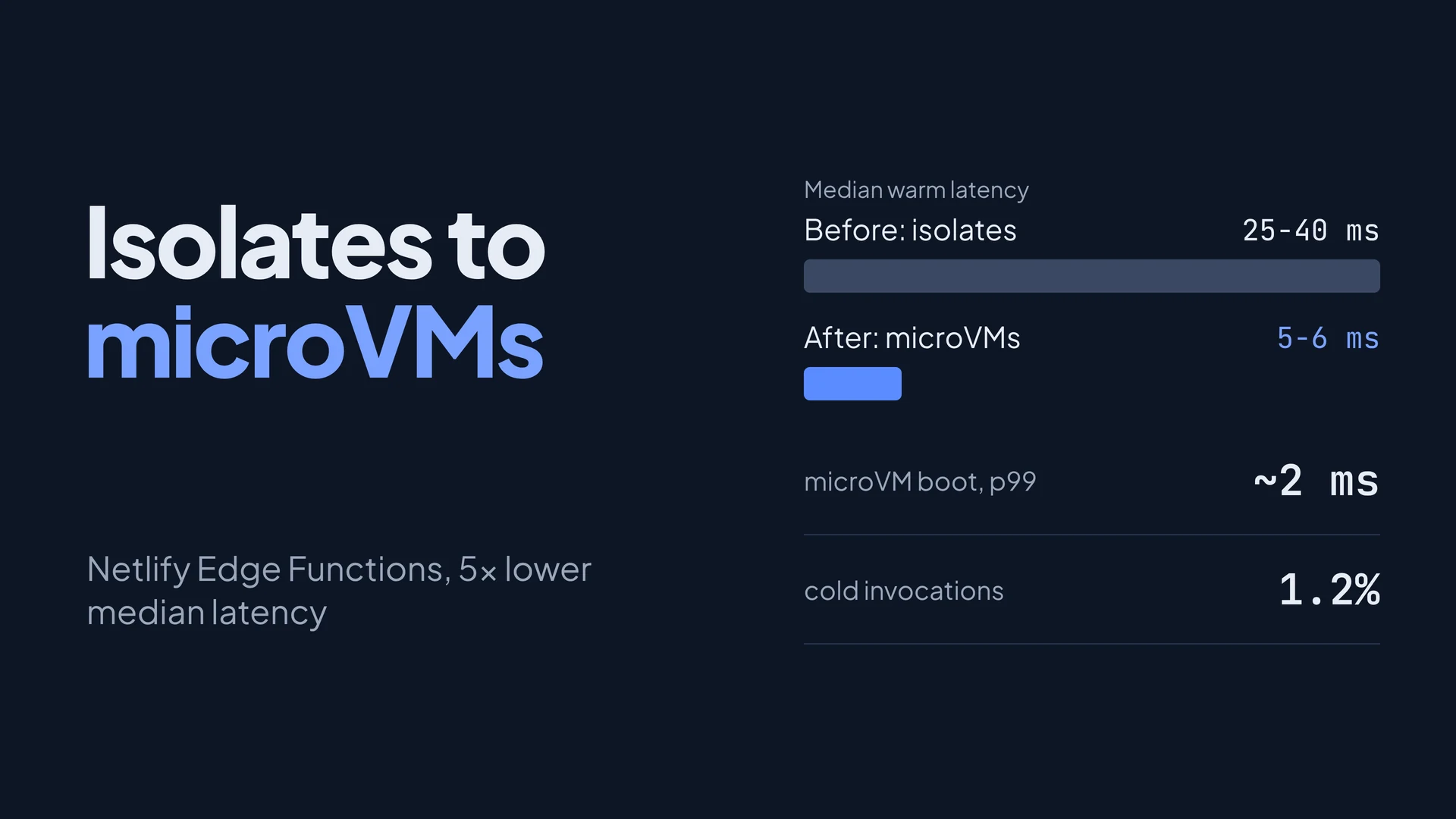 Netlify has moved Edge Functions off V8 isolates and onto Firecracker microVMs, and median warm latency dropped from 25-40 ms to roughly 5-6 ms. That runs against the usual story, where isolates are the fast, light option and virtual machines are the slow, heavy one. The numbers only make sense once you see that the old setup paid for a network hop, and the new one pays for almost nothing.
This post walks through why that works: what an isolate gives you and what it doesn’t, what a microVM costs to start, and the three tricks (memory-mapped images, snapshots and sticky routing) that bring that cost down to a few milliseconds. All figures come from Netlify's own write-up of the change, published on September 29, 2026, plus the Firecracker docs. I have not benchmarked any of it myself.
Summary
- The speedup is mostly the removed network hop. Requests used to leave Netlify’s network for a separate execution service. Now the code runs on compute nodes inside the edge network.
- A microVM can start in single-digit milliseconds when it boots a stripped-down Linux guest, reads its code from a memory-mapped read-only image, and restores from a snapshot instead of booting cold.
- Isolation gets stronger, not weaker. A hostile deploy lands in its own VM behind hardware virtualization, not in a shared V8 process.
- Routing keeps things warm. Rendezvous hashing sends the same function to the same compute node, so its snapshot and image are already there. About 1.2% of invocations are cold.
- The old limits stay for now (50 ms CPU, 512 MB memory, 20 MB compressed code), because they came from the isolate model and Netlify says it will revisit them.
What an isolate gives you, and what it doesn’t
A V8 isolate is a separate heap and execution context inside one running V8 process. Cloudflare’s docs describe one runtime instance running “hundreds or thousands” of isolates and switching between them, with an isolate starting around a hundred times faster than a Node process in a container or VM. Nobody pays for a kernel boot or a fresh process.
The trade is the isolation boundary. Every tenant shares one process, one JavaScript engine and one set of host syscalls, so the wall between customers is the engine’s own memory safety. Isolates are also disposable by design. Cloudflare’s docs warn that an isolate can be “spun down and evicted” at any time and that you should not keep mutable state in global scope.
Netlify’s argument is blunter. A compromised deploy in a microVM cannot poison other customers or the compute layer even if it escapes the runtime, and in their words, “V8 isolates, no matter their name, do not provide this level of isolation”.
For the rest of this post, the worked example is one Edge Function that reads a request header and rewrites the response. It is small on purpose, because small functions are where startup cost dominates.
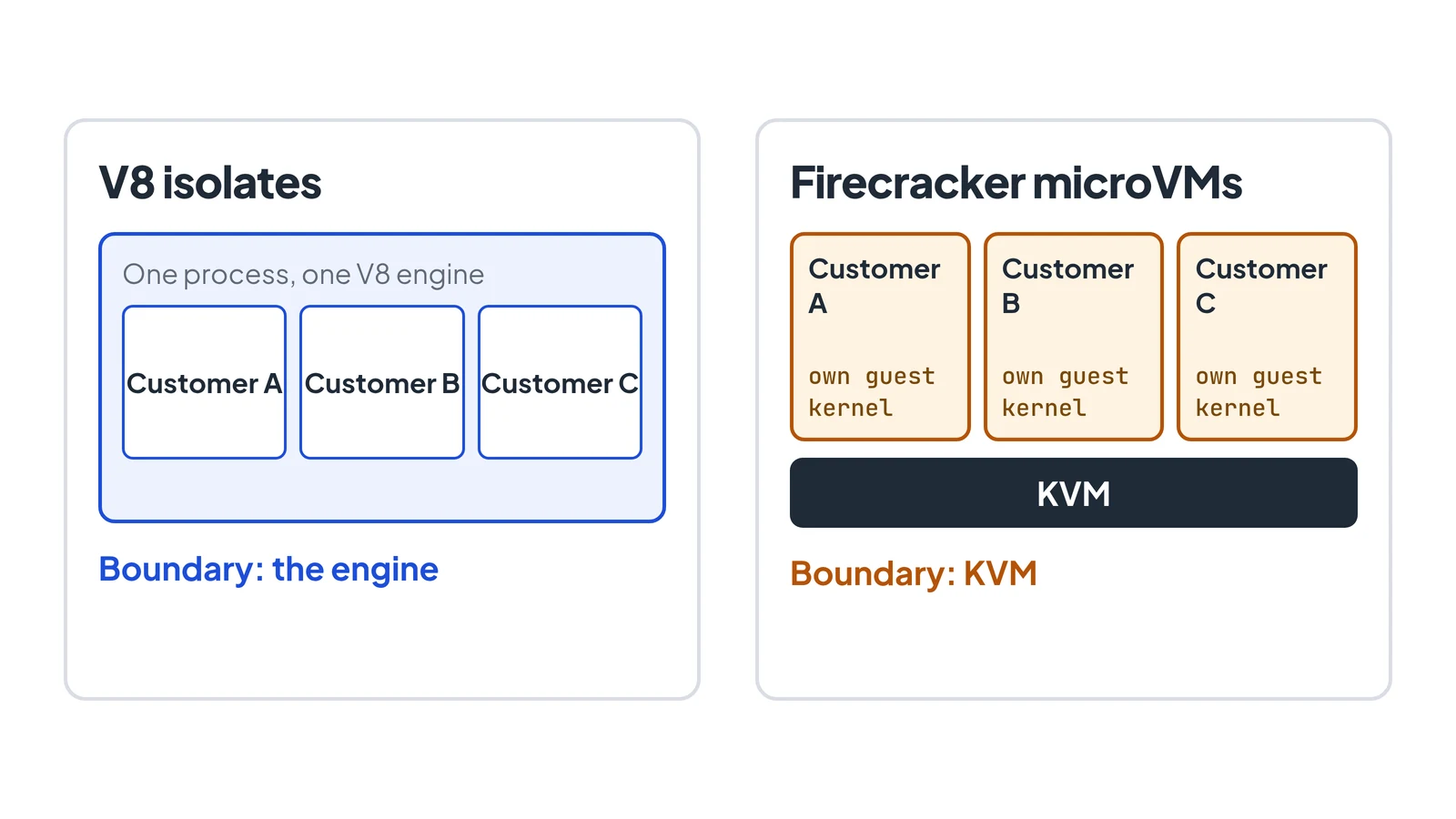
Same three customers, different place for the wall between them.
Where the old latency came from
Netlify says it handles “tens, sometimes hundreds of thousands” of edge function invocations per second, and each one has to route the request, find compute, start the platform and run customer code “within milliseconds”.
The old design sent each request out of Netlify’s network to a hosted execution service and back. The 25-40 ms median was that round trip plus the work. The redesign keeps everything in one network and splits it into three parts:
- Edge nodes terminate TLS, route requests and match the Edge Function path.
- Compute nodes run the microVMs, manage their lifecycle and cache function images.
- A control plane tracks compute node health and coordinates deployments.
A warm request now goes: client -> edge node -> compute node -> microVM -> back along the same path. Netlify reports about 5-6 ms at p50 for that, 47.4% faster at p99 than before, and 99.998% availability.
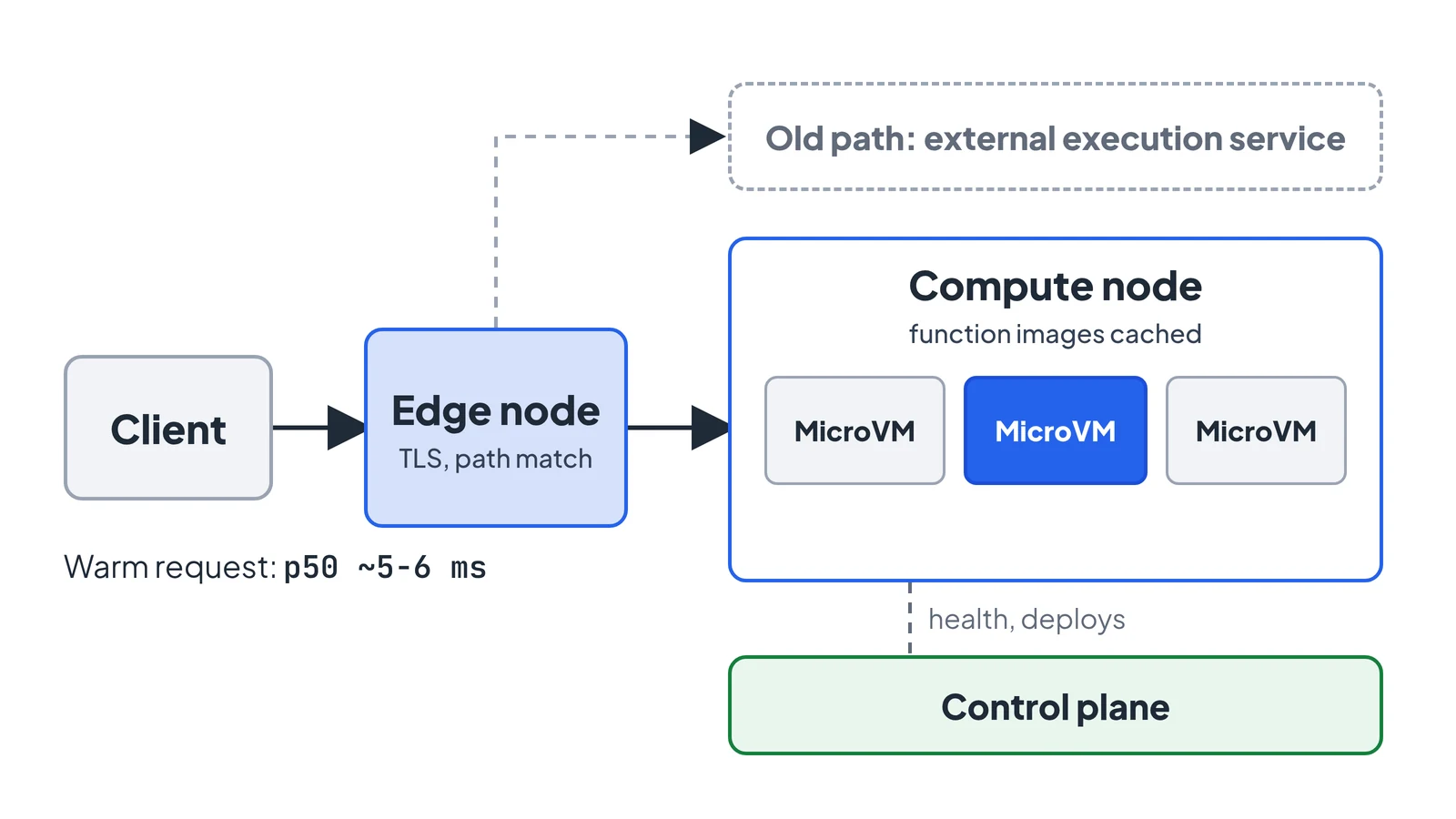
A warm request stays inside one network from edge node to microVM.
What a microVM costs to start
Firecracker is the open-source virtual machine monitor from AWS that powers Lambda and Fargate. It is Apache 2.0 licensed, built on Linux KVM, and deliberately small: it emulates only the devices a function workload needs and leaves the rest out. Its specification sets a few hard numbers, enforced in CI:
- Up to 125 ms from the
InstanceStartAPI call to the guest’s/sbin/initstarting. - A memory overhead of at most 5 MiB for the VMM threads.
- 0.06 ms of added network latency on average.
125 ms is nowhere near 5 ms, so Netlify is not doing a plain boot per request. Their numbers are creation in under a millisecond and a boot time of about 2 ms at p99, using a stripped-down Linux guest rather than a full OS. The remaining gap is closed by two techniques.
Reading only the code you run
The function’s code ships as an uncompressed EROFS image (a read-only filesystem designed for this kind of immutable bundle) that is memory-mapped into the VM. Because it is mapped, not copied, the guest reads only the pages it touches. If a function touches 1 MB of a 20 MB bundle, it reads about 1 MB, not 20.
Uncompressed matters here. A compressed image would have to be decompressed before any byte could be read at an arbitrary offset, which defeats the point of mapping it.
Snapshots, and why idle VMs disappear
When a microVM goes idle, Netlify scales it to zero instead of leaving it resident. The state is not thrown away, though. After the first boot the system captures a snapshot, and later invocations restore from it without waiting for a full read of the memory file.
Firecracker’s snapshot docs describe the pieces: a memory file with the guest’s RAM, a state file with emulated device and KVM state, and the disk files you manage yourself. On load, Firecracker maps the memory file with MAP_PRIVATE, so pages are pulled in on demand as the guest touches them. There is also a Uffd backend where a userspace process serves page faults, if you want to control that yourself.
The API sequence from the docs looks like this. I could not run it here because the machine I wrote this on has no /dev/kvm, so treat the calls as taken from the docs, not tested:
# pause, snapshot, then resume the original (or terminate it)
curl --unix-socket /tmp/fc.sock -X PATCH http://localhost/vm \
  -d '{"state": "Paused"}'
curl --unix-socket /tmp/fc.sock -X PUT http://localhost/snapshot/create \
  -d '{"snapshot_type": "Full", "snapshot_path": "vm.state", "mem_file_path": "vm.mem"}'
Snapshots have one sharp edge, and the docs say so plainly: if guest state resumes more than once, anything the guest assumed unique (random numbers, tokens, IDs) may not be. The safe pattern is boot -> snapshot -> terminate the original -> resume once. Restoring many clones from one snapshot is exactly what a platform scaling one function across requests wants to do, so it needs the mitigations the docs list, VMGenID (Linux 5.18+ reseeds its PRNG when it changes) and VMClock. Netlify’s post does not say how it handles this, so I won’t guess.
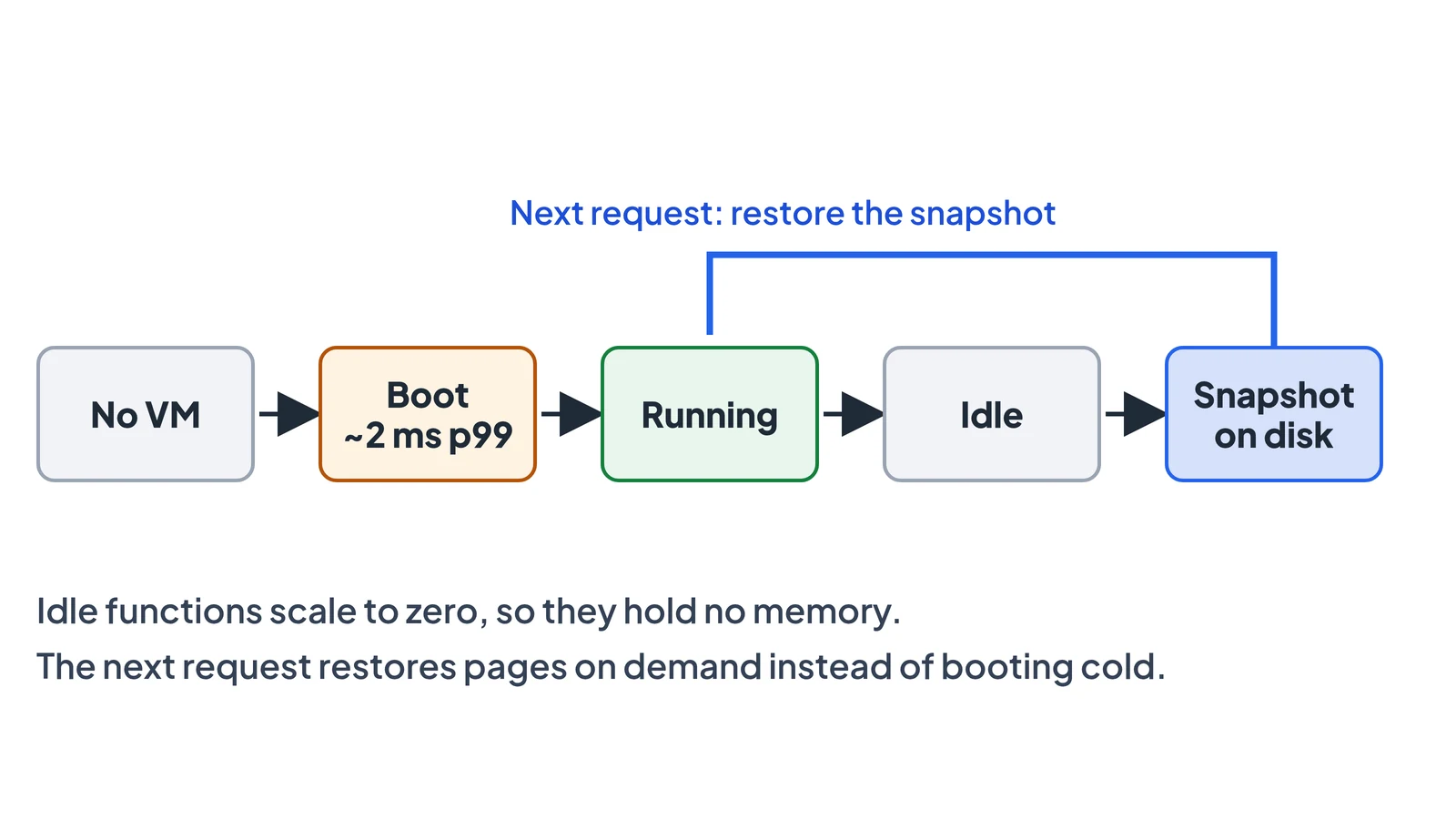
The microVM lifecycle: idle functions scale to zero and come back from a snapshot.
Keeping the right snapshot nearby
Restoring is only fast if the function image and snapshot are already on the compute node. Netlify routes with rendezvous hashing: for a given service, every compute node gets a score and the highest wins, so the same function lands on the same node each time. Adding or removing a node only moves the functions that node owned.
Stickiness has a cost. One busy function can saturate its node, so Netlify relaxes the hashing above traffic thresholds and spreads load across more nodes, trading some warmth for no hot spots.
The result: about 1.2% of invocations are cold, and those average 9 ms including the image fetch. A cold start that costs 9 ms is the number that makes the whole design viable. On a typical VM platform, a cold start is the problem you design around.
What changed for you, and what didn’t
Nothing in how you write or deploy changes. URL imports, npm packages, Node built-ins, netlify.toml declarations and local development work as before, pricing is the same, and there is no migration step.
The limits also stay: 50 ms CPU per request, 512 MB memory, 20 MB compressed code. Netlify says these came from the isolate model and will be revisited, and that a real VM with a real filesystem removes most of the reasons for the npm caveats the feature carried in beta. Those are statements of intent, so check the changelog before relying on any of them.
Check it on your own functions
You don’t have to take the latency numbers on trust. Deploy any Edge Function and time it from where your users are:
for i in $(seq 1 50); do
  curl -s -o /dev/null -w '%{time_starttransfer}\n' https://your-site.netlify.app/your-edge-path
done | sort -n | awk '{a[NR]=$1} END {print "p50:", a[int(NR*0.5)], "p99:", a[int(NR*0.99)]}'
Time-to-first-byte includes your network path to the edge, so compare it against a static asset on the same site: the difference is the function’s cost. If you want to try Firecracker directly, you need a Linux host with /dev/kvm; the Firecracker repo has a getting-started guide and its snapshot docs are under docs/snapshotting/.
Conclusion
The isolate-versus-VM debate usually assumes boot time is fixed. Netlify’s change shows it is a design choice: a minimal guest, a mapped read-only image, snapshots and sticky routing together turn a VM into something you can start per request, while keeping a boundary that a shared process cannot offer. What you give up is the simplicity of one shared runtime, and what you take on is a fleet of nodes that have to keep the right images warm.