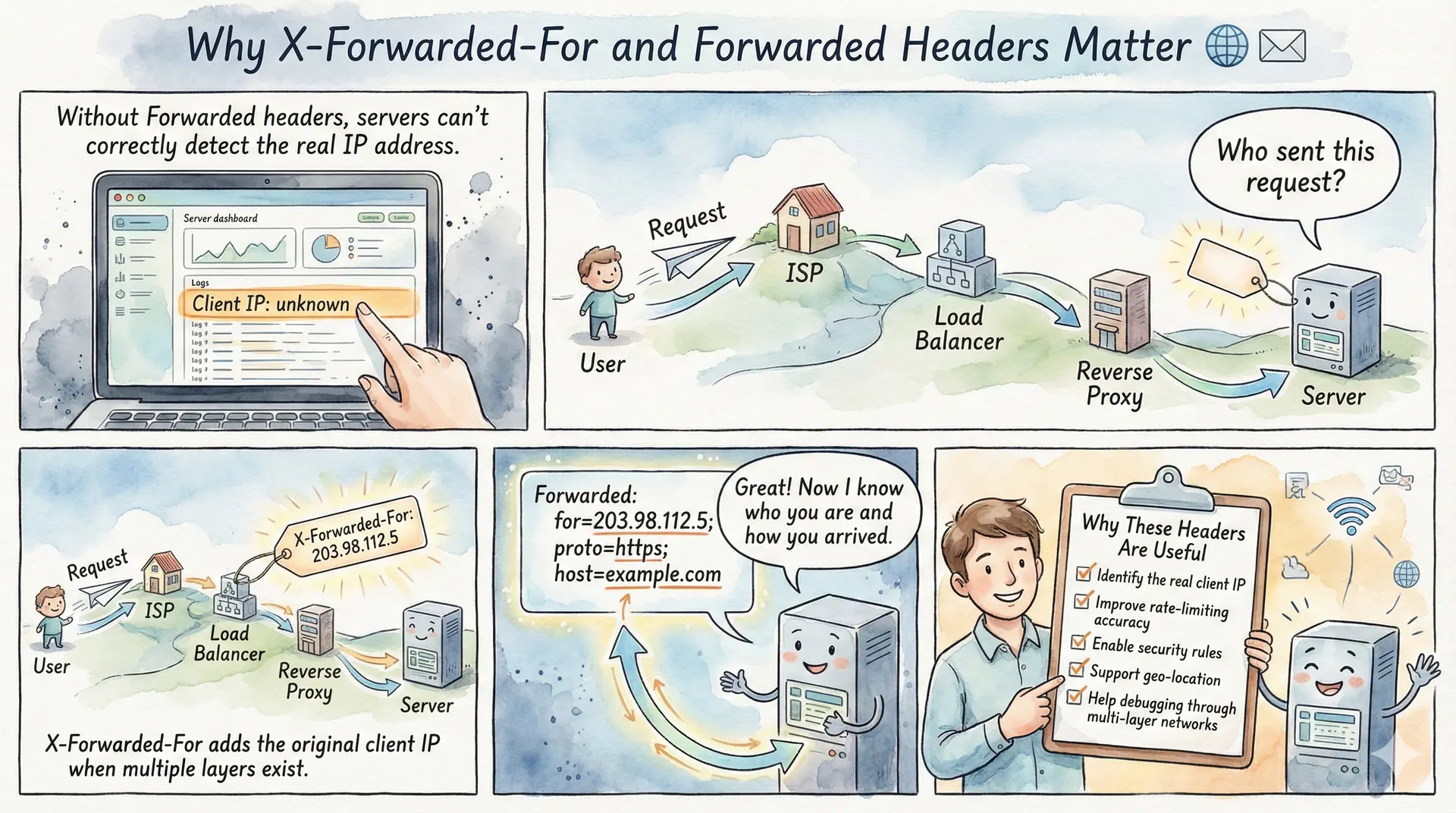
When a client sends an HTTP request directly to a web server, the server can easily identify the client’s IP address from the TCP connection. However, in modern web architectures, requests rarely travel directly from client to server. They typically pass through one or more intermediaries reverse proxies, load balancers, CDNs, or API gateways. Each of these intermediaries establishes a new connection to the next hop, and in the process, the original client’s IP address is lost. This is where the X-Forwarded-For and Forwarded headers become essential.
These headers provide a mechanism for preserving the original client’s IP address (and other connection details) as requests traverse through proxy infrastructure. Whether you’re implementing rate limiting, logging for security audits, serving geolocation-specific content, or debugging network issues, understanding these headers is crucial for any developer working with web applications.
Summary
What is X-Forwarded-For?
The X-Forwarded-For (XFF) header is a de-facto standard HTTP header used to identify the originating IP address of a client connecting through proxies or load balancers. Each proxy appends the IP address of the previous hop, creating a comma-separated list: X-Forwarded-For: client, proxy1, proxy2.
What is the Forwarded Header?
The Forwarded header is the standardized replacement defined in RFC 7239. It combines functionality from X-Forwarded-For, X-Forwarded-Proto, and X-Forwarded-Host into a single header with a structured format: Forwarded: for=192.0.2.60;proto=https;by=203.0.113.43.
Common Use Cases:
- Logging & Auditing: Record the actual client IP for security analysis and compliance
- Rate Limiting: Implement per-client request limits based on real IP addresses
- Geolocation: Serve region-specific content or enforce geo-restrictions
- Access Control: Allow or deny requests based on client IP whitelists/blacklists
- Fraud Detection: Identify suspicious patterns from specific IP addresses
Security Considerations:
- Never blindly trust X-Forwarded-For headers clients can spoof them
- Configure your server to trust only headers from known proxy IPs
- Read the rightmost trusted IP, not the leftmost (which is client-controlled)
- Validate all IP address formats before processing
Related Headers:
X-Forwarded-Proto: Original protocol (http/https)X-Forwarded-Host: Original Host header valueX-Real-IP: Single client IP (used by NGINX)Via: Information about intermediate proxies (RFC 9110)
The Problem: Lost Client Identity
Consider a typical web request flow. A user with IP address 203.0.113.50 makes a request to your application. But before reaching your server, the request passes through a CDN like
Cloudflare, then through your load balancer, and finally to your application server. By the time the request arrives at your application, the source IP address is that of your load balancer perhaps 10.0.0.5 not the original client.
This creates several problems. Your access logs show only internal IPs, making security analysis nearly impossible. Rate limiting becomes ineffective because all requests appear to come from the same source. Geolocation features break entirely, and fraud detection systems can’t correlate malicious activity across requests.
Client (203.0.113.50) → CDN (198.41.215.10) → Load Balancer (10.0.0.5) → App Server
                                                                              ↓
                                                        Sees: Source IP = 10.0.0.5
                                                        Loses: Original client IP
How X-Forwarded-For Works
The X-Forwarded-For header solves this problem by having each proxy append the IP address of the incoming connection before forwarding the request. The format is simple a comma-separated list of IP addresses, ordered from left (original client) to right (most recent proxy).
X-Forwarded-For: 203.0.113.50, 198.41.215.10
In this example, 203.0.113.50 is the original client IP, and 198.41.215.10 is the CDN’s IP address. The load balancer added these values before passing the request to your application server.
Here’s how the header evolves as a request passes through multiple proxies:
Step 1: Client (203.0.113.50) sends request to CDN
Step 2: CDN adds header and forwards: X-Forwarded-For: 203.0.113.50
Step 3: Load balancer appends CDN’s IP: X-Forwarded-For: 203.0.113.50, 198.41.215.10
Step 4: Application receives request with the complete chain
The application can then parse this header to extract the original client IP for logging, rate limiting, or other purposes.
The Standardized Alternative: Forwarded Header
While X-Forwarded-For is widely used, it was never formally standardized it’s a de-facto convention that emerged organically. The IETF addressed this by creating
RFC 7239, which defines the Forwarded header as a standardized replacement.
The Forwarded header offers several advantages over X-Forwarded-For. It uses a structured key-value format that’s less ambiguous to parse, and it consolidates multiple pieces of information that previously required separate headers.
Forwarded: for=192.0.2.60;proto=https;by=203.0.113.43;host=example.com
The header supports four parameters:
- for: The client IP address (equivalent to X-Forwarded-For)
- proto: The original protocol used (http or https)
- by: The IP of the proxy adding this information
- host: The original Host header value
Multiple proxy entries are separated by commas:
Forwarded: for=203.0.113.50, for=198.41.215.10;proto=https;by=10.0.0.5
One notable advantage of Forwarded is its extensibility. Proxies can include custom parameters like secret tokens to verify authenticity:
Forwarded: for=12.34.56.78, for=23.45.67.89;secret=egah2CGj55fSJFs, for=10.1.2.3
This makes it easier for backend servers to identify which entries came from trusted proxies, rather than relying solely on counting positions from the right.
Practical Use Cases
Logging and Security Auditing
Accurate client IP logging is fundamental for security operations. When investigating suspicious activity, security teams need to know which client IP was responsible for specific requests. Without proper header handling, your logs would only show internal proxy IPs, making incident response significantly more difficult.
# Example: Extracting client IP in Python/Flask
from flask import request

def get_client_ip():
    # Check for X-Forwarded-For header first
    if request.headers.get('X-Forwarded-For'):
        # Take the first IP (original client) if from trusted proxy
        # Or take rightmost trusted IP for security
        ip_list = request.headers.get('X-Forwarded-For').split(',')
        return ip_list[0].strip()
    return request.remote_addr
Rate Limiting
Effective rate limiting requires identifying unique clients. If all requests appear to come from your load balancer’s IP, you can’t implement per-client rate limits. By using X-Forwarded-For, you can rate limit based on the actual client IP.
# NGINX rate limiting using real client IP
set_real_ip_from 10.0.0.0/8;          # Trust internal load balancer IPs
real_ip_header X-Forwarded-For;
real_ip_recursive on;

limit_req_zone $binary_remote_addr zone=api_limit:10m rate=10r/s;
Geolocation Services
Many applications serve different content based on user location whether for regulatory compliance, content licensing, or user experience optimization. Geolocation databases like
MaxMind GeoIP require the actual client IP to determine location accurately.
Access Control and IP Whitelisting
Some applications restrict access to specific IP ranges for example, admin panels accessible only from corporate IPs. Without proper header parsing, these controls would fail when requests pass through proxies.
Security Considerations: Trust, But Verify
The most critical aspect of working with these headers is understanding that they can be spoofed. A malicious client can send a request with a fake X-Forwarded-For header:
GET /api/resource HTTP/1.1
Host: example.com
X-Forwarded-For: 10.0.0.1, 192.168.1.1
If your application naively trusts this header, the attacker could bypass IP-based access controls, evade rate limiting, or pollute your logs with false data.
The Right Way to Parse X-Forwarded-For
The key insight is that only your trusted proxies add legitimate entries to these headers. When parsing, you should:
- Configure trusted proxy IPs: Define which IPs belong to your infrastructure (load balancers, CDNs)
- Read from the right side: Start from the rightmost IP and work left, stopping at the first untrusted IP
- Validate IP format: Ensure the extracted value is a valid IP address
import ipaddress

TRUSTED_PROXIES = {
    ipaddress.ip_network('10.0.0.0/8'),      # Internal network
    ipaddress.ip_network('198.41.128.0/17'), # Cloudflare
}

def get_trusted_client_ip(xff_header, connection_ip):
    """Extract the real client IP from X-Forwarded-For."""
    if not xff_header:
        return connection_ip

    # Parse the header into a list of IPs
    ips = [ip.strip() for ip in xff_header.split(',')]
    ips.append(connection_ip)  # Add the direct connection IP

    # Walk backwards through the chain
    for ip_str in reversed(ips[:-1]):
        try:
            ip = ipaddress.ip_address(ip_str)
            # Check if this IP is from a trusted proxy
            is_trusted = any(ip in network for network in TRUSTED_PROXIES)
            if not is_trusted:
                # This is the client IP (first untrusted IP from the right)
                return ip_str
        except ValueError:
            continue  # Skip malformed IPs

    return ips[0]  # Fallback to leftmost IP
Common Mistakes to Avoid
Mistake 1: Trusting the leftmost IP
Many developers assume the first IP in X-Forwarded-For is the client. This is only true if you trust all intermediaries, which you shouldn’t. Attackers can prepend fake IPs.
Mistake 2: Not validating trusted proxies
If you accept X-Forwarded-For from any source, attackers connecting directly to your server can completely control the header content.
Mistake 3: Not handling IPv6
Modern networks use IPv6, and your parsing logic must handle both address families:
X-Forwarded-For: 2001:db8::1, 203.0.113.50
Configuring Popular Servers and Load Balancers
NGINX
NGINX provides the ngx_http_realip_module for handling forwarded headers:
# /etc/nginx/conf.d/realip.conf
set_real_ip_from 10.0.0.0/8;
set_real_ip_from 172.16.0.0/12;
set_real_ip_from 192.168.0.0/16;
set_real_ip_from 103.21.244.0/22;   # Cloudflare
set_real_ip_from 2400:cb00::/32;    # Cloudflare IPv6

real_ip_header X-Forwarded-For;
real_ip_recursive on;
Apache
Apache uses mod_remoteip:
<IfModule mod_remoteip.c>
    RemoteIPHeader X-Forwarded-For
    RemoteIPTrustedProxy 10.0.0.0/8
    RemoteIPTrustedProxy 172.16.0.0/12
</IfModule>
AWS Application Load Balancer
AWS ALB automatically adds X-Forwarded-For, X-Forwarded-Proto, and X-Forwarded-Port headers. Your application just needs to parse them, trusting the ALB’s IP range.
Cloudflare
Cloudflare provides several headers:
CF-Connecting-IP: The client IP (single value, easier to use)X-Forwarded-For: Standard header with the proxy chainCF-IPCountry: Two-letter country code for geolocation
For applications behind Cloudflare, CF-Connecting-IP is often the simplest option since it provides a single, verified client IP.
While X-Forwarded-For remains dominant due to its long history, the standardized Forwarded header is gaining adoption. Here’s how to handle both:
// Node.js/Express example
function getClientIP(req) {
    // Check standardized Forwarded header first
    const forwarded = req.headers['forwarded'];
    if (forwarded) {
        const match = forwarded.match(/for=["']?([^"',;\s]+)/i);
        if (match) {
            return match[1].replace(/^\[|\]$/g, ''); // Handle IPv6 brackets
        }
    }

    // Fall back to X-Forwarded-For
    const xff = req.headers['x-forwarded-for'];
    if (xff) {
        return xff.split(',')[0].trim();
    }

    // Last resort: direct connection
    return req.socket.remoteAddress;
}
Beyond X-Forwarded-For and Forwarded, several related headers are commonly used:
X-Forwarded-Proto: Indicates the original protocol (HTTP or HTTPS). Essential for applications that need to know if the original connection was secure, even when SSL termination happens at a load balancer.
X-Forwarded-Host: The original Host header value. Useful when proxies rewrite the host for internal routing.
X-Forwarded-Host: www.example.com
X-Real-IP: A simpler alternative used by NGINX that contains just the client IP (not a chain). Less flexible but easier to parse.
Via: Defined in HTTP standards (RFC 9110), indicates the intermediate protocols and proxies. Unlike X-Forwarded-For, it’s primarily for debugging proxy chains rather than identifying clients.
Via: 1.1 proxy.example.com, 1.1 another-proxy.example.net
Conclusion
The X-Forwarded-For and Forwarded headers are indispensable tools for modern web applications operating behind proxies and load balancers. They restore visibility into the original client connection that would otherwise be lost in multi-tier architectures.
When implementing support for these headers, always remember: trust is earned, not given. Configure your servers to accept forwarded headers only from known proxy IPs, validate all input, and read from the right side of the header chain. With proper implementation, these headers enable robust logging, effective rate limiting, accurate geolocation, and reliable access control.
Whether you choose the widely-deployed X-Forwarded-For or the standardized Forwarded header depends on your infrastructure. Many modern proxies and CDNs support both, giving you flexibility to choose based on your parsing requirements and security posture.